
ProcessSpy
ProcessSpy is the advanced macOS process monitor trusted by pros for its lightning-fast, native performance and deep system insights.
Visit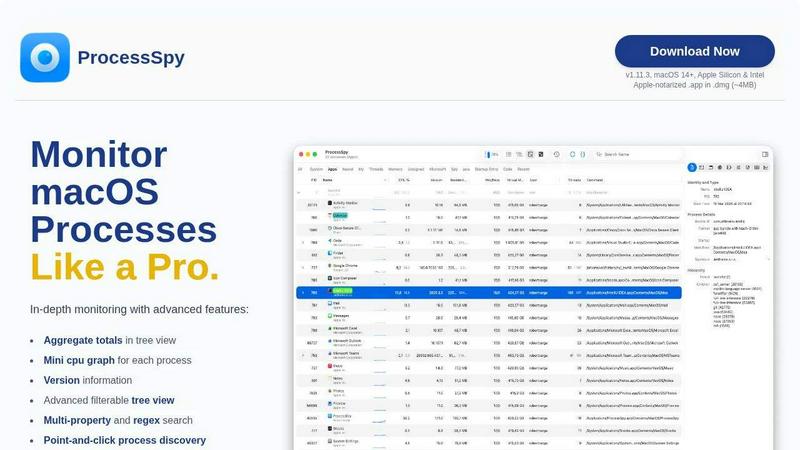
About ProcessSpy
Tired of macOS Activity Monitor hiding the truth? Welcome to ProcessSpy, the native macOS power tool that developers, sysadmins, and power users are raving about. Born from a developer's frustration with managing multiple Java processes, ProcessSpy is the definitive answer to "What is really running on my Mac?" It's the closest thing to Sysinternals Process Explorer for macOS, but built from the ground up with a sleek, native Mac interface that's both incredibly powerful and a joy to use. While the free version is already a massive upgrade over Apple's built-in tools, unlocking the Pro license reveals a staggering depth of forensic capability. From visualizing intricate process trees and inspecting open files to viewing environment variables and killing stubborn apps instantly, ProcessSpy gives you unparalleled visibility into your system. Join thousands of professionals who have ditched the guesswork and embraced total control over their macOS environment.
Features of ProcessSpy
Advanced Hierarchical Process Tree
ProcessSpy doesn't just list processes; it maps their entire lineage in a dynamic, visual tree. See parent-child relationships at a glance and understand how applications spawn other services. Crucially, this view shows aggregate totals for CPU, memory, and threads, allowing you to instantly see the total resource consumption of an entire application branch, not just its individual components. This is a game-changer for identifying resource-hogging software families that Activity Monitor completely obscures.
Multi-Property & Regex Smart Search
Forget basic name searches. ProcessSpy's powerful quick-search bar understands regular expressions and can query multiple process properties simultaneously. Need to find all processes with "node" in the name that also have a specific environment variable set? Or hunt for a Java process using a particular command-line argument like "-Xmx"? You can do it in a single search. This surgical precision turns debugging and process discovery from a chore into a lightning-fast operation.
JavaScript-Powered Custom Filters
Move beyond simple toggles. ProcessSpy allows you to define complex, custom filters using JavaScript. This gives you programmatic control to show or hide processes based on any combination of criteria—CPU usage thresholds, specific bundle identifiers, process age, user ID, and more. It's an incredibly flexible feature that lets power users tailor the view to their exact workflow, automating the hunt for the processes that matter.
Comprehensive Process Context & History
With a Pro license, ProcessSpy becomes a forensic time machine. It can record historical metrics (CPU, Memory, Threads) for processes and export this data to CSV for analysis. Even more impressively, it remembers finished processes, retaining their command-line arguments, environment variables, and recorded history for later review. This means you can investigate what was running, not just what is running, which is invaluable for diagnosing crashes or intermittent issues.
Use Cases of ProcessSpy
Debugging Complex Development Environments
Developers running multiple local servers, database instances, and microservices finally have clarity. ProcessSpy distinguishes between identical process names by showing full paths, version info, and command-line arguments. Identify which specific Node.js or Java version a misbehaving service is using, inspect its environment variables, and terminate it precisely without affecting other critical processes, streamlining your entire debugging workflow.
System Performance Investigation & Optimization
When your Mac slows down, Activity Monitor's flat list is often useless. Use ProcessSpy's tree view with aggregate totals to instantly pinpoint the true culprit—not just a single process, but an entire application and its helpers consuming resources. The mini CPU graphs per process and the ability to record history help identify trends and intermittent spikes, providing the data needed to optimize performance and clean up resource leaks.
Security Auditing & Malware Detection
Gain deep visibility for security checks. Inspect process entitlements, signature information, and loaded dynamic libraries (dylibs). View launchd agents and daemons (startup entries) to see what's set to run automatically. The ability to flag newly discovered processes in real-time helps you spot unexpected activity. This level of detail is essential for security-conscious users and IT professionals auditing system integrity.
Uninstalling Stubborn Applications & Cleanup
Some apps leave behind persistent processes that refuse to quit. ProcessSpy lets you not only force-kill these stubborn processes but also understand their origin. See what files they have open, which connections they hold, and what launched them. This information is critical for completely cleaning up after an uninstall, ensuring no hidden components are left running and consuming system resources.
Frequently Asked Questions
Is ProcessSpy safe to install on my Mac?
Absolutely. ProcessSpy is fully Apple-notarized, meaning it has been checked by Apple for malicious content. It's distributed as a signed .app inside a .dmg file, just like most trusted Mac software. It runs natively and efficiently on both Intel and Apple Silicon Macs, with no bloated cross-platform layers.
What macOS versions are supported?
ProcessSpy is designed for modern macOS systems, supporting macOS 14 Sonoma and newer, including the latest macOS 26 Tahoe. It leverages native APIs for the best performance and integration, so it focuses on current and future OS versions rather than legacy systems.
What's the difference between the free and paid versions?
The free version is already a massive upgrade over Activity Monitor, featuring the advanced tree view, smart search, JavaScript filters, and basic process info. The one-time Pro license ($24.99) unlocks powerful forensic features: viewing environment variables, entitlements, and signatures; recording process history with CSV export; remembering finished processes; and seeing advanced details like startup entries and responsible PIDs.
What does the license include?
The license is a fantastic value: a one-time purchase of $24.99 grants lifetime updates and all new Pro features for one user across an unlimited number of their personal devices. There are no subscriptions, no recurring fees, and no device limits, making it a permanent upgrade to your toolkit.
Similar to ProcessSpy


WidgIq
Provide an AI-powered customer support widget for your website

Product Launch Checklist
A free launch checklist for SaaS, apps, AI tools and more. Every step says why it matters and when you can skip it.

Sprite Sheet Maker
A free browser-based toolkit for creating, cutting, converting, and previewing sprite sheet animations.

Forms Plugin
The #1 Native Form Builder Plugin for Framer - No Code, No Embeds, No External Platforms.

GPT Image 2 API
Production-ready image generation and editing with GPT Image 2 API

