
ProspectBuddy
ProspectBuddy simplifies LinkedIn lead capture to your CRM with one click, ensuring safe, manual prospecting that’s fully compliant and efficient.
Visit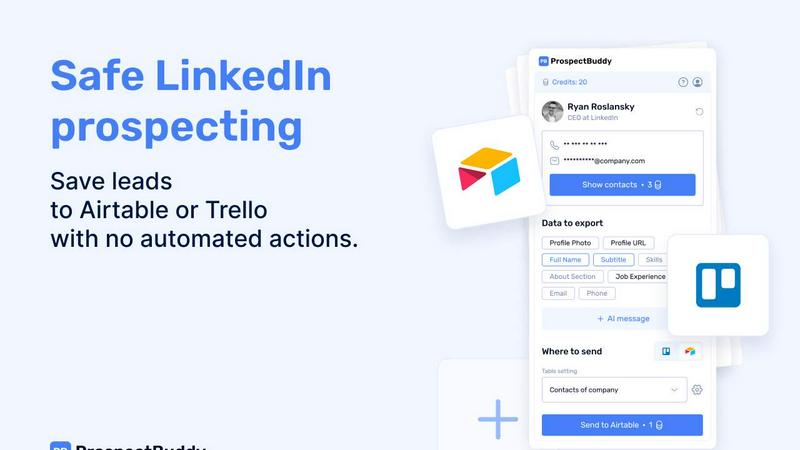
About ProspectBuddy
ProspectBuddy is an innovative LinkedIn prospecting tool crafted for professionals who seek to streamline their lead generation processes. Designed with seamless integration for Airtable and Trello workflows, it empowers sales teams, recruiters, founders, and operators to efficiently manage leads by allowing them to save LinkedIn profiles with just a single click. This eliminates the tedious and error-prone task of manual copy-pasting, transforming LinkedIn profiles into structured records that can be easily utilized. Unlike many automation tools that perform actions on your behalf, ProspectBuddy focuses on manual prospecting, assuring users maintain full control over their outreach efforts. This approach makes it not only safer but also compliant with LinkedIn's policies. With features like verified email and phone number discovery, personalized AI-generated outreach messages, and selective data capture, ProspectBuddy enhances the prospecting workflow while keeping it organized and consistent. Join countless satisfied users who have transformed their LinkedIn activities with this powerful tool.
Features of ProspectBuddy
One-Click Profile Saving
ProspectBuddy allows users to save contacts directly from LinkedIn profiles to Airtable or Trello with just a click. This feature significantly reduces the time spent on manual data entry, ensuring that your lead data remains clean and organized.
Safe Manual Prospecting
Built for compliance, ProspectBuddy emphasizes manual prospecting over automation. Users can engage with LinkedIn profiles directly, minimizing the risks associated with automated actions and ensuring a safer prospecting experience.
Verified Contact Discovery
With ProspectBuddy, users can find verified business emails and phone numbers for their leads. This invaluable feature enhances outreach efforts, ensuring you have the most accurate contact information at your fingertips.
AI-Powered Outreach Messaging
Craft personalized messages in seconds using LinkedIn profile data. ProspectBuddy's AI-generated outreach functionality helps users create tailored messages that resonate with prospects, increasing engagement and response rates.
Use Cases of ProspectBuddy
Streamlining Sales Processes
Sales teams can use ProspectBuddy to quickly capture leads from LinkedIn, saving valuable time and ensuring that all data is organized in their preferred CRM. This efficiency allows for more focus on closing deals rather than manual data entry.
Enhancing Recruitment Efforts
Recruiters can seamlessly add candidates from LinkedIn to Trello, transforming profiles into structured cards. This integration makes tracking potential hires more efficient and organized, enhancing the overall recruitment process.
Managing Networking Opportunities
Founders and business operators can utilize ProspectBuddy to save valuable connections from LinkedIn profiles into their databases, ensuring they never miss an opportunity to network effectively within their industry.
Optimizing Marketing Campaigns
Marketers can gather leads and relevant data from LinkedIn to enhance their outreach campaigns. With personalized messaging capabilities, they can tailor their communication strategies based on the captured profile data, leading to improved campaign outcomes.
Frequently Asked Questions
How do I connect Airtable?
To connect Airtable, click on "Airtable" on the Connect screen or in your Profile. Select the bases or workspaces you want to grant access to and click "Grant access." You can disconnect anytime.
How do I send LinkedIn data to Airtable?
Create a new setting in the Settings menu, choose your Airtable base and table, and map the LinkedIn fields to Airtable fields. Once set up, open a LinkedIn profile, select the fields, and click "Send to Airtable" to add the contact.
Is ProspectBuddy safe to use with LinkedIn?
Yes, ProspectBuddy is designed for safe manual prospecting. It does not perform automated actions, allowing users to maintain control while working directly from LinkedIn profiles, making it a compliant alternative to risky automation tools.
Why don’t I see some Airtable fields?
Only compatible field types are supported. If a field type is not supported, it will not appear in the dropdown. Common field types include text, email, phone, and URL mappings.
Pricing of ProspectBuddy
Starter: $10 for 500 credits, ideal for solo professionals and small teams. Growth: $20 for 1000 credits, designed for active prospecting teams. Custom pricing for high-volume teams needing specialized workflows and support.
Similar to ProspectBuddy

IndieStore
Launch and market your indie product. Discover new tools, explore weekly launches, and use free tools and founder guides.
CleanSmart
CleanSmart removes duplicates, fixes formatting, fills gaps, and flags anomalies in one automated pass. No code. No data engineers.
Vidpop
Vidpop plans, designs and posts three carousel posts a week for your business, with captions, and on Pro an AI-presenter UGC video ad. iPhone app.

TrackMedia
Your Social Media Content Engine That Drives Revenue. Distribute your content to every social media platform and track it in real time.
Product Launch Checklist
A free launch checklist for SaaS, apps, AI tools and more. Every step says why it matters and when you can skip it.

99x Prompts
Discover 50,000+ ready-to-use AI prompts for text, image, and video generation. Save time and create better results with AI.
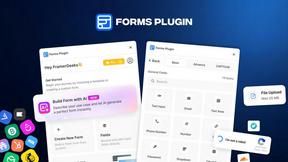
Forms Plugin
The #1 Native Form Builder Plugin for Framer - No Code, No Embeds, No External Platforms.

Motion Control AI
Reference-driven AI character motion video generation