
Easymotion - AI Motion Graphic Generator
Stop wasting hours in After Effects; 10K+ creators use Easymotion’s AI to turn images, data, or ideas into stunning motion graphics in under 5.
VisitPublished on:
June 15, 2026
Pricing:
About Easymotion - AI Motion Graphic Generator
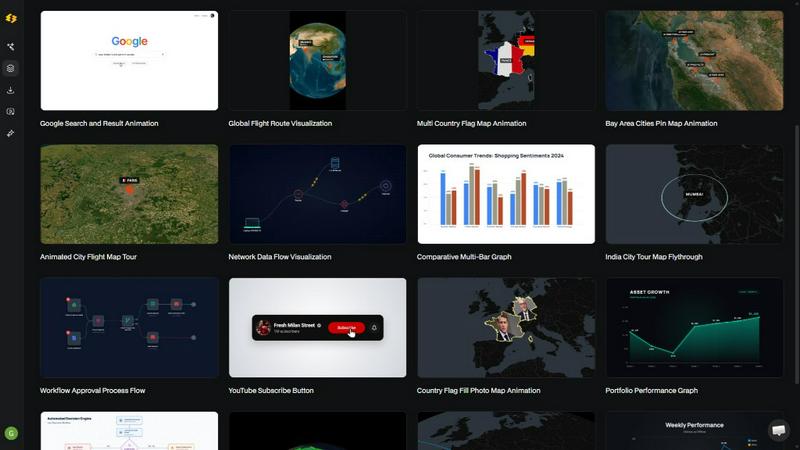
Easymotion is the AI-powered motion graphics generator and map animation platform that is taking the content creation world by storm. Loved by over 10,000 creators, it is built for YouTubers, video editors, marketers, founders, and data storytellers who need to produce professional animated videos in under five minutes. Forget complex timeline editing and expensive software like After Effects. Easymotion lets you turn ideas, static images, boring spreadsheets, and PDFs into polished, animated videos simply by chatting with AI. You can create everything from SaaS product promos and animated flowcharts to UI explainers and dynamic data visualizations. The platform also shines as a map animation maker, allowing you to build flight routes, location pins, flag fill highlights, and geographic storytelling visuals with zero design skills. After generating your animation, you can refine every detail by chatting with the AI to adjust colors, pacing, labels, layout, and visual style. With a premium template library, support for all major aspect ratios including 16:9, 9:16, 1:1, and 4:5, and the ability to export as MP4 or MOV with transparent backgrounds, Easymotion is the fastest way to create reusable video assets directly in your browser. The result is a 3x increase in projects for editors, same-day campaign launches for marketers, and 5x more engagement for data storytellers.
Features of Easymotion - AI Motion Graphic Generator
Static Design into Animation
Upload any static image, and let the AI breathe life into it with stunning motion. Whether it is a product screenshot, a logo, or an infographic, Easymotion automatically generates smooth animations that make your visuals pop. This feature is perfect for creators who want to repurpose existing assets into engaging video content without spending hours on manual keyframing.
Map Animations Made Easy
Create professional map animations effortlessly and faster than ever before. You can visualize flight routes, highlight geographic regions with flag fills, animate location pins, and build globe fly-throughs. Just describe the map you want, and the AI handles all the complex animation curves and transitions. This is a game-changer for travel content, global business presentations, and data journalism.
Boring Sheets into Visuals
Upload a CSV or XLSX file, and let the AI transform your raw data into beautiful, animated charts and graphs. Instead of presenting static spreadsheets, you can create dynamic bar charts, line graphs, and pie charts that stop the scroll. This feature is ideal for data storytellers, analysts, and marketers who want to make their insights more engaging and shareable.
Customize Everything with Chat
After generating your animation, you are not stuck with the result. You can edit by chatting with the AI to adjust colors, pacing, labels, layout, and visual style. Want to change the background to match your brand? Need to slow down the animation? Just type it in. This conversational editing workflow makes it incredibly fast to iterate and perfect your videos without touching a timeline.
Use Cases of Easymotion - AI Motion Graphic Generator
Social Media Video Creation for Creators
YouTubers and social media creators can use Easymotion to produce high-quality motion graphics for their channels in under five minutes. Whether it is a travel reel with animated flight routes, a YouTube milestone celebration video, or a promo for a coffee shop, the AI handles the heavy lifting. Creators are racking up views with map animations and posting more frequently, leading to faster channel growth and higher engagement.
Data Visualization for Marketers and Analysts
Marketers and data storytellers can turn boring spreadsheets into animated data visualizations that actually stop the scroll. By uploading a CSV or XLSX file, users can create animated bar charts, line graphs, and pie charts that explain complex insights in a visually compelling way. Video posts with animated data get 5x more engagement than static images, making this a powerful tool for reports, social content, and presentations.
Product Demos and UI Explainer Videos
SaaS companies and startups can use Easymotion to create polished product promos, UI explainers, and flowchart animations without hiring expensive freelancers. Founders can describe their product in plain English, and the AI generates an animated walkthrough that highlights key features. This allows startups to ship same-day campaigns and grow their social presence without a steep learning curve or a big budget.
Client Deliverables for Video Editors
Professional video editors can use Easymotion to work 3x faster by skipping After Effects for motion graphics. The platform allows them to generate map animations, animated charts, and branded templates that can be exported with transparent backgrounds. These alpha channel exports drop directly into any editing software, making it seamless to integrate AI-generated animations into larger video projects for clients.
Frequently Asked Questions
What is Easymotion?
Easymotion is an AI-powered motion graphics generator that lets you create professional videos simply by chatting. You can instantly generate map animations, animate static images, turn spreadsheets into data visualizations, and create social media videos without needing complex software like After Effects. It is built for creators, marketers, and businesses who need to produce polished videos in minutes.
How does AI motion graphics generation work?
It works in three simple steps. First, describe the animation you want in plain English. Second, refine the result using chat commands to adjust colors, timing, map styles, or assets. Finally, export your completed video as an MP4 or with a transparent background. The AI handles all the keyframes and animation curves, so you do not need any design or editing skills.
What types of videos can I create?
You can create a wide variety of motion graphics including SaaS product promos, animated flowcharts, data visualizations like bar charts and line graphs, UI explainers, quizzes, and map animations such as flight routes, location pins, and flag fill highlights. The platform also supports social media videos for YouTube, TikTok, Instagram, and more with aspect ratios including 16:9, 9:16, 1:1, and 4:5.
Is there a free option to try Easymotion?
Yes, you can start creating for free with no credit card required. The free tier allows you to explore the platform and generate your first animations. For users who need more advanced features, higher export quality, or access to the full premium template library, there are paid plans available. You can check the pricing page on the Easymotion website for the latest details on plans and tiers.
Pricing of Easymotion - AI Motion Graphic Generator
Easymotion offers a free tier that allows you to start creating motion graphics with no credit card required. For users who need more advanced features, higher export quality, and access to the full premium template library, paid plans are available. Specific pricing details for the paid plans can be found on the official Easymotion pricing page, as the exact costs are subject to change and are not fully detailed in the provided content.
Similar to Easymotion - AI Motion Graphic Generator

Promptclay
Free-to-copy AI image prompt library. Each prompt is shown next to the image it made.

The Kiss
Turn two photos into a cinematic AI kissing video. Pick one of 13 kiss video templates; 30 free credits on sign-up.

trykissai
AI kiss generator: add a photo of each person, pick a kiss scene, and get a kiss photo or a 5–7 second clip. 30 free credits.

Banana Art Lab
Create and edit AI images with Nano Banana models, GPT Image 2, prompt templates and a node-based canvas.

AI Video Meme Maker
Make AI video memes from text, photos or clips, or use a trending template. Free credits to start.

AIVideoAgent
Turn text ideas or reference images into videos through conversation, with agent-assisted prompts and a choice of video models.

Easemic
Open-source Android comic & manga reader with encrypted cloud streaming and AI ad-page stripping.

EveryGen AI
AI image and video generator with browser-based creative tools and text rewriting. Freemium.