
ComicsMaker
Turn your raw scene idea into a reviewable comic page in minutes, with panel planning, dialogue, and layout all in your browser.
Visit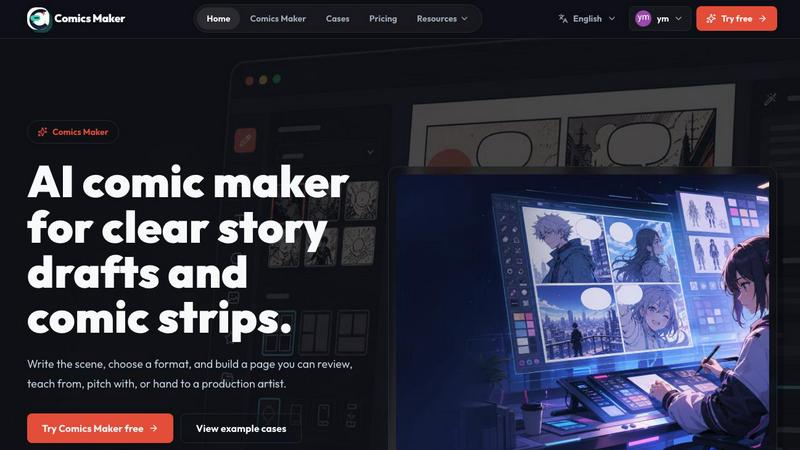
About ComicsMaker
ComicsMaker is the AI-powered comic creation studio that is changing how creators, educators, marketers, and teams turn raw ideas into readable comic drafts. Unlike a generic image generator, ComicsMaker is built around the complete comic workflow, allowing you to start with a simple scene, character concept, product story, classroom topic, or dialogue prompt, and then use AI to shape it into comic panels, captions, layouts, and visual direction. The platform supports comic strips, 2x2 story pages, single-panel scenes, vertical webtoon drafts, storyboards, and export-ready panel sets, making it a versatile tool for any storytelling need. You can choose from visual styles like manga, western comic, noir, cyberpunk, watercolor, or chibi, while keeping characters, palettes, and story context consistent across panels. The core value proposition is speed: you can move from prompt to panel faster than ever, while still retaining full control over editing, refining, and exporting the final draft. Whether you are an independent creator testing a new comic idea, a teacher making visual lessons, a marketer creating product stories, or a team building storyboards, ComicsMaker helps you plan the beats, generate panels, and add dialogue directly in your browser. It is designed to turn a raw idea into a reviewable comic page before the inspiration cools off, making it an essential tool for anyone who wants to create visual stories without starting from a blank canvas.
Features of ComicsMaker
Scene-to-Panel Planning
Start with a single scene by naming the character, setting, visible action, and change. The AI then plans the beats and generates panels based on your input. You can choose from formats like single-panel, three-panel, or 2x2 page layouts, and the system keeps panel count, pacing, shot type, and reading order visible before you invest time in polish. This feature ensures that every scene has a clear structure and that each panel has one clear job, making the drafting process efficient and focused.
Consistent Visual Style Control
Keep the look of your comic consistent across all panels by locking the visual direction before generating. You can choose from styles like shonen, manga, western comic, noir, cyberpunk, watercolor, or chibi, and reuse character and environment notes to ensure every panel belongs to the same world. This feature allows you to maintain a cohesive aesthetic without manual adjustments, making your drafts look professional and ready for the next stage of production.
Flexible Layout and Export Options
Comics Maker supports a wide range of layouts, including single panel, 3-panel strip, 2x2 page, and vertical flow for webtoons. Simple controls let you adjust size, tone, and production notes, while the empty canvas is ready for your next idea. You can export drafts as JSON project data, prompts, notes, and panels, making it easy to hand off to an artist or teammate for further development. This flexibility ensures that your comic draft is not just a static image but a complete project file.
In-Browser Dialogue and Caption Editor
After generating panels, you can add dialogue, captions, and arrange the page directly in your browser. The editor keeps captions and dialogue close to the panel plan, allowing you to refine the story without switching between tools. This feature streamlines the revision process, letting you check story clarity, panel order, dialogue space, and visual direction before generating more images or investing in a longer production pass.
Use Cases of ComicsMaker
Independent Comic Creators
Independent creators testing new comic ideas can use ComicsMaker to move from a raw concept to a reviewable page in minutes. By starting with a simple scene and letting the AI plan the beats, creators can quickly see if a story works, adjust pacing, and refine dialogue before committing to a full production. The ability to export project data also makes it easy to collaborate with artists or editors later in the process.
Educators Making Visual Lessons
Teachers can create engaging visual lessons by turning classroom topics into comic strips or story pages. For example, a history teacher could generate a 2x2 page explaining a historical event, complete with characters and captions. ComicsMaker helps educators present complex information in a digestible, visual format that captures students attention, making learning more interactive and memorable.
Marketers Creating Product Stories
Marketers can use ComicsMaker to produce product stories that explain features, benefits, or customer journeys in a narrative format. A product reveal case, for instance, can be organized into a clear comic sequence that highlights the product moment. This approach helps brands communicate their message in a way that stands out on social media, websites, or campaigns, driving engagement and conversions.
Teams Building Storyboards and Campaign Concepts
Teams working on brand comics, campaigns, or classroom content can use ComicsMaker to quickly draft storyboards and campaign concepts. The platforms support for multiple layouts and consistent style ensures that every team member is aligned on the visual direction. By generating drafts that an artist or teammate can understand, teams can review pacing, panel order, and dialogue space before investing in a longer production pass, saving time and resources.
Frequently Asked Questions
How does ComicsMaker differ from a general AI image generator?
ComicsMaker is purpose-built for the comic workflow, supporting full panel planning, consistent character and style control across multiple panels, and in-browser dialogue editing. Unlike general image generators, it helps you structure a story from a single scene, choose specific layouts like 2x2 or vertical webtoon, and export project data for further production. It is designed for creators who need a complete comic draft, not just a single image.
Can I use ComicsMaker for free?
Yes, the free plan includes 10 starter credits for testing image generation. This allows you to try the platform and see how it works before committing to a paid plan. The free plan gives you access to the editor and JSON project export, so you can experience the full workflow without any upfront cost.
What formats and styles does ComicsMaker support?
ComicsMaker supports comic strips, 2x2 story pages, single-panel scenes, vertical webtoon drafts, storyboards, and export-ready panel sets. You can choose from visual styles such as manga, western comic, noir, cyberpunk, watercolor, or chibi. The platform also allows you to lock the visual direction and reuse character and environment notes to maintain consistency across panels.
How do I start creating a comic with ComicsMaker?
To start, you simply write a scene in plain language, naming the character, setting, visible action, and change. Then, choose a layout format like single-panel, three-panel, or 2x2 page. The AI will plan the beats and generate panels based on your input. After that, you can add dialogue, captions, and arrange the page in your browser, making it easy to refine your draft until it is ready for export.
Pricing of ComicsMaker
ComicsMaker offers three pricing tiers to fit different needs. The Free plan costs $0 and includes 10 starter credits for testing image generation, along with access to the editor and JSON project export. The Creator plan is $15 per month and is designed for creators making comic strips, lessons, and social campaigns every week, offering increased monthly credits. The Studio plan is $39 per month and is ideal for teams producing brand comics, campaigns, and classroom content, with even more monthly credits. All paid plans follow the same workflow and editor features, with the main difference being the number of credits available each month.
Explore more in this category:
Similar to ComicsMaker
Try OC Maker
Create OCs from text or images, customize their look, and turn them into animated videos with AI.

FreeVideoGenerator
Free AI video generator: turn text prompts and photos into video clips with Sora 2, Veo 3.1, Wan and more. Free starter credits, no watermark download

VidhyaGen - Image Converter
VidhyaGen is a comprehensive, all-in-one web platform built to make handling images, media, and digital files seamless and fast. Instead of juggling m

ImageGenerator
Create and edit AI images online with multiple models, text-to-image, image-to-image, background removal, and upscaling.
AIPetGen
AIPetGen turns a photo of your dog, cat, or other pet, or a written description, into a new picture or a short animation.

AI Object Remover
Remove unwanted objects, people, text and watermarks from photos with AI


Image to Layers AI
Turn any image into editable transparent PNG/PSD layers with AI