
Hush Touch | Voice-to-Text for MacOS vs URL to Any
Side-by-side comparison to help you choose the right AI tool.

Hush Touch | Voice-to-Text for MacOS
Hush Touch transforms your voice into text offline on Mac, learning your vocabulary for smarter, accurate dictation.
Last updated: February 28, 2026

URL to Any
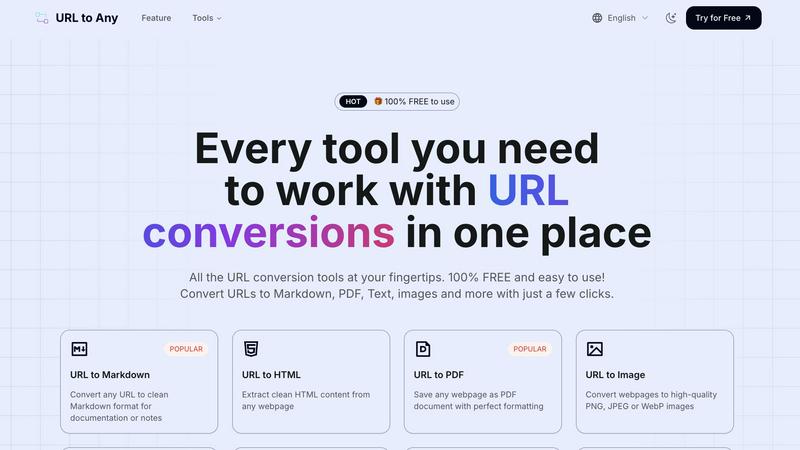
Instantly convert any URL to PDF, Markdown, images, and more with our 100% free, all-in-one toolkit.
Last updated: March 1, 2026
Visual Comparison
Hush Touch | Voice-to-Text for MacOS

URL to Any
Feature Comparison
Hush Touch | Voice-to-Text for MacOS
Dual-Engine Recognition
Hush Touch employs a dual-engine recognition system that combines the strengths of DictationTranscriber and SFSpeechRecognizer. This powerful pairing not only ensures natural flow and accurate punctuation but also boosts your custom vocabulary recognition for more precise transcription results.
Custom Vocabulary
With the ability to learn from your corrections, Hush Touch can store up to 500 unique terms, including technical jargon and brand names. This feature allows the app to adapt to your specific needs, making it particularly beneficial for professionals in specialized fields who require accurate terminology.
Smart Text Processing
Hush Touch features intelligent text processing capabilities that remove filler words and auto-correct common errors in real-time. It even allows you to format lists and voice snippets for repeated phrases, enhancing your dictation experience and resulting in cleaner, more polished output.
100% On-Device Privacy
Privacy is paramount with Hush Touch, as it processes all voice data entirely on your Mac. This means there is no reliance on cloud services, ensuring that your voice and text are kept confidential. Enjoy peace of mind knowing that your data is secure and never leaves your device.
URL to Any
Lightning-Fast, Multi-Format Conversion
Choose from a vast array of output formats with a single click. Instantly convert any URL to Markdown, PDF, high-quality images (PNG, JPEG, WebP), clean HTML, pure Text, structured JSON, XML, and even MP3 audio. Our optimized cloud processing engine delivers your converted content in mere seconds, saving you invaluable time and effort. No more juggling between different websites or tools for different formats.
Advanced Extraction & Utility Tools
URL to Any goes beyond basic conversion with a powerhouse of utility features. Extract and analyze meta tags and headings for SEO insights, export them to CSV. Use the AI Summarizer to get instant summaries of lengthy articles. Instantly extract all links from a site with the URL Extractor, or open multiple pages at once. Plus, handle encoding/decoding across 8+ formats like Base64, JWT, and HTML entities with our dedicated URL Encode/Decode tools.
100% Free & No-Registration Access
Every single feature, tool, and conversion is completely free to use forever. There are no hidden fees, premium tiers, or usage limits. We believe in powerful, accessible tools for everyone. Enjoy instant access without any sign-up forms or account creation. Just visit the site and start converting—it’s that simple and straightforward, a major reason for its viral popularity.
Secure, Private & Cloud-Based
Your privacy and data security are paramount. All processing happens securely in the cloud, requiring no software installation that could compromise your system. We never store your URLs or converted content on our servers, ensuring your information remains private and confidential. Access your tools from any device, anywhere in the world, with complete peace of mind.
Use Cases
Hush Touch | Voice-to-Text for MacOS
Efficient Email Drafting
Hush Touch is ideal for busy professionals who need to draft emails quickly. Simply activate the app and start dictating your message without worrying about typing errors or formatting issues.
Seamless Note Taking
Students and professionals alike can benefit from Hush Touch when taking notes during lectures or meetings. The app allows for hands-free dictation, enabling users to focus on the speaker while capturing important information effortlessly.
Content Creation for Writers
Freelance writers and content creators can leverage Hush Touch to brainstorm and draft articles or blog posts. The app's ability to process natural speech means ideas can flow freely, without the interruption of typing.
Medical Documentation
Healthcare professionals will find Hush Touch particularly useful for dictating patient notes or medical reports. Its custom vocabulary feature ensures that medical terminology is accurately transcribed, streamlining the documentation process.
URL to Any
Content Creators & Bloggers
Streamline your research and content curation! Quickly convert online articles, competitor pages, or inspiration into clean Markdown or Text to use as a base for your own posts. Save webpages as PDFs for offline reference archives or convert them to images to create engaging social media teasers and pins, all without leaving your browser.
Developers & Technical Writers
Supercharge your documentation workflow. Convert API documentation, GitHub READMEs, or any technical webpage into pristine Markdown or HTML to integrate into your projects. Use the URL to JSON/XML feature to scrape and structure web data for testing or analysis, and employ encoding tools for debugging—all essential for a efficient dev process.
Students & Researchers
Capture and organize information effortlessly. Save online journals, academic papers, or important articles as PDFs for annotated highlighting and long-term storage. Extract pure text from cluttered news sites for easy quoting in papers, and use the AI Summarizer to quickly grasp the key points of lengthy sources for literature reviews.
SEO & Digital Marketing Professionals
Conduct efficient competitor and site audits. Use the Meta Tags and Heading Extractors to analyze on-page SEO elements across multiple sites, exporting the data to CSV for easy comparison. Generate QR codes from campaign landing pages for print materials, and create image snapshots of webpages for visual reports or client presentations.
Overview
About Hush Touch | Voice-to-Text for MacOS
Hush Touch is a groundbreaking voice-to-text application designed specifically for macOS, bringing a seamless dictation experience that feels both fast and natural. Perfect for professionals and casual users alike, Hush Touch operates completely offline, ensuring that your data remains private and secure. By utilizing a sophisticated blend of two Apple transcription engines and an advanced Apple Intelligence final pass, Hush Touch delivers remarkably accurate text transcription while learning your unique vocabulary over time.
Whether you are drafting emails, writing notes, or creating documents, Hush Touch enhances your productivity by allowing you to dictate hands-free. With a lightweight footprint of only 5.5 MB, it integrates effortlessly into your daily writing workflows, requiring minimal setup. Experience the freedom of voice dictation without the hassle of cloud dependencies, while also benefiting from features that improve punctuation, remove filler words, and enable you to communicate with clarity and precision. Hush Touch is not just an app; it’s a game-changing tool for anyone looking to elevate their writing efficiency.
About URL to Any
Tired of clunky, expensive software just to save a webpage? Meet URL to Any, the revolutionary, all-in-one web content converter that's taking the internet by storm! 🚀 This powerful, 100% FREE platform is your ultimate Swiss Army knife for transforming any online content into the format you need, instantly. Whether you're a content creator, developer, researcher, student, or business professional, URL to Any eliminates the friction from your workflow. Simply paste a URL, choose your desired format, and get pristine results in seconds—no registration, no downloads, no hassle. With over 50,000 daily users and processing 1 million+ URLs monthly, it's the go-to resource trusted by a massive global community. From converting articles to clean Markdown for your notes, saving webpages as perfectly formatted PDFs, to generating QR codes for easy sharing, URL to Any puts an incredible suite of over 10+ conversion tools right at your fingertips. Experience the power of lightning-fast, cloud-based processing that delivers clean, ready-to-use output every time, making web content conversion truly accessible to everyone.
Frequently Asked Questions
Hush Touch | Voice-to-Text for MacOS FAQ
How does Hush Touch ensure accuracy in transcription?
Hush Touch combines two advanced Apple transcription engines with an Apple Intelligence final pass, which helps refine and enhance the accuracy of the transcribed text. Additionally, the app learns your unique vocabulary over time for better results.
Can I use Hush Touch offline?
Yes, Hush Touch is designed to work entirely offline, meaning that all voice processing occurs on your Mac. This ensures that your data remains private and secure, without any cloud dependency.
What kind of devices is Hush Touch compatible with?
Hush Touch is specifically built for macOS, ensuring seamless integration with Mac devices. Its lightweight design allows it to run efficiently without taxing system resources.
Is there a trial version available for Hush Touch?
Absolutely! Hush Touch offers a 7-day free trial with no credit card required. This allows potential users to experience the app's capabilities firsthand before committing to a purchase.
URL to Any FAQ
Is URL to Any really free to use?
Absolutely, 100% free! There are no hidden charges, subscription plans, or premium features locked behind a paywall. Every tool listed on the platform, from URL to PDF to the AI Summarizer, is completely free to use without any registration. This commitment to free access is a core part of our mission and a key reason for its widespread adoption.
How does URL to Any ensure my privacy and data security?
Security is a top priority. All conversions are processed via secure, cloud-based servers. Crucially, we do not store the URLs you submit or the content generated from the conversions on our databases. Your data is processed in real-time and delivered to you, then discarded, ensuring your research and browsing activities remain completely private.
What formats can I convert a URL into?
The platform supports a wide and growing range of formats to suit various needs. Popular conversions include Markdown, PDF, Image (PNG/JPEG/WebP), Text, and HTML. For developers, we offer JSON and XML. Unique tools also allow conversion to MP3 audio, QR codes, and extensive encoding/decoding across multiple formats like Base64 and JWT.
Do I need to install software or create an account?
No installation and no account required! URL to Any is a fully web-based tool. You can access it directly from any modern web browser on your desktop, tablet, or phone. For even quicker access, you can optionally install our handy browser extension, but it's not necessary to use the core website and its full suite of tools.
Alternatives
Hush Touch | Voice-to-Text for MacOS Alternatives
Hush Touch | Voice-to-Text for MacOS is an innovative dictation app designed to enhance productivity by converting speech into text quickly and accurately. As an AI Assistant, it leverages advanced on-device technology to ensure your dictation remains private and efficient. Users often seek alternatives to Hush Touch for various reasons, including budget constraints, specific feature requirements, or compatibility with different platforms. When exploring options, it's essential to consider factors like transcription accuracy, ease of use, offline functionality, and overall cost to find the best fit for your dictation needs.
URL to Any Alternatives
URL to Any is a leading AI-powered web content conversion tool that has taken the digital world by storm. It effortlessly transforms any webpage into versatile formats like PDF, Markdown, and QR codes, all without requiring a login or payment. This has made it a viral favorite among creators, developers, and researchers for its sheer simplicity and power. Despite its popularity, users often explore alternatives for various reasons. Some may need advanced features like batch processing or API access for larger projects. Others might require specific integrations with their existing workflow platforms. The quest for the perfect tool often comes down to finding the right balance between specialized capabilities, ease of use, and cost. When evaluating other options, focus on a few key areas. Consider the range of output formats offered and whether they match your primary use case. Look at the tool's speed, reliability, and any potential limits on usage. Finally, assess the overall user experience—tools that are intuitive and require minimal setup, much like URL to Any, tend to become indispensable parts of your daily toolkit.