
PFPMe vs RemoveTexts
Side-by-side comparison to help you choose the right AI tool.

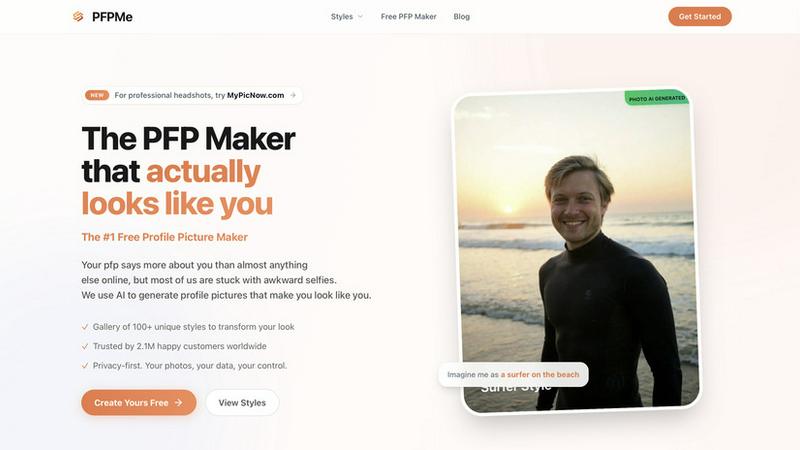
PFPMe is a free AI profile picture maker that creates personalized avatars for all your social media in just seconds.
Last updated: February 28, 2026

RemoveTexts
Join 50,000+ users who instantly remove text from images with AI, no Photoshop skills needed.
Last updated: March 11, 2026
Visual Comparison
PFPMe
RemoveTexts

Feature Comparison
PFPMe
Extensive Style Gallery
PFPMe boasts a diverse gallery of over 100 unique styles, including everything from anime-inspired designs to sleek, professional looks. This extensive range ensures that every user can find a style that resonates with their personality and online presence, making it easy to elevate your profile picture to the next level.
Instant Avatar Creation
With PFPMe, creating a new avatar is a breeze. Simply upload your photo, and in under 10 seconds, you will receive multiple optimized profile pictures tailored for various platforms. This rapid turnaround allows you to update your online presence quickly and efficiently, without the hassle of complicated editing tools.
Privacy-First Approach
User privacy is paramount at PFPMe. All image processing is conducted locally within your browser, meaning your photos are never uploaded to external servers. This commitment to privacy gives users peace of mind, knowing their images and data are secure and under their control.
User-Friendly Experience
PFPMe is designed for everyone, with no signup required and unlimited downloads available. The intuitive interface ensures that even those with no technical skills can easily navigate the platform. With no watermarks on your images, you can confidently use your new profile pictures across all your social media accounts.
RemoveTexts
Paint to Remove
Take ultimate control with the intuitive brush tool. Simply paint over the specific text, watermark, or object you want gone. The AI then works its magic only on the selected areas, giving you pixel-perfect precision without affecting the rest of your image. It's the easiest way to target exactly what you need, making it perfect for detailed edits on complex screenshots or photos.
Auto Remove All Text
Why edit manually when AI can do it for you? With one click, this powerful feature automatically scans your entire image, detects every single text element—from tiny watermarks to large captions—and removes them all simultaneously. It delivers a perfectly clean canvas in seconds, saving you hours of tedious work. This is the go-to feature for users processing batches of images quickly.
Edit & Replace Text
Don't just remove text—change it! This groundbreaking feature allows you to replace existing words in an image while having the AI intelligently match the original font style, size, and color. Need to update a price on a menu, correct a typo on a graphic, or localize text for a different audience? This tool makes it look flawlessly authentic, as if the new text was always part of the original design.
Remove Objects & Watermarks
Beyond text, our AI is trained to erase any unwanted element. Accidentally photobombed by a stranger? Have an obtrusive logo on a stock photo? Use this mode to seamlessly remove people, objects, logos, and visual clutter. The advanced inpainting technology analyzes the surrounding background to fill in the gap perfectly, leaving no trace behind.
Use Cases
PFPMe
Social Media Enhancement
PFPMe is perfect for individuals looking to enhance their social media profiles. Whether you want to stand out on Instagram or present a polished image on LinkedIn, PFPMe provides a wide array of styles to meet your needs, helping you make a lasting impression.
Professional Networking
For professionals, a strong profile picture can significantly impact networking opportunities. PFPMe's professional styles enable users to create headshots that convey competence and approachability, making it an essential tool for anyone looking to expand their professional connections online.
Gaming Avatars
Gamers looking to represent themselves online can utilize PFPMe to create unique and engaging avatars. With styles tailored specifically for gaming platforms, users can express their personality and interests while connecting with others in the gaming community.
Group and Team Profiles
PFPMe is also ideal for teams and organizations seeking consistent and professional profile pictures for group members. The platform allows for bulk uploads and uniform styles, ensuring that your team's online presence appears cohesive and polished, which can impress potential clients and partners.
RemoveTexts
Cleaning E-commerce Product Photos
Online sellers can instantly remove distracting watermarks, price tags, or promotional text from product images sourced from suppliers. This creates a clean, professional-looking catalog that enhances brand credibility and boosts sales, all without needing a graphic designer or expensive software.
Preparing Professional Screenshots & Presentations
Professionals can clean up software screenshots for tutorials, reports, or client presentations by removing irrelevant UI text, personal data, or system watermarks. This ensures communications look polished, focused, and privacy-compliant, elevating the overall standard of your professional materials.
Creating Clean Social Media & Marketing Graphics
Marketers and social media managers can repurpose images by erasing old captions, dates, or branded overlays from memes, stock photos, or user-generated content. This allows for fresh, on-brand visuals that resonate with new campaigns, driving higher engagement without starting from scratch.
Redacting Sensitive Information
Legal, real estate, and administrative professionals can use the tool to quickly and securely redact personal information like names, addresses, or account numbers from documents before sharing. It provides a fast, reliable alternative to traditional black-bar methods, ensuring sensitive data is completely erased from the visual field.
Overview
About PFPMe
PFPMe is a groundbreaking, free AI-powered profile picture maker that revolutionizes how you present yourself online. In a world where first impressions matter, PFPMe empowers users to transform their ordinary photos into striking, professional-grade avatars in just seconds. Whether you need a vibrant profile for Instagram, a polished look for LinkedIn, an eye-catching image for Discord, or a fun avatar for TikTok, PFPMe has you covered with over 100 unique styles. Designed for everyone—from casual users wanting to enhance their social media presence to professionals aiming to make a strong impression—PFPMe is the ultimate solution. Its standout feature is its commitment to user privacy; all image processing occurs locally in your browser, ensuring your photos remain confidential. With no signup required and unlimited downloads without watermarks, PFPMe has garnered the trust of over 2.1 million users who have discovered the transformative power of a great profile picture.
About RemoveTexts
Tired of clunky Photoshop tutorials just to remove a simple watermark or clean up a screenshot? Welcome to the future of image editing. RemoveTexts is the viral, AI-powered online tool that removes any unwanted text from your images in under 30 seconds—no skills needed. It’s the secret weapon for over 100,000 creators, marketers, and designers worldwide who are ditching complicated software for instant, professional results. Simply upload your image, and our state-of-the-art AI does the rest: detecting and erasing watermarks, subtitles, date stamps, logos, and meme text while perfectly reconstructing the background so no one can tell anything was ever there. Whether you're cleaning product photos for your e-commerce store, redacting sensitive info from a document, or perfecting a social media graphic, RemoveTexts delivers 4K output quality with the click of a button. It’s not just an editor; it’s a productivity revolution, processing over 100,000 images and trusted by a global community for its speed, precision, and stunningly seamless results.
Frequently Asked Questions
PFPMe FAQ
What is a PFP?
A PFP, or "Profile Picture," is the avatar or image that represents you on social media platforms like Discord, Instagram, TikTok, LinkedIn, and more. A good PFP helps you stand out and make a memorable first impression, reflecting your personality or brand.
Is PFPMe really free?
Yes, PFPMe is completely free to use. There are no signup requirements, no watermarks on your images, and you can enjoy unlimited downloads. This means you can experiment with different styles without any financial commitment.
What size should my profile picture be?
Profile picture sizes vary by platform. Discord uses 128x128px, Instagram uses 320x320px, LinkedIn requires 400x400px, TikTok uses 200x200px, and Twitter/X also utilizes 400x400px. PFPMe automatically optimizes your PFP for each platform, making it easy to ensure your image fits perfectly.
What makes a good profile picture?
A good PFP should be well-lit, properly framed with your face centered, high resolution, and appropriate for the platform. It should also reflect your personality or brand. PFPMe's AI technology assists you in achieving all these qualities automatically, ensuring your profile picture makes a great impression.
RemoveTexts FAQ
Is RemoveTexts really free to use?
Yes! RemoveTexts offers a robust free tier that allows you to upload images and remove text with powerful AI. You can start using the core "Paint to Remove" feature immediately without any cost. For access to advanced modes like "Auto Remove All Text" and higher-resolution downloads, there are premium plans available.
What image formats and sizes are supported?
The tool supports the most common web image formats: JPG, PNG, and WebP. You can upload files up to 10MB in size. The AI processes these efficiently and allows you to download your edited image in high quality, preserving the original resolution.
How does the AI remove text without leaving a trace?
RemoveTexts uses advanced deep learning inpainting technology, similar to architectures pioneered by industry leaders. The AI doesn't just delete pixels; it intelligently analyzes the colors, patterns, and textures of the background surrounding the text and generates new pixels that blend in seamlessly, making the edit undetectable.
Can I use it to remove logos or people from photos?
Absolutely! While named "RemoveTexts," the AI is powerfully equipped with a dedicated "Remove Objects" mode. This feature is specifically designed to erase unwanted visual elements like logos, people, or other objects by reconstructing the background just as effectively as it does for text removal.
Alternatives
PFPMe Alternatives
PFPMe is an innovative AI-powered profile picture maker that allows users to create personalized avatars for their social media profiles quickly and efficiently. It falls under the categories of Image & Photo and Productivity & Management, serving anyone from casual users to professionals seeking to enhance their online presence. Users often look for alternatives to PFPMe for various reasons such as the need for different features, pricing models, or compatibility with specific platforms. When choosing an alternative, consider factors like the variety of styles offered, ease of use, privacy measures, and any associated costs. It’s essential to find a tool that aligns with your specific needs and preferences to ensure you get the best possible profile picture experience.
RemoveTexts Alternatives
RemoveTexts is a leading AI-powered image editing tool that specializes in removing unwanted text from any picture. It falls into the category of automated, user-friendly photo editors designed to simplify tasks that once required complex software like Photoshop. Users often seek alternatives for various reasons, including budget constraints, the need for different feature sets, or compatibility with specific operating systems or workflows. When exploring other options, it's crucial to consider several factors. Key considerations include the accuracy of the AI in removing text and reconstructing the background, the speed of processing, the available output quality, and the overall ease of use. The ideal alternative should match your specific needs, whether that's a one-time project or a tool for daily professional use, without compromising on the clean, seamless results you expect.