
Patrivox vs Playwriter
Side-by-side comparison to help you choose the right AI tool.

Patrivox
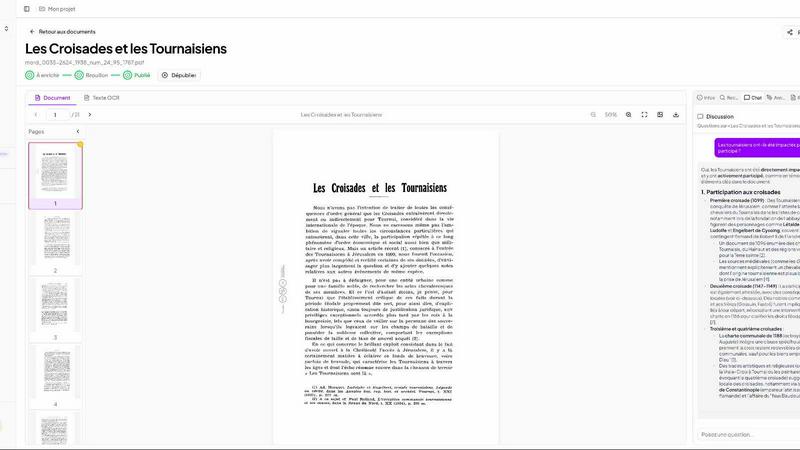
Unlock your archives in minutes with Patrivox, the AI tool that digitizes and makes documents fully searchable.
Last updated: March 4, 2026

Playwriter
Playwriter transforms your Chrome into a powerful AI-controlled browser, leveraging existing sessions for seamless automation and real-time debugging.
Last updated: March 18, 2026
Visual Comparison
Patrivox
Playwriter

Feature Comparison
Patrivox
Automation
Patrivox takes the hassle out of archival management with its seamless automation feature. Users can batch upload hundreds of PDFs at once, and within minutes, Mistral AI reads and classifies every page. This eliminates manual entry and configuration, making the process efficient and user-friendly.
Next-gen OCR (Mistral AI)
The platform utilizes cutting-edge OCR technology to ensure that every word in your documents is accurately extracted. Mistral AI not only identifies text but also recognizes important entities like names and locations, enriching your data and making it readily searchable.
Smart Semantic Search
Patrivox enables users to find information in record time. With full-text search capabilities across entire collections, users can utilize typo tolerance, advanced filters, and even ask questions in plain language. The AI provides sourced answers, ensuring that users get the information they need without delay.
Interactive Knowledge Graph
Discover the hidden connections within your archives with Patrivox's interactive knowledge graph. Each identified entity—be it a person, place, or organization—is linked, allowing users to navigate effortlessly through their documents and uncover relationships that may have previously gone unnoticed.
Playwriter
Seamless Browser Integration
Playwriter connects your AI agents to your live Chrome session, complete with all your extensions, logins, and cookies. This eliminates the hassle of managing multiple accounts and the risk of bot detection, providing a seamless browsing experience.
Full Automation API
With Playwriter, agents gain access to the complete Playwright API through a single execution tool. This means no wrappers or schema bloat, allowing your agents to execute any Playwright code with ease and efficiency.
Real-Time Collaboration
Experience true collaboration with Playwriter. You can see everything your agent does in real time, allowing for instant human intervention when needed. Whether it's solving captchas or navigating consent walls, you're always in control.
Advanced Debugging and Snapshots
Playwriter includes a powerful debugger with breakpoints and live code editing, plus accessibility snapshots that are significantly smaller in size. This allows for quick diagnostics and ensures that your agents can efficiently handle tasks without excessive memory usage.
Use Cases
Patrivox
Municipal Archives
Patrivox is perfect for municipal archives aiming to digitize and showcase their deliberations, registers, and correspondence. The platform allows easy access and exploration of essential civic documents, fostering transparency and public engagement.
Historical Societies
Historical societies can benefit immensely from Patrivox by making their bulletins and documentary collections searchable. This enhances their research capabilities and allows for broader dissemination of historical knowledge to the public.
Heritage Libraries
Heritage libraries can utilize Patrivox to open their special collections to researchers and the public. The platform makes it simple to index and search through valuable texts, promoting accessibility and scholarly work.
Dioceses & Parishes
Patrivox aids dioceses and parishes in preserving and indexing their parish registers and ecclesiastical archives. This ensures that important religious documents are not only preserved but also easily accessible for community members and researchers alike.
Playwriter
Automated Testing
Developers can utilize Playwriter to automate browser testing, allowing agents to run through test cases in real-time while maintaining full access to existing browser sessions for accurate results.
Data Scraping
With Playwriter, data scientists can automate the collection of web data without the usual hurdles of logging in or dealing with bot detection, making it easier to gather insights from various online sources.
User Experience Improvements
UX researchers can leverage Playwriter to simulate user interactions in real time, allowing them to observe how agents navigate sites and identify areas for improvement without losing context.
Task Automation
Businesses can streamline repetitive online tasks such as form submissions, data entry, or content gathering by deploying Playwriter, saving time and resources while ensuring accuracy in execution.
Overview
About Patrivox
Patrivox is an innovative SaaS platform based in Europe that revolutionizes the way organizations manage and access their archival documents. Specifically designed for heritage institutions, municipal services, associations, and enterprises, Patrivox turns vast, scanned collections into a fully searchable knowledge base. Users can effortlessly drag and drop their PDFs into the platform, and within minutes, Mistral AI employs advanced optical character recognition (OCR) technology to extract every word. The platform goes beyond mere indexing; it identifies key entities such as people, places, and organizations, creating an interactive knowledge graph that connects this information. Patrivox is ideal for anyone who needs quick access to valuable data, enabling instant searches with typo tolerance or natural language queries. With its focus on making previously inaccessible knowledge easily shareable, Patrivox opens new doors for research and public engagement, thus transforming dusty archives into vibrant resources of information.
About Playwriter
Playwriter is a groundbreaking tool designed to empower AI agents with unparalleled access to your actual browser session. Unlike traditional AI agents that operate in isolated environments with no access to personal logins, extensions, or cookies, Playwriter allows agents to work seamlessly within your existing Chrome setup. This innovative Chrome extension and CLI provide full automation capabilities, enabling agents to perform tasks as if they were you. With features like accessibility snapshots, a comprehensive debugger, and network interception, Playwriter enhances productivity while ensuring a collaborative experience. Ideal for developers, testers, and anyone looking to automate repetitive web tasks, Playwriter not only saves time but also minimizes bot detection risks, making it a must-have tool for modern web automation.
Frequently Asked Questions
Patrivox FAQ
How does Patrivox ensure data security?
Patrivox is 100% hosted in Europe and is GDPR-native, which means it adheres to strict data protection regulations. The platform also maintains an audit log to track data access and modifications.
Can I share access to my archives with others?
Absolutely! Patrivox allows unlimited readers and multiple administrators, making it easy to share your archives with your team, researchers, or the public without any additional costs.
What types of documents can I upload to Patrivox?
You can upload any scanned PDF documents. Patrivox is designed to handle a variety of files, enabling you to digitize and manage both small and large collections effortlessly.
Is there a free trial available for Patrivox?
Yes! Patrivox offers a free trial that allows you to test the platform with 100 trial pages and a one-time credit. This enables potential users to explore its features before committing to a paid plan.
Playwriter FAQ
How does Playwriter ensure security?
Playwriter operates entirely on your local machine, meaning no data is sent to remote servers. The extension creates a secure WebSocket connection, ensuring your browsing session remains private.
Can Playwriter work with other programming environments?
Yes, Playwriter is designed to work seamlessly with various MCP clients, including Cursor, Claude, VS Code, and others, enhancing its versatility in different programming environments.
Is there any technical support available for Playwriter?
Playwriter is open-source and MIT licensed, which means you can access community support through forums and GitHub. Additionally, documentation is available to help you get started quickly.
What platforms does Playwriter support?
Currently, Playwriter is a Chrome extension and is designed for use with environments that can run Playwright, ensuring it fits well within modern web development workflows.
Alternatives
Patrivox Alternatives
Patrivox is an innovative European SaaS platform that transforms scanned documents into a searchable knowledge base, primarily aimed at heritage institutions, municipal services, associations, and enterprises. Utilizing advanced AI technology, Patrivox simplifies the process of digitizing and classifying documents, making information retrieval fast and efficient. Users often seek alternatives to Patrivox for various reasons, including pricing, specific feature requirements, or the need for compatibility with existing workflows and platforms. When searching for an alternative, it's essential to consider factors such as functionality, ease of use, customer support, scalability, and integration capabilities to ensure a seamless transition and continued productivity.
Playwriter Alternatives
Playwriter is an innovative automation tool designed to enhance user control over Chrome using AI, specifically through Command Line Interface (CLI) or Multi-Client Protocol (MCP). As part of the automation category, it allows users to leverage their actual browser sessions, complete with existing logins and extensions, thereby providing a seamless experience that AI agents typically lack. Users often seek alternatives to Playwriter due to various factors such as pricing, specific feature sets, or compatibility with different platforms. When exploring alternatives, it's essential to consider aspects like ease of use, integration capabilities, and any additional functionalities that may enhance your automation tasks. A thorough understanding of your needs will guide you in selecting the right tool that aligns with your operational requirements.