
MyImageUpscaler vs Seedream 4.0
Side-by-side comparison to help you choose the right AI tool.

MyImageUpscaler
Join 54 founding members and upscale your photos instantly with AI while keeping text perfectly sharp.
Last updated: February 28, 2026

Seedream 4.0
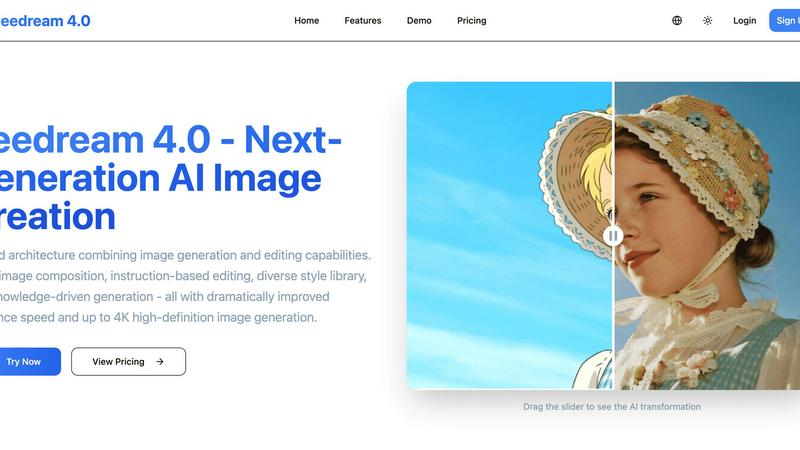
Seedream 4.0 transforms your words into stunning 4K images and edits them effortlessly with cutting-edge AI technology.
Last updated: March 1, 2026
Visual Comparison
MyImageUpscaler

Seedream 4.0
Feature Comparison
MyImageUpscaler
Lightning-Fast AI Upscaling
Watch your images transform in real-time! Our advanced AI engine delivers stunning 2x or 4x upscaling results in under 10 seconds per image. It doesn't just add pixels; it intelligently reconstructs fine details, textures, and edges to create a crisp, natural-looking enlargement that feels like magic. Perfect for when you're on a deadline and need professional-grade results instantly.
Bulk Batch Processing Power
Stop processing images one by one. Unleash the true power of automation by uploading and enhancing up to 500 images simultaneously. This game-changing feature saves hours of manual work, making it ideal for photographers with large galleries, e-commerce stores updating entire catalogs, or agencies handling big client projects efficiently.
Platform-Optimized Presets
Get perfectly sized images for every channel without the guesswork. MyImageUpscaler comes with built-in, optimized presets for Amazon, Instagram, YouTube, and TikTok. One click ensures your images meet the exact resolution and aspect ratio requirements for each platform, maximizing engagement and presenting a polished, professional brand image everywhere.
Privacy-First & Watermark-Free
Your work deserves to be seen, not branded by a tool. Even on the completely free tier, every upscaled image you download is 100% free of distracting watermarks. For added security, we automatically delete your uploaded images after a period (7-30 days depending on your plan), ensuring your assets and projects remain confidential.
Seedream 4.0
Multi-Image Composition
Multi-Image Composition allows users to input several images and achieve a cohesive composition with just one sentence. This feature streamlines complex visual storytelling and brand asset creation, enabling batch output for more efficient workflows. Perfect for designers and marketers, it transforms the way images are crafted.
Instruction-Based Editing
With Instruction-Based Editing, what you say is precisely what you get. Users can generate high-quality images or make detailed edits using simple, straightforward commands. This feature enhances creativity by making the image generation and editing process intuitive and user-friendly, regardless of skill level.
Diverse Style Library
The Diverse Style Library puts professional artistic styles at your fingertips. Whether you aim to generate stylized images or modify your own photos, this feature offers a wide range of styles—from classic watercolor to futuristic cyberpunk. Users can easily create a unique visual language that reflects their brand or personal aesthetic.
Knowledge-Driven Generation
Knowledge-Driven Generation harnesses rich knowledge and advanced reasoning capabilities to produce beautiful, accurate illustrations, charts, and professional images. This feature is particularly beneficial for educators and content creators who require enhanced understanding and precision in their visual materials.
Use Cases
MyImageUpscaler
E-Commerce & Product Listings
Online sellers are raving about this! Transform low-quality supplier images into stunning, high-resolution product photos that captivate customers and boost sales. Perfect for creating zoom-ready images for Amazon, eBay, or Shopify stores. Enhance details on fabrics, textures, and logos to make your products look irresistible and professional, directly impacting conversion rates.
Social Media Content Creation
Content creators and influencers are making their feeds pop. Quickly upscale older content or enhance screenshots to meet the high-resolution demands of Instagram Reels, YouTube thumbnails, and TikTok videos. The platform presets ensure your visuals are always sharp and optimized for each app's algorithm, helping you stand out in crowded feeds and grow your audience.
Real Estate & MLS Listings
First impressions are everything. Real estate agents use MyImageUpscaler to dramatically improve property photos, enhancing details in kitchens, bathrooms, and architectural features for MLS listings and brochures. Turn dim, grainy interior shots into bright, inviting images that attract more views and drive potential buyers to schedule a showing.
Photography & Digital Archives
Photographers are saving countless hours. Effortlessly upscale entire batches of portrait sessions, wedding photos, or scanned historical archives without losing the soul of the image. Restore and enhance details in old family photos or prepare large galleries for high-quality client delivery or printing, all while maintaining the original artistry and quality.
Seedream 4.0
Social Media Content Creation
Seedream 4.0 is perfect for social media influencers who need to create engaging visuals quickly. Using the platform, they can generate eye-catching images tailored to their brand, ensuring their posts stand out and attract more followers.
Professional Design Projects
Designers can utilize Seedream 4.0 to create high-quality brand assets efficiently. The multi-image composition feature allows them to craft complex visuals that tell a cohesive story, making their design projects more impactful and engaging.
Educational Illustrations
Educators can benefit immensely from knowledge-driven generation. They can create accurate and informative illustrations, charts, and diagrams that enhance their teaching materials, helping students grasp complex concepts visually.
Marketing Campaigns
Marketers can leverage Seedream 4.0 to generate compelling visuals for their campaigns. The diverse style library enables them to align images with their brand identity, ensuring consistency and professionalism across all marketing channels.
Overview
About MyImageUpscaler
Tired of blurry, pixelated images ruining your professional look? Welcome to MyImageUpscaler, the AI-powered image enhancement platform that's going viral among savvy businesses and creators. This isn't just another simple resizer; it's a smart, lightning-fast tool that intelligently upscales your images 2x to 4x while magically preserving and enhancing sharp details, textures, and clarity. Imagine turning a small, grainy product photo into a stunning, high-resolution masterpiece ready for a billboard—in under 10 seconds. Built for the demands of the digital age, it supports massive batch processing and includes ready-to-go presets for all major platforms. With a wildly generous free tier (10 credits, no watermarks, no credit card!) and paid plans starting at an unbeatable $9/month, it's no wonder professionals are switching in droves. Upscale smarter, not harder, and join the thousands who are already transforming their visual content.
About Seedream 4.0
Seedream 4.0 is the cutting-edge AI image generator and editor that embodies the future of creative technology. With its unified architecture, it seamlessly combines image creation and editing into one powerful platform. This revolutionary tool has already generated over 1 million unique images, captivating a vibrant community of digital artists, marketers, and content creators. Whether you're a social media influencer looking to craft eye-catching visuals, a professional designer developing brand assets, or an educator creating detailed illustrations, Seedream 4.0 offers unmatched speed and quality. Its intuitive design allows users to generate stunning artwork from a simple sentence, followed by precise, instruction-based edits—all within a streamlined workflow. Experience the thrill of creating high-definition 4K images that are ready for any medium, from social media posts to large-scale prints. Seedream 4.0 is not just a tool; it is a comprehensive creative suite that empowers users to elevate their artistic expression.
Frequently Asked Questions
MyImageUpscaler FAQ
How does the free tier work?
It's incredibly generous and truly free! Simply sign up (no credit card required) and you'll instantly receive 10 credits to start upscaling. You can process images at 2x or 4x, and crucially, all downloads from the free tier are completely free of watermarks. It's the perfect way to test the AI's power on your own images with zero risk.
What is batch processing and how many images can I upload?
Batch processing allows you to upload and upscale multiple images simultaneously, saving you massive amounts of time. MyImageUpscaler supports bulk processing for up to 500 images in one go. Just select your files, choose the upscale ratio or platform preset, and let our AI handle the rest, delivering a folder of enhanced images ready for use.
Are my uploaded images kept private and secure?
Absolutely. We prioritize your privacy. All uploaded images are processed securely. Furthermore, we automatically delete your originals and enhanced files from our servers after a set period—7 days for free users and 30 days for paid plan subscribers. This ensures your proprietary visuals and client work are never stored indefinitely.
What are the platform-ready presets?
These are one-click optimization settings tailored for specific social media and e-commerce platforms like Instagram, YouTube, TikTok, and Amazon. Instead of manually calculating dimensions, you select the preset, and our AI upscales and formats your image to the ideal resolution and aspect ratio for that platform, ensuring it always looks its best.
Seedream 4.0 FAQ
Can I try it for free?
Yes, Seedream 4.0 offers a trial period that allows new users to explore its features without any cost. This trial provides an opportunity to experience the capabilities of the platform before committing to a subscription.
How does Seedream 4.0 work?
Seedream 4.0 uses advanced AI algorithms to generate and edit images based on user input. By providing simple instructions or descriptions, users can create stunning visuals and refine them through intuitive editing capabilities.
What makes Seedream 4.0 different?
What sets Seedream 4.0 apart is its unified architecture that combines image generation and editing in one platform. This seamless workflow enhances creativity, allowing users to move from concept to finished product without the need for multiple tools.
What image formats are supported?
Seedream 4.0 supports various image formats, including JPG, PNG, and WebP. This versatility ensures that users can download their creations in the format that best suits their needs, whether for web use or print.
Alternatives
MyImageUpscaler Alternatives
MyImageUpscaler is a leading AI-powered image enhancement tool in the productivity and management category, designed to intelligently upscale and sharpen photos in seconds. It's become a go-to for e-commerce sellers and creators who need crisp, platform-ready visuals fast. Users often explore other options to find the perfect fit for their specific workflow. This could be due to budget constraints, the need for different upscaling multipliers, a requirement for longer file storage, or simply wanting to test different AI engines for specific image types like text-heavy graphics or portraits. When evaluating other tools, savvy users look at core value: speed, output quality, and cost-effectiveness. Key factors include processing time per image, the availability of batch processing for large volumes, the presence of watermarks on free plans, and specialized modes for preserving text or details critical to their business.
Seedream 4.0 Alternatives
Seedream 4.0 is a cutting-edge AI image generator and editor that allows users to create stunning 4K images from simple text prompts. It caters to a diverse audience, including digital artists, marketers, and educators, by offering a seamless, unified platform for both creation and editing. With its impressive community of over a million generated images, it exemplifies the growing trend of AI-driven creativity. Despite its popularity, users often seek alternatives to Seedream 4.0 for various reasons, including pricing concerns, specific feature requirements, or compatibility with particular platforms. When searching for an alternative, consider factors such as ease of use, the ability to generate high-quality images, and the flexibility of editing options. Additionally, assess community support and the range of available features to ensure that the chosen tool meets your creative needs.