
Tab Folio
Tab Folio uses AI to bookmark and group your tabs by topic instead of URL, so you can close overloaded windows without losing your thread.
Visit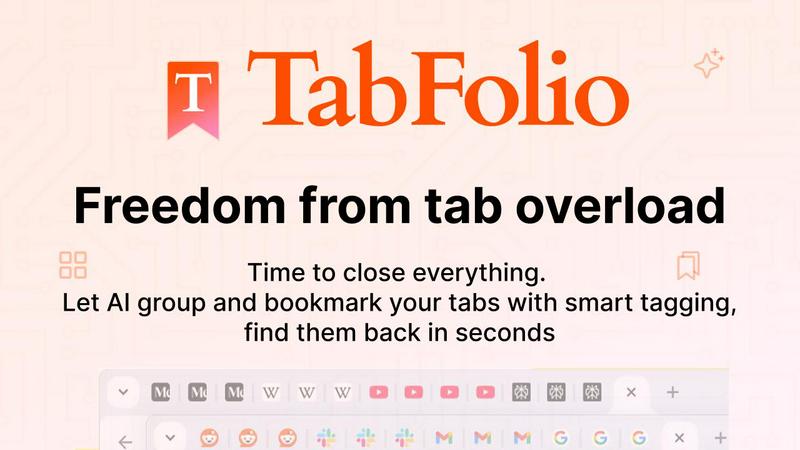
About Tab Folio
Tab Folio is the AI-powered browser extension that finally solves the problem of tab overload. If you are the kind of person who regularly has 40+ tabs open, each one representing a different context you do not want to lose, Tab Folio was built for you. Instead of forcing you to remember URLs or manually organize bookmarks, Tab Folio uses AI to automatically read the content of every page you save, group it by topic, and tag it intelligently. You stop drowning in tabs and start finding everything instantly by what it is about, not what it is called. Whether you are a researcher juggling multiple projects, a developer deep in Stack Overflow threads, a student saving sources, or a marketer tracking competitor pages, Tab Folio adapts to your workflow. It works seamlessly in Chrome, Edge, Brave, and Opera, and it saves your tabs locally on your device for complete privacy. With features like custom collections, Notion sync, session management, and instant recovery, Tab Folio turns your chaotic tab bar into a searchable, organized, and permanent library of your online life. Loved by 47 early users and growing fast, it is the tool that finally lets you close tabs without losing the thread.
Features of Tab Folio
AI-Powered Topic Grouping
Tab Folio does not just save the URL. When you save a tab, the AI reads the actual page content and automatically groups it by what it is about. A React article from October gets tagged with React, JavaScript, and frontend. A kayak listing gets tagged with outdoor gear and travel. You never have to guess where something went. The AI understands context, not just keywords, so your saved tabs are organized exactly how your brain works.
Custom Collections with Auto-Routing
Create collections for specific projects, topics, or workflows like design inspiration, client research, or weekend recipes. Once you set them up, the AI automatically routes new saves into the correct collection based on the page content. You get three collections on the free plan and unlimited on Pro. This feature eliminates manual sorting forever and ensures every tab lands exactly where it belongs.
Smart AI Tagging
Every tab you save is analyzed and tagged automatically. The AI does not just look at the title. It reads the page to understand if it is an article, a product, a video, a code repository, or a document. Each gets relevant, specific tags that make searching effortless. You can find any tab by typing what you remember, like that React article from October or those kayak listings, without needing to know the exact title or URL.
Notion Sync
For power users who live in Notion, Tab Folio offers native, one-way sync. Every saved tab flows automatically into a Notion database you control, complete with title, URL, AI-generated tags, and source collection. Your tab library becomes a permanent, searchable reference inside the tool you already use. This feature is exclusive to the Pro plan and is a game-changer for researchers and project managers who need everything in one place.
Use Cases of Tab Folio
Research and Project Management
Researchers and students often have dozens of tabs open for different projects, papers, or topics. With Tab Folio, you can save all tabs from a research session, let the AI group them by subject, and find them back instantly by typing what you remember. You can reopen entire sessions in one click, so you never lose the context of a deep dive into a new topic.
Developer Workflow Management
Developers live in a browser with Stack Overflow threads, documentation pages, GitHub repos, and tutorial videos. Tab Folio automatically tags and groups these by technology, framework, or problem type. You can save a session of debugging tabs, close everything to free up RAM, and restore the entire context later with one click. No more hunting through bookmarks for that one specific solution.
Shopping and Comparison
Shopping rabbit holes are real. You open tabs for a tent, a sleeping bag, a kayak, and reviews across different sites. Tab Folio groups all your outdoor gear research together automatically. You can close the tabs, come back tomorrow, and reopen the entire comparison session instantly. The AI tags help you find that specific product review without remembering the website name.
Content Creation and Curation
Writers, marketers, and designers constantly collect inspiration, competitor content, and reference materials. Tab Folio lets you create custom collections for each client or project. As you browse, the AI automatically routes new saves into the correct collection. You can search across all your saved content by topic, tag, or keyword, making it easy to find that perfect design reference or competitor analysis from months ago.
Frequently Asked Questions
How does Tab Folio protect my privacy?
Tab Folio is built with a local-first privacy approach. When you save a tab, the page content is sent to the AI for tagging and then immediately deleted from the AI servers. The tags, URLs, and page data stay local in your browser. Only your collections and settings sync across devices if you choose to. You can export all your data as JSON anytime. No tracking, no data selling, and your browsing history stays yours.
Can I use Tab Folio with browsers other than Chrome?
Yes, Tab Folio works in Chrome, Edge, Brave, and Opera. It is built on the Chromium engine, so it is compatible with all major Chromium-based browsers. You can install it from the Chrome Web Store and it will work across all these browsers seamlessly.
What happens if I close a tab before saving it?
Tab Folio requires you to actively save tabs using the extension. It does not automatically save every tab you open. You can save the current tab, all tabs in the current window, or selected tabs with one click. Once saved, you can close the tab safely, and everything remains searchable and recoverable in your dashboard.
How does the free plan compare to the Pro plan?
The free plan gives you 100 AI analyses per month and up to 3 custom collections. The Pro plan, which costs a monthly subscription, gives you 1,000 AI analyses per month, unlimited custom collections, Notion sync, and priority support. The first 100 users to join the founder program get Pro free for one year and 50% off forever after that.
Pricing of Tab Folio
Tab Folio offers two pricing tiers. The Free plan includes 100 AI analyses per month and up to 3 custom collections. The Pro plan includes 1,000 AI analyses per month, unlimited custom collections, Notion sync, and priority support. The first 100 users who claim founder access get Pro free for the first year and then 50% off forever. No credit card is required to start with the free plan.
Explore more in this category:
Similar to Tab Folio

KS-Agents
AI platform for HR leaders: spot burnout by cohort, map who your organization runs on, and keep expert knowledge before people leave.

Agent Pets
Your Claude Code & Codex sessions as pets in Chrome. Approve, deny and reply to your coding agents from any tab.

Lemongraph
Almost every conversation ends with a promise. Lemongraph keeps track of them for you and lines up your day the way you would.
TypeFire
Type a few letters, get the whole reply. Markdown notes as files you own. Find anything you copied.

LightScreen
Free light screen tool online. Turn any display into a flashlight, ambient light, or solid-color screen. No download or sign-up.
Screen Issues
Free Online Screen Test Tool - Instantly diagnose dead pixels, lines, color issues, and flickering. Multiple test modes, no download needed.

Context Board
Context Board brings your numbers, docs, clients, content and day into one workspace that Claude and Codex can read and update.