SubtitlesFast
Create stunning subtitles in minutes with SubtitlesFast, the ultimate tool for effortless video editing and publishing.
VisitPublished on:
August 30, 2025
Pricing:
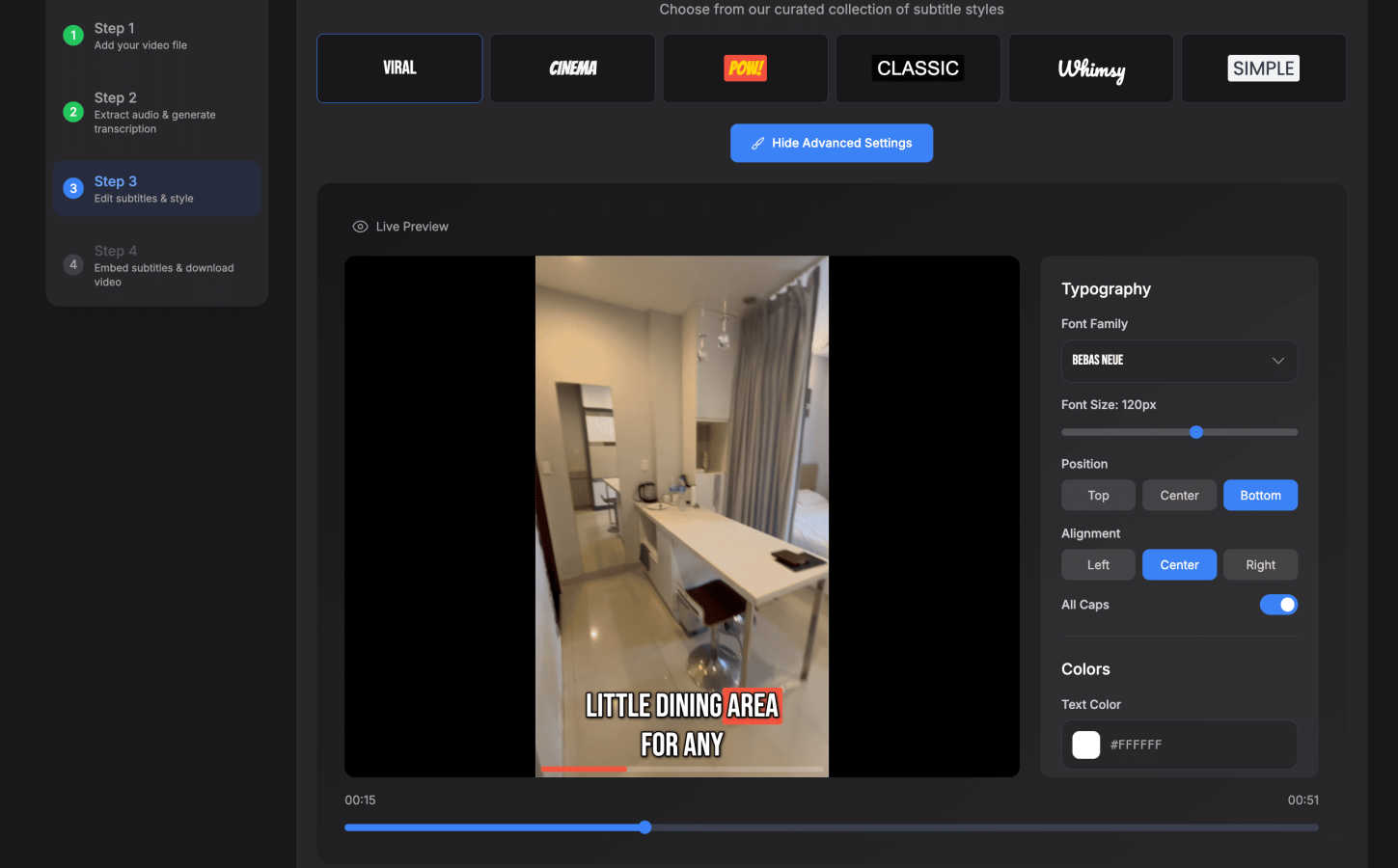
About SubtitlesFast
SubtitlesFast is a cutting-edge online tool that transforms the way video content creators, marketers, and accessibility advocates add subtitles to their videos. By automatically generating accurate subtitles, this software not only saves valuable time but also enhances viewer engagement and accessibility. Designed for ease of use, SubtitlesFast caters to a diverse audience, from daily vloggers and marketers creating promotional content to individuals passionate about making their videos more inclusive. With auto-transcription capabilities in over 50 languages, SubtitlesFast eliminates the cumbersome task of manual transcription, allowing users to focus on their creative processes. The platform's user-friendly interface ensures that even those without technical skills can produce polished, professional-quality videos in just minutes. Everything operates seamlessly within the browser, removing the need for lengthy software installations. Whether you are looking to grow your audience or improve accessibility, SubtitlesFast provides a swift and efficient solution to enhance your video content.
Features of SubtitlesFast
Auto-Transcription
SubtitlesFast boasts an advanced auto-transcription feature that supports over 50 languages. This means you can effortlessly convert spoken words into written text, saving you hours of manual transcription and ensuring accuracy in your subtitles.
Customizable Subtitle Styles
With over 30 animated styles to choose from, SubtitlesFast allows you to customize the look of your subtitles. You can easily highlight words in real-time, creating an engaging viewing experience that captures your audience's attention.
Simple Editing Tools
The platform includes a simple editor that lets you add text, images, and music to your videos. This straightforward editing interface requires no prior experience, making it easy for anyone to enhance their video content while maintaining a professional appearance.
One-Click Export
Once your video is ready, SubtitlesFast offers a one-click export feature that allows you to download your video with burned-in subtitles. This ensures your content is ready for immediate sharing on platforms like TikTok, YouTube, and Instagram without any watermarks.
Use Cases of SubtitlesFast
Daily Vloggers
Daily vloggers can benefit immensely from SubtitlesFast by quickly adding subtitles to their videos. This not only saves time but also enhances viewer engagement, ensuring that content is accessible to a wider audience, including those who are hearing impaired.
Marketers and Brand Promoters
For marketers, creating promotional videos with subtitles can significantly boost engagement rates. SubtitlesFast allows marketers to produce polished videos efficiently, making it easier to reach potential customers and convey their message effectively.
Educators and Trainers
Educators can utilize SubtitlesFast to create instructional videos that are accessible to all learners. By adding accurate subtitles, they can cater to a diverse audience, ensuring that every student has the opportunity to understand the material.
Social Media Influencers
Influencers can leverage SubtitlesFast to make their short clips more engaging and shareable. With the ability to create eye-catching subtitles, influencers can capture more attention on platforms like Instagram Reels and TikTok, ultimately growing their follower base.
Frequently Asked Questions
How does SubtitlesFast generate subtitles?
SubtitlesFast uses advanced AI algorithms to automatically transcribe audio from your video, converting it into accurate subtitles in multiple languages.
Is there a limit to the length of videos I can upload?
No, SubtitlesFast allows you to upload videos of varying lengths, making it suitable for both short clips and longer content like tutorials or vlogs.
Can I customize the appearance of my subtitles?
Absolutely! SubtitlesFast offers over 30 animated styles, and you can also customize the color, font, and positioning of your subtitles to match your branding.
Do I need to download any software to use SubtitlesFast?
No, SubtitlesFast is a browser-based application. You can access all its features directly online without the need for any software downloads or installations.
Similar to SubtitlesFast

@fuck.it - email with attitude
Private email. Pure. Secure. Exclusive. No ads, no tracking, no data selling. GDPR compliant, EU-hosted.

FreeVideoGenerator
Free AI video generator: turn text prompts and photos into video clips with Sora 2, Veo 3.1, Wan and more. Free starter credits, no watermark download

Leadeon
AI growth tool for X and LinkedIn: write posts in your voice, schedule at your best times, find leads on X and see what works.

Verla AI
Verla is an AI academic assistant for university and college students, combining AI essay writing, academic research, AI detection, AI humanization
ZombieTrend AI
Turn two photos into a cinematic zombie love story video. Free scene preview, no sign-up needed.