
MeetingMind
MeetingMind automatically records and summarizes your Zoom meetings so you never miss an insight again.
Visit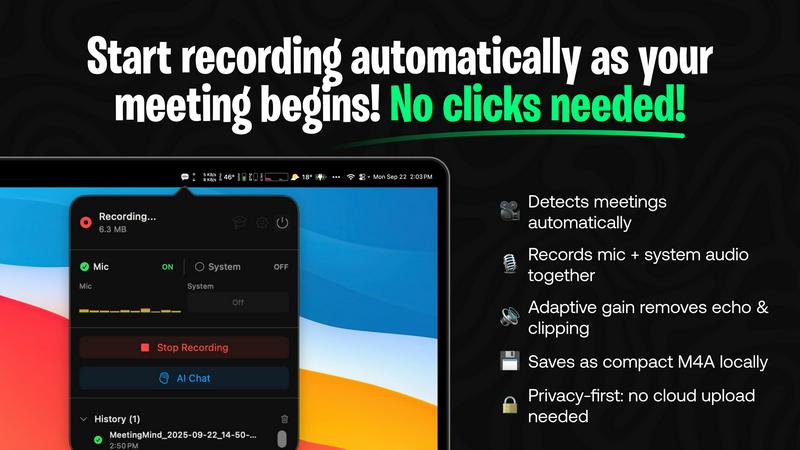
About MeetingMind
MeetingMind is the next-generation intelligent meeting assistant specifically designed for professionals who want to elevate their meeting experience. This innovative tool is engineered to automatically capture every detail of your meetings, transforming them into searchable and interactive notes that enhance productivity and save valuable time. Whether you are a busy executive, a team leader, or someone who frequently participates in virtual meetings, MeetingMind ensures that no critical detail slips through the cracks. With its effortless one-click recording feature, you can capture both microphone and system audio simultaneously. The advanced WhisperKit-powered transcription provides immediate, speaker-attributed notes in a clean markdown format, making it easy to reference later. Furthermore, the AI assistant tracks action items, summarizes discussions, and allows for real-time querying of insights. Privacy is a top priority; all data is processed locally on your macOS device, ensuring that your sensitive information remains secure and confidential. Experience the transformation in how you document and engage in meetings with MeetingMind.
Features of MeetingMind
Automatic Detection
MeetingMind intelligently detects Zoom meetings automatically, eliminating the need for manual clicks. This feature allows users to focus on the discussion without the distraction of starting and stopping recordings, making the whole experience seamless.
Comprehensive Recording
Capture both microphone and system audio in one go, thanks to MeetingMind's adaptive gain technology. This ensures that every voice and sound from your meetings is recorded clearly, allowing for accurate transcriptions and summaries.
AI Assistant
Choose between a local Ollama AI or a cloud-based OpenRouter for your summaries and insights. This flexibility enables users to tailor their experience based on their preferences for speed and functionality, enhancing the overall utility of the software.
Markdown Export
After each meeting, receive AI-generated summaries and transcripts saved directly as formatted markdown files. This feature not only saves time but also makes it easy to share notes with team members or integrate them into other documentation.
Use Cases of MeetingMind
Streamlined Team Meetings
With MeetingMind, team leaders can focus on brainstorming and collaboration without worrying about missing key points. The automatic recording and transcription ensure that all ideas are captured accurately, fostering a more productive environment.
Efficient Project Updates
During project update meetings, MeetingMind helps project managers track action items and decisions made in real-time. This clarity allows teams to stay aligned on goals and responsibilities, leading to smoother project execution.
Enhanced Client Calls
For sales professionals, MeetingMind captures vital information during client calls, enabling them to refer back to discussions and commitments made. This feature significantly improves client relationship management and follow-up processes.
Comprehensive Training Sessions
MeetingMind is an invaluable tool for trainers and educators who conduct virtual sessions. The automatic transcription and markdown export allow for easy distribution of training materials, ensuring participants have access to all content covered.
Frequently Asked Questions
How does MeetingMind ensure privacy?
MeetingMind prioritizes user privacy by processing all data locally on your Mac. This means that your meetings and sensitive information never leave your device, maintaining confidentiality at all times.
Can I use MeetingMind for meetings other than Zoom?
Currently, MeetingMind is optimized for Zoom meetings. However, it’s designed to evolve, and future updates may include compatibility with other platforms, enhancing its versatility for users.
Is there a limit to the free version?
Yes, the free version of MeetingMind offers 60 minutes of recording per day. This is perfect for short meetings and daily standups, which allows users to determine if they want to upgrade for unlimited recording in the future.
How do updates and support work?
MeetingMind operates on a one-time purchase model, which includes lifetime updates without the need for recurring subscriptions. Users can check the Mac App Store for details on updates and support options available.
Explore more in this category:
Similar to MeetingMind

@fuck.it - email with attitude
Private email. Pure. Secure. Exclusive. No ads, no tracking, no data selling. GDPR compliant, EU-hosted.

FreeVideoGenerator
Free AI video generator: turn text prompts and photos into video clips with Sora 2, Veo 3.1, Wan and more. Free starter credits, no watermark download


Verla AI
Verla is an AI academic assistant for university and college students, combining AI essay writing, academic research, AI detection, AI humanization

Panzoe
Panzoe is an all-in-one AI platform for personal productivity, business automation, AI assistants, content creation, and custom AI solutions.

Memorable Contact
Memorable Contact helps you remember people, save conversation details, find contacts using AI-powered search, and share digital business cards
screenRIG
Signage and kiosk infrastructure for AI agents. Your agent publishes images, video, streams, web pages and apps to screens via one plugin.screenRIG is