
Browser Notes
Join 50,000+ users keeping notes, sticky boards, and mind maps locally in their browser with zero signup or cloud dependency.
Visit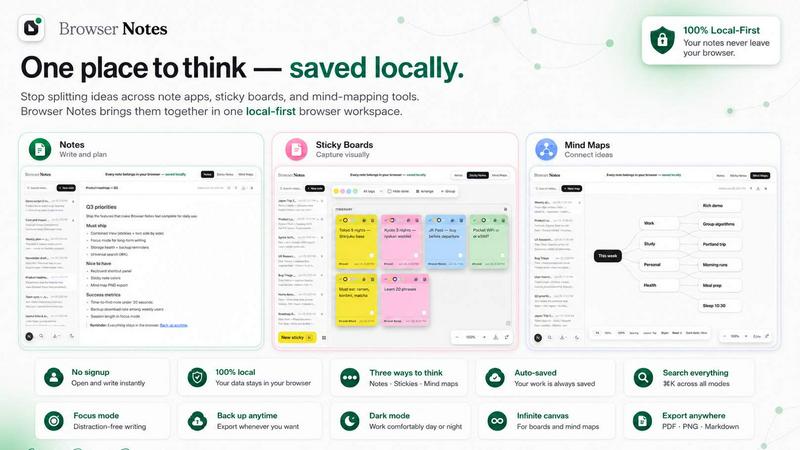
About Browser Notes
Browser Notes is the ultimate local-first workspace that is quietly revolutionizing how people capture, organize, and visualize their ideas. It is a Chrome extension that eliminates the chaos of scattered notes across writing apps, sticky boards, and mind-mapping tools by bringing everything into a single, private, and secure environment that lives entirely in your browser. The core value proposition is radical simplicity: no account creation, no tracking, and no forced cloud sync. Your data stays with you, stored locally, and works completely offline. This tool is for anyone who values privacy, from students and researchers to project managers and creative professionals who are tired of their private ideas being pushed to the cloud. With Browser Notes, you get three powerful ways to think: markdown notes for structured writing, sticky notes for freeform brainstorming on a canvas, and mind maps for branching ideas from a central point. It is a viral sensation because it solves a universal pain point: the fear of losing control over your own data. The interface is clean, fast, and intuitive, with keyboard shortcuts like CtrlK for search and Ctrl/ for all shortcuts. It is designed for the modern knowledge worker who wants to back up their data anytime, but never be forced to share it. Browser Notes is not just a tool; it is a movement back to digital sovereignty, where every note belongs in your browser, saved locally.
Features of Browser Notes
Notes with Markdown
Write and format your thoughts with full markdown support. This feature allows you to create rich, structured documents directly in your browser without any external dependencies. Whether you are drafting a blog post, taking meeting minutes, or writing a research paper, the markdown editor provides a distraction-free environment. All formatting is done with simple syntax, and your notes are instantly saved locally. You can start writing immediately, and the tool provides a clean preview of your formatted text. This is perfect for users who want the power of a text editor without the overhead of a cloud-based system.
Sticky Notes on a Free Canvas
Brainstorm like a pro with a free-form canvas that lets you place sticky notes anywhere. This feature is designed for visual thinkers who need to map out ideas spatially. You can open a board, add as many sticky notes as you want, and move them around freely to create connections. Each sticky note can contain text, and the canvas is infinite, allowing for massive brainstorming sessions. This is ideal for project planning, creative sprints, or just jotting down random thoughts that need to be organized later. The canvas is responsive and works smoothly even with hundreds of notes.
Mind Maps from a Center
Branch your ideas visually from a central concept with the mind map feature. This is a game-changer for anyone who needs to break down complex topics or generate new ideas. You can create a map by starting from a single node and then adding branches, sub-branches, and connections. The interface is intuitive, allowing you to drag and drop nodes, change colors, and reorganize the entire structure with ease. This feature is perfect for students studying for exams, writers outlining a novel, or entrepreneurs planning a business strategy.
Local-First Architecture with Backup
Everything you create in Browser Notes is stored locally in your browser's storage. There is no account, no tracking, and no forced sync to any cloud server. This means your data is truly private and secure. However, the tool also gives you full control over your data by allowing you to back up your entire workspace anytime. You can export your notes, sticky boards, and mind maps as a single backup file. If you ever need to restore, you can simply import the backup. This feature is a lifesaver for users who switch devices or want to ensure their data is never lost.
Use Cases of Browser Notes
Academic Research and Study
Students and researchers can use Browser Notes to compile all their research in one place. Use the markdown notes to write summaries and citations, the sticky notes canvas to brainstorm connections between concepts, and the mind maps to outline entire thesis structures. Everything stays private and offline, so there is no risk of data breaches. The ability to back up your work ensures that hours of research are never lost due to a browser crash.
Project Planning and Management
Project managers can leverage the three tools to plan and execute projects. Start with a mind map to outline the project's goals and tasks. Then, use sticky notes on a canvas to assign responsibilities and deadlines visually. Finally, write detailed notes for each phase using markdown. This integrated approach eliminates the need for multiple apps and ensures that all project information is accessible in one local workspace.
Creative Writing and Content Creation
Writers can use Browser Notes as their private writing studio. The markdown editor is perfect for drafting articles, stories, or scripts. When stuck on a plot point, switch to the mind map to branch out character arcs or storylines. Use the sticky notes canvas to brainstorm dialogue or scene ideas. Because there is no cloud sync, writers can work on sensitive or unpublished content without any fear of leaks.
Personal Knowledge Management
For individuals who want to build a second brain, Browser Notes is the perfect tool. Use it to capture daily thoughts, book summaries, and life goals. The local-first approach ensures that your most personal ideas remain yours. The backup feature allows you to archive your knowledge base over time. With the keyboard shortcuts, you can quickly search through all your notes, making it a powerful system for lifelong learning.
Frequently Asked Questions
Do I need to create an account to use Browser Notes?
No, you do not need to create an account. Browser Notes is designed with privacy as its core principle. There is no sign-up, no email verification, and no tracking. You can install the Chrome extension and start using it immediately. All your data is stored locally in your browser, and there is no server interaction. This makes it one of the most private note-taking tools available.
Is my data safe if I clear my browser cache?
Your data is stored in the browser's local storage, which is separate from the cache. Clearing your cache will not delete your notes. However, it is always recommended to use the backup feature to export your data regularly. Browser Notes provides a simple one-click backup option that saves all your notes, sticky boards, and mind maps into a single file that you can store anywhere.
Can I use Browser Notes offline?
Yes, Browser Notes works completely offline. Since all data is stored locally, you do not need an internet connection to create, edit, or view your notes. This makes it perfect for use on planes, in remote areas, or any time you want to avoid distractions from the internet. The only time you need a connection is to install the extension.
How do I restore my data from a backup?
Restoring your data is simple. On the main interface, there is an option to "Import backup." You can select the backup file you previously exported, and all your notes, sticky boards, and mind maps will be restored to their exact state. This is useful when switching to a new computer or after a browser reset. The import process is fast and does not require any account authentication.
Pricing of Browser Notes
Browser Notes is completely free to use. There are no pricing tiers, no premium subscriptions, and no hidden costs. The Chrome extension is available for download without any payment. All features, including markdown notes, sticky notes canvas, mind maps, and backup/restore functionality, are included in the free version. This commitment to being free and local-first is a core part of the product's philosophy.
Explore more in this category:
Similar to Browser Notes

@fuck.it - email with attitude
Private email. Pure. Secure. Exclusive. No ads, no tracking, no data selling. GDPR compliant, EU-hosted.

FreeVideoGenerator
Free AI video generator: turn text prompts and photos into video clips with Sora 2, Veo 3.1, Wan and more. Free starter credits, no watermark download
Verla AI
Verla is an AI academic assistant for university and college students, combining AI essay writing, academic research, AI detection, AI humanization
Panzoe
Panzoe is an all-in-one AI platform for personal productivity, business automation, AI assistants, content creation, and custom AI solutions.
Memorable Contact
Memorable Contact helps you remember people, save conversation details, find contacts using AI-powered search, and share digital business cards
Novastart
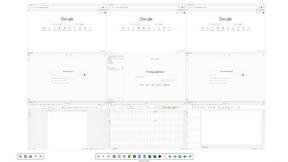
Novastart brings apps and files onto an infinite canvas where people and AI agents can work together.

AUTOMATER.ai
A tray helper for every AI coding tool: sessions, alerts and usage in one place