
AI Architecture Generator
Turn your sketch or prompt into a photorealistic 3D render in 30 seconds with AI.
Visit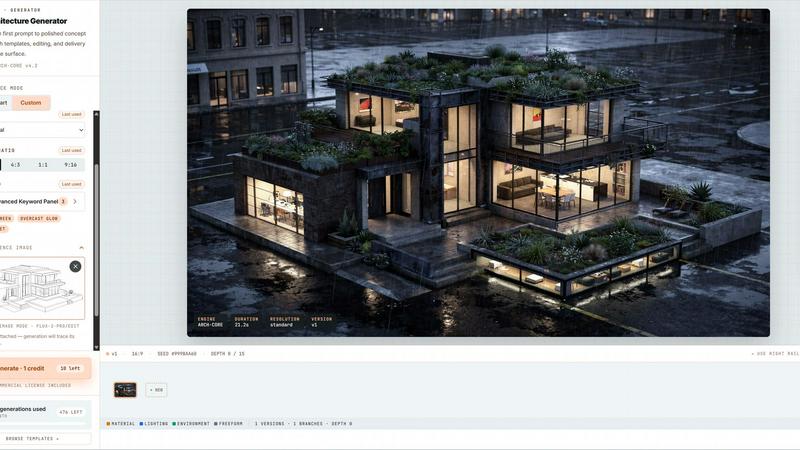
About AI Architecture Generator
The AI Architecture Generator is a browser-based design visualization tool that is rapidly changing how architects, interior designers, realtors, and students approach early concept development. It has quickly become a viral sensation in the design community, with over 100,000 renders generated in its first month. This tool allows you to transform text prompts, rough sketches, reference images, and even photos of empty rooms into stunning, photorealistic architecture renders, interior design concepts, virtual staging images, and schematic floor plan drafts in under 30 seconds. The core value proposition is speed and iteration. Instead of spending hours or days on initial modeling and rendering, you can test multiple design directions, styles, and moods instantly. The platform is built around two distinct modes: Pro Mode for professionals who need unlimited creative freedom with advanced keyword panels and workflow exports, and Template Mode for realtors, students, and quick users who want one-click results. With 3 free generations per day and no signup required, it has become the go-to tool for anyone looking to move from a first prompt to a polished concept render without the traditional software overhead. The platform supports a wide range of architectural styles including Modern, Brutalist, Scandinavian, Japanese, Art Deco, and more, making it a versatile addition to any design workflow.
Features of AI Architecture Generator
Sketch to Render AI Pipeline
This is the flagship feature that has gone viral on social media. Users can upload a rough sketch, a line drawing, an axonometric view, or even a massing study, and the AI will interpret the composition and generate a photorealistic render in seconds. The tool cycles between input and output, showing the transformation in real time. This feature is perfect for architects who want to quickly visualize initial concepts without spending hours in 3D modeling software. It supports JPG, PNG, and WebP formats up to 10MB.
Pro Mode with Advanced Keyword Panel
For design pros who demand total control, Pro Mode offers a 2000-character free-form text input with no fixed structure. It supports technical jargon like BIM, parametric, and passive house. The advanced keyword panel allows you to fine-tune materials, lighting, environment, and camera settings using modular tags instead of fixed dropdowns. This feature also includes workflow export capabilities, allowing you to export Enhanced HD renders, GLB preview meshes, and batch iterations with a version tree that opens in any glTF viewer like Blender, SketchUp, or AR Quick Look.
Template Mode for One-Click Generation
This feature is designed for zero learning curve. It includes a curated library of over 50 hand-tuned prompts that you can browse by style, room type, or use case. With one click, you can "Use this" template and generate a render instantly. The virtual staging tool is a flagship feature within Template Mode: upload an empty room photo, pick a style, and get a staged photo in 30 seconds with zero prompt writing required. This is a massive time saver for realtors who need listing-ready images quickly.
Enhanced HD Export and 3D Mesh Output
Every render generated by the AI Architecture Generator can be exported in Enhanced HD quality, making it suitable for client presentations, marketing materials, and even print. For users on Pro Mode, the tool also exports a GLB preview mesh that can be opened in any glTF viewer. This allows for further iteration in traditional 3D software like Blender or SketchUp. The export is watermark-free on Pro plans, saving users up to $45 per photo compared to traditional virtual staging services.
Use Cases of AI Architecture Generator
Virtual Staging for Real Estate Listings
Realtors and property managers can use the AI Architecture Generator to virtually stage empty rooms in seconds. Upload a photo of an empty living room, bedroom, or office space, select a style like Scandinavian, Modern, or Luxury, and the AI will generate a fully furnished, photorealistic image. This eliminates the cost and hassle of traditional staging, which can run $20 to $45 per photo. The output is auto-cropped to a 16:9 aspect ratio and is MLS-compliant, making it ready for listing websites immediately.
Early Concept Development for Architects
Architects can rapidly explore multiple design directions before committing to traditional modeling and rendering workflows. By inputting a text prompt or uploading a rough sketch, they can generate a variety of architectural styles, massing studies, and material palettes in minutes. This speeds up the iterative process significantly, allowing for more creative exploration and client feedback loops. The tool supports technical architectural language, so professionals can specify BIM parameters or passive house standards.
Interior Design Visualization for Clients
Interior designers can use the tool to show clients how different styles and furnishings would look in a real space. By uploading a photo of an existing room and selecting a style preset like Industrial, Japanese, or Mid-Century, the AI generates a realistic render that helps clients visualize the final result. This reduces the need for expensive physical samples or lengthy mockups, making the design approval process faster and more collaborative.
Educational Tool for Architecture Students
Architecture students can use the AI Architecture Generator as a learning and presentation tool. They can quickly generate renders from their hand-drawn sketches, test different architectural styles, and create polished visuals for studio projects and critiques. The free tier offers 3 generations per day, making it accessible for students on a budget. The ability to export 3D meshes also helps students bridge the gap between conceptual design and digital modeling.
Frequently Asked Questions
How many free generations do I get per day?
You get 3 free generations per day with no signup required. This allows you to test the tool and see if it fits your workflow before committing to a paid plan. To track your daily quota and save generations, you can sign in to your account. The free tier is perfect for students, hobbyists, or professionals who only need occasional renders.
Can I use my own sketches and reference images?
Absolutely. The tool is designed to accept a wide range of inputs. You can upload rough sketches, line drawings, axonometric views, massing studies, or reference photos in JPG, PNG, or WebP format up to 10MB. The AI will anchor the composition based on your input and generate a render that respects the original design intent. This feature is particularly popular for early concept development.
What architectural styles are supported?
The AI Architecture Generator supports a broad range of styles including Auto, Modern, Minimalist, Industrial, Scandinavian, Japanese, Mediterranean, Art Deco, Victorian, Brutalist, and Contemporary. In Pro Mode, you can combine styles or create custom blends using free-form text prompts. The template library also includes curated prompts for specific style and room combinations.
Can I export the renders for commercial use?
Yes, you can export renders in Enhanced HD quality. On Pro Mode, exports are watermark-free and include a GLB preview mesh for further editing in 3D software. The output is suitable for client presentations, marketing materials, real estate listings, and other commercial applications. The platform is designed to save you time and money compared to traditional rendering and staging services.
Pricing of AI Architecture Generator
The AI Architecture Generator offers a free tier with 3 generations per day. For unlimited generations, advanced features like Pro Mode, watermark-free exports, and batch iteration, users can upgrade to a paid subscription. Specific pricing tiers and plan details are available on the platform's pricing page. The tool is designed to provide significant cost savings compared to traditional virtual staging, which can cost $20 to $45 per photo.
Similar to AI Architecture Generator

ImageGPT
ImageGPT is an all-in-one AI creative platform for generating, editing and transforming images and videos using AI.
AI Album Cover Maker
Create release-ready album covers from a prompt or photo. Generate, refine, and export art for singles, EPs, mixtapes, and playlists.
Free AI Image Background Remover
Remove image backgrounds free — no uploads, no signup, no watermark, full resolution. The AI runs in your browser; photos never touch a server.
Sprite Sheet Maker
A free browser-based toolkit for creating, cutting, converting, and previewing sprite sheet animations.

99x Prompts
Discover 50,000+ ready-to-use AI prompts for text, image, and video generation. Save time and create better results with AI.

RemoveMate
AI background remover for product photos, portraits, pets and everyday objects. Preview the cutout, then download.
EffectSnap
For creators and marketers: Free browser-based animation generator creating After Effects-quality motion graphics, chat bubbles, and video overlays in

GPT Image 2 API
Production-ready image generation and editing with GPT Image 2 API