
VideoDubber Video Translator vs YouTube to Transcript
Side-by-side comparison to help you choose the right AI tool.

VideoDubber Video Translator
Join 200,000+ users who translate and dub videos into 150+ languages with AI to instantly reach a global audience.
Last updated: March 1, 2026

YouTube to Transcript
Instantly extract free, accurate transcripts from any YouTube video without limits or sign-up in over 100 languages.
Last updated: March 3, 2026
Visual Comparison
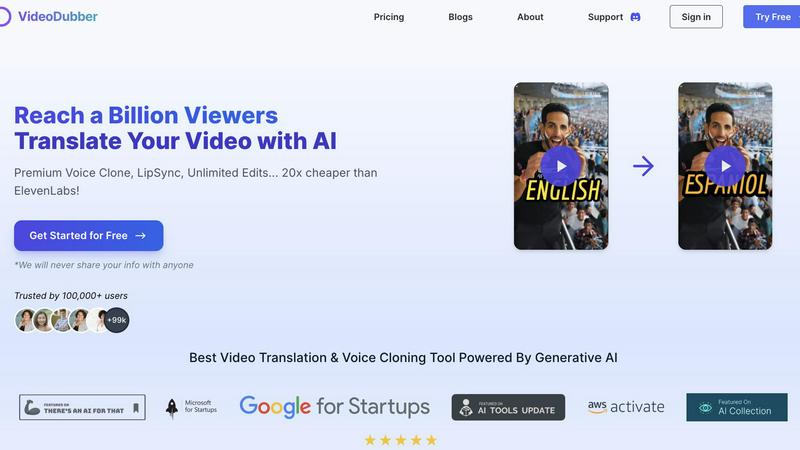
VideoDubber Video Translator
YouTube to Transcript

Feature Comparison
VideoDubber Video Translator
Superior AI Voice Cloning & Lip-Sync
Experience the future of dubbing with our premium voice cloning technology. It doesn't just translate words; it captures the original speaker's unique tone, pitch, and emotional delivery. Combined with advanced lip-sync capabilities, the final video looks and sounds natural, as if the speaker is fluently speaking the target language. This authenticity is key to building trust and connection with a global audience, setting your content miles apart from robotic, low-quality dubs.
One-Click Multi-Language Translation
Expand your reach exponentially with a single click! Our incredibly simple yet powerful UI lets you translate one video into dozens of languages simultaneously. No need to upload your file multiple times. Just select your source language, tick the boxes for all your target languages (from over 150 options), and let VideoDubber handle the rest. This massive time-saver is how top creators and marketing teams scale their content production globally without the headache.
Unlimited Free Edits & Re-dubs
Unlike other platforms that charge you for every tiny change, VideoDubber believes in creator freedom. Once you translate your video, you get unlimited free edits forever. Need to tweak the translated text, adjust timestamps, change the voice-over, or request a complete re-translation? Go ahead! Make changes directly in our editor, click "Apply Changes," and get your updated video instantly—at zero extra cost. This makes it perfect for ongoing projects and perfectionists.
Top-Tier AI Translation Engines (DeepSeek, Gemini, GPT-5)
We give you the power of choice for unparalleled accuracy. Don't settle for a one-size-fits-all translation. VideoDubber lets you select between leading AI models like DeepSeek, Gemini, or OpenAI's GPT-5 for your translation. This ensures context-aware, highly accurate, and nuanced translations that require minimal manual correction. You choose the best brain for the job, guaranteeing your message is perfectly conveyed in every language.
YouTube to Transcript
Completely Free
Enjoy unlimited access to YouTube to Transcript without any hidden fees or premium tiers. This service is entirely free forever, making it accessible to anyone who needs it.
Multi-language Support
With the ability to translate transcripts into over 125 languages, YouTube to Transcript caters to a diverse global audience. This feature ensures that language barriers are eliminated, allowing users from various backgrounds to benefit from the service.
No Video Duration Limit
Whether you want to transcribe a short clip or a lengthy documentary, YouTube to Transcript has no restrictions on video duration. This flexibility allows users to extract text from any video, regardless of length.
Clean Formatting
Transcripts are exported in a clean and organized format, making them perfect for SEO optimization, note-taking, or repurposing content for different platforms. This feature helps users maximize their productivity.
Use Cases
VideoDubber Video Translator
YouTube Creators & Influencers Expanding Globally
YouTubers are already using AI to crush it in multilingual markets! VideoDubber is their go-to tool for rapidly translating viral videos, tutorials, and vlogs. By adding multiple language audio tracks and subtitles, creators can tap into new audiences, boost watch time, and skyrocket their subscriber count from all over the world, all while maintaining their unique on-screen personality and brand voice.
Corporate Marketing & Training for International Teams
Trusted by 2000+ marketing teams, VideoDubber is essential for global campaigns. Translate product launches, explainer videos, customer testimonials, and internal training materials with consistent, professional quality. Engage a diverse customer base in their native language and ensure every international team member receives clear, effective communication, driving better results and unified branding.
E-Learning Platforms & Online Course Creators
Educators and course creators can unlock a massive new student base by offering their content in multiple languages. Translate lecture videos, course modules, and educational content effortlessly. The authentic voice cloning keeps the instructor's engaging teaching style intact, making learning effective and personal for students regardless of their native language, thereby increasing course sales and impact.
Social Media Marketers & Ad Agencies
Create hyper-localized, high-conversion ad campaigns for Facebook, Instagram, TikTok, and LinkedIn without blowing your budget. Quickly dub testimonial videos, product demos, and brand stories to resonate with specific regional markets. The fast turnaround and unlimited edits allow for rapid A/B testing of different languages and messages to see what drives the most engagement and sales.
YouTube to Transcript
Content Creation
Content creators can easily convert their YouTube videos into written format, enabling them to create blog posts, articles, and other content types without starting from scratch.
Academic Research
Students and researchers can utilize the tool to transcribe educational videos, lectures, and webinars, allowing for easier study and analysis of the material presented.
Accessibility Improvements
By providing transcripts for videos, creators can enhance accessibility for hearing-impaired individuals or non-native speakers, fostering inclusivity in their audience.
Language Learning
Language learners can benefit from transcripts as they can read along while watching videos, improving their comprehension and vocabulary in the target language.
Overview
About VideoDubber Video Translator
Break language barriers and go viral globally with VideoDubber Video Translator! This isn't just another translation tool; it's the AI-powered revolution for content creators, marketers, educators, and businesses ready to dominate the international stage. Trusted by over 100,000 users and 2000+ marketing teams, VideoDubber is the secret weapon for effortlessly translating and dubbing videos into more than 150 languages. Imagine uploading your video just once and instantly creating authentic, engaging versions for audiences in Spanish, Mandarin, French, Japanese, and beyond. The magic lies in its cutting-edge voice cloning and lip-sync technology, which preserves the original speaker's tone, emotion, and charisma, making every dubbed video feel incredibly real and relatable. With a stunning 4.98/5 rating on There's An AI For That, it's clear this platform delivers unparalleled quality. Best of all, it empowers you with unlimited free edits and re-dubs, making it the most flexible and budget-friendly solution on the market. Stop limiting your reach and start speaking the world's language with VideoDubber.
About YouTube to Transcript
YouTube to Transcript is a revolutionary online tool designed to simplify the way we interact with video content. This powerful utility allows users to convert any YouTube video into a high-quality, readable transcript in mere seconds. Whether you are a content creator looking to repurpose your videos into blog posts, a student needing to capture lectures for study, or a researcher delving into video-based data, this tool is crafted for you. The main value proposition lies in its sheer ease of use: simply paste the video's URL, click generate, and receive an accurate transcript instantly. With no registration required and its 100% free model, YouTube to Transcript has quickly become a popular choice among thousands of users worldwide. Say goodbye to tedious note-taking and hello to efficiency.
Frequently Asked Questions
VideoDubber Video Translator FAQ
How many languages does VideoDubber support?
VideoDubber supports a massive library of over 150 languages, including all major global languages like English, Spanish, French, German, Mandarin, Japanese, Arabic, Portuguese, Russian, Italian, Dutch, and many more. You can translate one video into multiple target languages in a single project.
What is voice cloning and how does it work?
Voice cloning is our advanced AI technology that analyzes the original speaker's voice in your video and creates a synthetic voice model that mimics its unique characteristics—like tone, accent, and emotional inflection. When dubbing, it uses this model to speak the translated script, making the new audio sound incredibly natural and authentic, as if the original person is speaking the new language.
Is there a limit to how many times I can edit my translated video?
Absolutely not! VideoDubber offers unlimited free edits. You can go back into your project anytime to change the translated text, adjust subtitle timings, select a different voice, or even re-translate sections. Every update generates a new version of your video instantly and for free, giving you complete creative control.
How do I get started and is there a free trial?
Getting started is easy and risk-free! Simply visit the VideoDubber website, click "Try Free" or "Translate Video Online," and upload your first video. The process requires no credit card upfront and no spam. You can experience the powerful upload, translation, and preview features to see the quality for yourself before choosing a plan that fits your needs.
YouTube to Transcript FAQ
Is YouTube to Transcript free to use?
Yes, YouTube to Transcript is completely free to use with no hidden costs or subscription fees. You can generate as many transcripts as you need without any charge.
How do I get a transcript of a YouTube video?
To get a transcript, simply copy the URL of the YouTube video you want to transcribe, paste it into the input field on the website, and click the "Generate" button.
How long does it take to generate the transcript?
The transcript generation process is incredibly fast, typically taking only a few seconds. You will receive your transcript almost instantly after clicking the generate button.
Can I download the transcript?
Absolutely! Once the transcript is generated, you have the option to either copy the text directly to your clipboard or download it as a TXT file for easy access and storage.
Alternatives
VideoDubber Video Translator Alternatives
VideoDubber Video Translator is a powerhouse in the AI video translation and dubbing category, trusted by over 100,000 users. It uses advanced AI to translate and dub videos into 150+ languages, featuring voice cloning and lip-sync to keep content authentic and engaging. It’s the go-to for creators and businesses exploding their global reach. Even with its stellar 4.98/5 rating, users often scout for alternatives. Reasons vary from specific budget constraints and the need for different feature sets to compatibility with other platforms in their workflow. It’s a smart move to compare options in this fast-evolving space. When evaluating other tools, focus on core needs. Prioritize translation accuracy, language range, and output quality like natural-sounding dubbing. Also, consider ease of use, integration capabilities, and transparent pricing models to find the perfect fit for your viral content goals.
YouTube to Transcript Alternatives
YouTube to Transcript is a cutting-edge web-based utility that falls under the categories of Education & Learning, Productivity & Management, and Video. This innovative tool empowers users, including content creators, students, and researchers, to effortlessly extract high-quality transcripts and subtitles from any YouTube video by simply pasting the URL. Its appeal lies in its completely free access, multi-language support, and user-friendly interface that eliminates the frustration often associated with other platforms. Many users seek alternatives to YouTube to Transcript for a variety of reasons, such as pricing concerns, feature limitations, or specific platform needs. When considering an alternative, it's important to look for factors like ease of use, language support, and the ability to handle various video lengths without restrictions. A good alternative should also prioritize clean formatting for effective content repurposing, ensuring that it meets the diverse requirements of users in today's fast-paced digital landscape.