
Dividend Data vs QuickData.ai
Side-by-side comparison to help you choose the right AI tool.

Dividend Data
Effortlessly access 30+ years of dividend data and financials for 80,000 stocks directly in Google Sheets or Excel with instant formulas.
Last updated: March 11, 2026

QuickData.ai
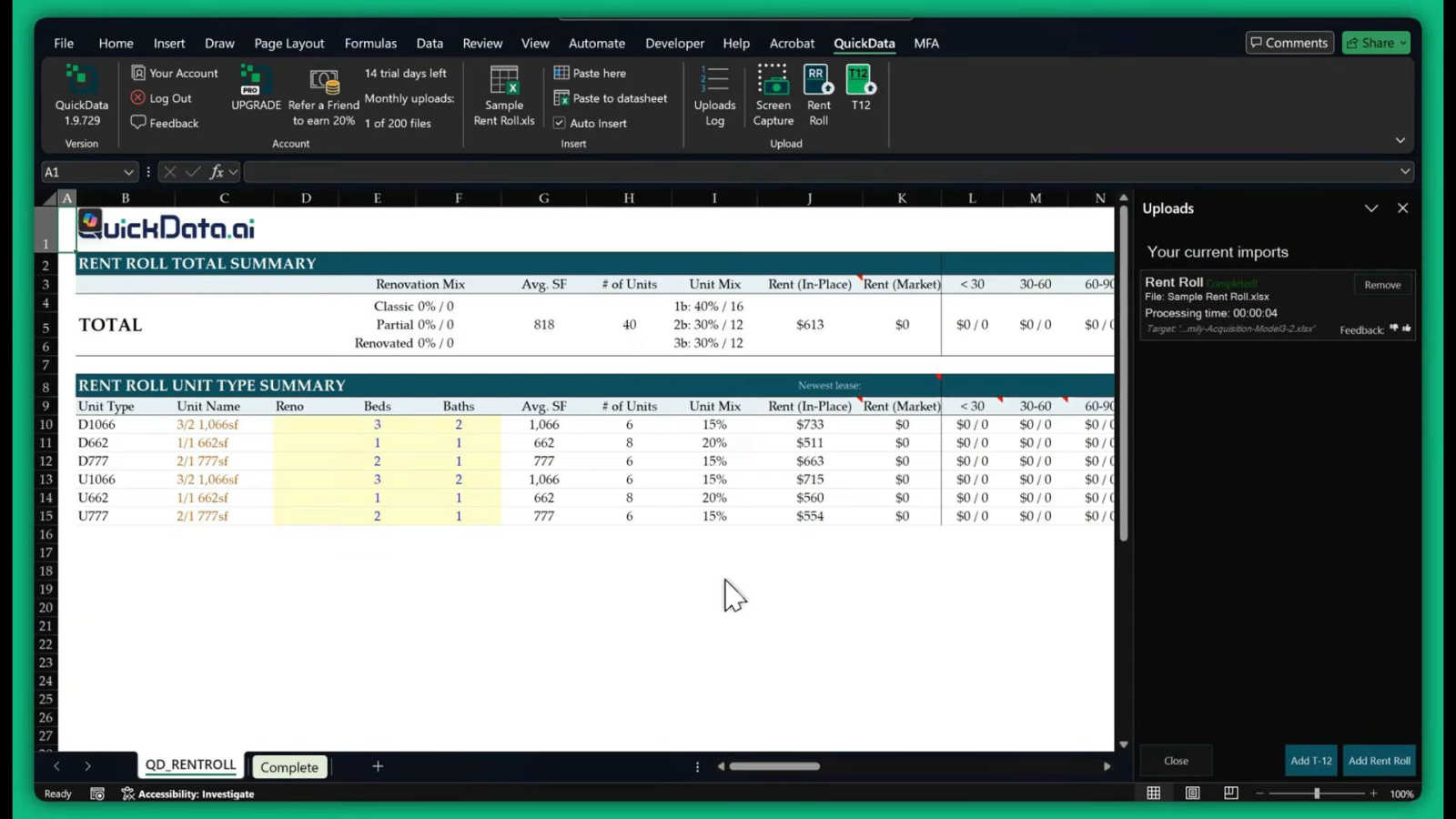
QuickData.ai automates rent roll and T12 data entry into Excel, helping multifamily pros underwrite deals 10x faster.
Last updated: March 1, 2026
Visual Comparison
Dividend Data

QuickData.ai
Feature Comparison
Dividend Data
Free Tier with Monthly Credits
Dividend Data offers a generous free tier that provides users with 2,500 credits each month. This means investors can explore and utilize the platform's extensive features without any trial limitations, making it accessible for everyone from novice investors to seasoned professionals.
Custom Functions for Dividend Investors
The platform includes 16 custom functions specifically designed to cater to all the needs of dividend investors. These functions allow users to pull detailed financial information and metrics effortlessly, ensuring that users have instant access to the data they require for effective stock analysis.
Extensive Historical Data
Dividend Data boasts over 30 years of historical stock market data, providing users with a rich context for their investment decisions. This extensive background allows investors to analyze trends, performance, and other critical metrics over a significant time frame, enhancing their overall market understanding.
Cross-Compatibility with Popular Spreadsheet Tools
Whether you prefer Google Sheets or Microsoft Excel, Dividend Data works flawlessly with both platforms. This cross-compatibility ensures that users can access crucial stock data in the environment they are most comfortable with, streamlining their investment analysis process.
QuickData.ai
AI-Powered Data Extraction
Our core technology uses advanced artificial intelligence trained specifically on multifamily documents. It intelligently reads, interprets, and extracts key figures from PDFs and scanned rent rolls, T12s, and offering memorandums with over 99% accuracy. No more manual typing or copy-pasting errors—just clean, reliable data fed directly into your model in seconds.
One-Click Excel Integration
The magic happens right inside Microsoft Excel. After a simple setup, you simply click the QuickData.ai add-in button, select your document, and watch as all the extracted data flows perfectly into your predefined underwriting model cells. It works with any Excel model, preserving your firm's unique formulas and structure while supercharging your input speed.
Multifamily-Specific Intelligence
Unlike generic OCR tools, QuickData.ai understands the nuanced language of multifamily real estate. It automatically identifies and categorizes line items like unit mixes, monthly rents, concessions, vacancy rates, and operating expenses from a T12, ensuring every data point lands in the correct place for accurate financial analysis.
Free 1:1 Onboarding & Support
We ensure you get value from day one. Every new user gets a complimentary, personalized onboarding session with our experts to integrate QuickData.ai seamlessly into your workflow. Combined with a simple setup that takes minutes and the ability to cancel anytime, we remove all barriers to instant productivity gains.
Use Cases
Dividend Data
Streamlined Dividend Tracking
Investors can easily track dividends for multiple stocks by using Dividend Data's custom functions. By simply entering the appropriate formula, users can view upcoming dividends, yields, and payout ratios without sifting through multiple sources of information.
Comprehensive Financial Analysis
Dividend Data allows users to perform in-depth financial analyses by providing access to financial statements, earnings reports, and various financial ratios. This feature is invaluable for fundamental investors looking to evaluate a company's health before making investment decisions.
AI-Powered Research Assistance
With the AI Analyst feature, users can chat with an intelligent research assistant that provides insights and answers questions about investment strategies, stock performance, and market trends. This interactive tool enhances the research experience and helps investors make informed choices.
Automated Portfolio Management
By linking portfolios directly within Dividend Data, investors can track their dividends and overall portfolio performance in real time. This automation eliminates the need for manual tracking, enabling users to focus on strategy and decision-making instead of data entry.
QuickData.ai
For Acquisitions Teams
Underwrite more deals, faster. Acquisitions analysts can instantly extract data from dozens of offering memorandums, perform rapid initial underwriting, and identify the most promising assets for their portfolio without the bottleneck of manual entry, allowing them to submit competitive bids ahead of the pack.
For Commercial Real Estate Brokers
Close listings quicker with professional-grade underwriting. Brokers can use QuickData.ai to prepare compelling, data-accurate investment summaries and pro formas for clients in a fraction of the usual time, enhancing their credibility and speeding up the sales process with powerful, instant analytics.
For Lenders & Debt Underwriters
Accelerate loan origination and improve risk assessment. Lenders can automatically pull historical operating data (T12) and current rent roll details into their debt underwriting models, enabling faster, more consistent financial analysis and decision-making while reducing processing backlogs.
For Accounting & Advisory Firms
Deliver higher-value client services. Firms can automate the data aggregation process for audits, valuations, and financial reporting for multifamily property clients, reallocating staff hours from tedious data compilation to strategic advisory and analytical work.
Overview
About Dividend Data
Dividend Data is an innovative tool designed to simplify the way dividend and fundamental investors access stock market data. With over 30 years of comprehensive historical data for more than 80,000 tickers, Dividend Data integrates seamlessly into Google Sheets and Microsoft Excel, allowing users to access critical investment information without the hassle of API keys, coding, or manual data entry. The platform is tailored specifically for dividend investors, offering instant access to vital metrics such as dividends, yields, payout ratios, growth rates, financial statements, earnings, ratios, and price history. With a simple formula, investors can retrieve live data directly in their spreadsheets, making it easier than ever to make informed investment decisions. Built by a dividend investor for dividend investors, Dividend Data empowers users to harness institutional-grade data without the hefty price tag, ensuring that every investor can enhance their portfolio management strategies effectively.
About QuickData.ai
Tired of drowning in spreadsheets and missing deals because of slow underwriting? You're not alone. The multifamily real estate world is buzzing about QuickData.ai, the revolutionary AI-powered Excel add-in that's turning weeks of manual data entry into a task that takes minutes. This isn't just another tool; it's the secret weapon that top acquisitions teams, brokers, lenders, and accounting firms are using to dominate their market. QuickData.ai is engineered specifically for multifamily professionals, automating the tedious extraction of critical data from complex documents like rent rolls, T12 statements, and offering memorandums. With one click, it populates your existing Excel underwriting models with flawless accuracy, eliminating human error and freeing up an average of 15 hours per month. The result? You can analyze and underwrite deals 10x faster, move on opportunities before your competition, and focus on high-value strategy instead of mind-numbing data entry. Join the thousands who are already transforming their workflow and start your 14-day free trial to experience the future of real estate underwriting today.
Frequently Asked Questions
Dividend Data FAQ
How does Dividend Data work?
Dividend Data integrates directly into your Google Sheets and Microsoft Excel, allowing you to access live stock market data simply by entering specific formulas. This makes data retrieval quick and easy.
Is there a cost associated with using Dividend Data?
Dividend Data offers a free tier with 2,500 monthly credits, allowing users to explore its features without any upfront costs. There are also paid plans available for more extensive use.
What types of data can I access through Dividend Data?
Users can access a wide range of data, including dividends, yields, payout ratios, financial statements, earnings, ratios, price history, and over 100 metrics relevant to dividend and fundamental investing.
Can I use Dividend Data on both Google Sheets and Microsoft Excel?
Yes, Dividend Data is designed to work seamlessly on both platforms, providing users with flexibility in how they analyze and manage their investment data.
QuickData.ai FAQ
How accurate is the AI data extraction?
Our AI is specifically trained on thousands of multifamily real estate documents, achieving an accuracy rate of over 99% for standard rent rolls and T12 statements. The system continuously learns and improves, and we include easy in-tool verification steps to allow for quick human review if needed.
Does it work with my existing Excel underwriting model?
Absolutely! QuickData.ai is designed as a flexible add-in that works with any Excel model. You are not forced to use a proprietary template. During the free 1:1 onboarding, we help you map our extracted data points to the specific cells in your own model for a seamless integration.
What is included in the 14-day free trial?
The free trial gives you full, unrestricted access to all features of QuickData.ai, including the AI extraction for rent rolls and T12s, one-click Excel integration, and dedicated onboarding support. It's a true hands-on experience to prove the time savings and value for your specific workflow.
Is my financial data secure?
Yes, security is our top priority. We use enterprise-grade encryption for all data in transit and at rest. Your documents and extracted data are processed securely and are never used to train our AI models or shared with third parties. You maintain complete ownership and control of your information.
Alternatives
Dividend Data Alternatives
Dividend Data is a powerful tool designed for investors looking to access comprehensive stock market information, particularly focusing on dividends and fundamental analysis. This product falls within the Business & Finance category and offers over 30 years of historical data for more than 80,000 tickers, all easily integrated into Google Sheets and Microsoft Excel. Users often seek alternatives to Dividend Data for various reasons, such as pricing, specific features, or compatibility with their preferred platforms. When choosing an alternative, it's essential to consider factors like data accuracy, ease of use, and the breadth of metrics offered to ensure it meets your investment needs. Finding the right alternative can significantly impact your investment strategy, so look for options that provide robust historical data, customizable functions, and a user-friendly interface. Additionally, consider the support and resources available, as well as any free tier options that allow you to test the product without commitment. Ultimately, the goal is to find a solution that aligns with your investment philosophy and enhances your decision-making process.
QuickData.ai Alternatives
QuickData.ai is the viral Excel add-in that's taken the multifamily real estate world by storm. It's an AI-powered data extraction tool that automates the tedious entry of rent roll and T12 data, letting underwriters analyze deals in minutes instead of days. It’s a category leader for a reason, saving pros an average of 15 hours a month. Even with its massive popularity, savvy investors and analysts still shop around. Common reasons include budget constraints, needing a platform that works outside of Excel, or requiring different feature sets for unique workflows. It's smart to explore the landscape to find your perfect fit. When evaluating other options, focus on core needs. Prioritize accuracy in parsing complex documents, seamless integration with your existing software stack, and time savings that translate to real ROI. The right tool should feel like a natural extension of your process, eliminating grunt work without creating new headaches.