
Dubvid vs StatPecker
Side-by-side comparison to help you choose the right AI tool.

Dubvid
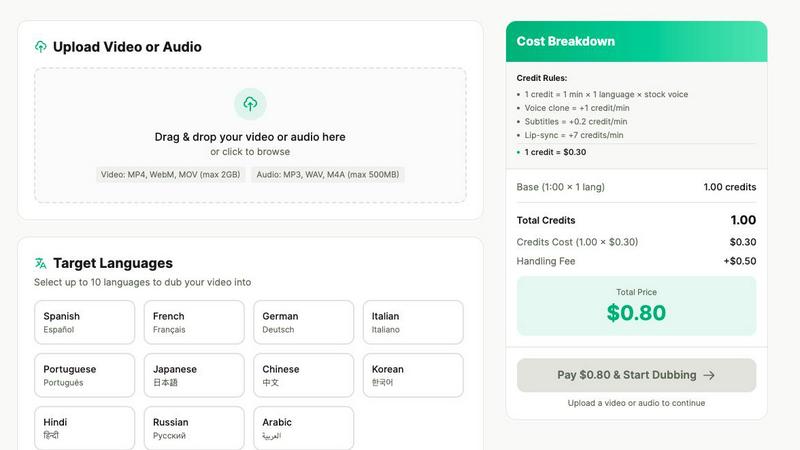
Dubvid instantly dubs your videos into any language with natural voices and optional lip-sync.
Last updated: February 27, 2026

StatPecker
Join 1349 leaders using StatPecker's AI to get instant insights and stunning visuals from your data.
Last updated: March 1, 2026
Visual Comparison
Dubvid
StatPecker

Feature Comparison
Dubvid
One-Click Multi-Language Dubbing
Go viral in multiple markets simultaneously. Upload your video once and select as many target languages as you want. Dubvid's powerful AI engine handles all the translation and voice synthesis automatically, generating separate, ready-to-publish videos for each language you choose. This feature is a game-changer for creators and teams who need to launch content globally on the same day, maximizing impact and engagement across continents.
Ultra-Realistic AI & Cloned Voices
Sound authentic everywhere. Choose from a library of premium, natural-sounding stock AI voices tailored for each language. For the ultimate personal touch, use the groundbreaking voice clone feature. Simply provide a sample, and Dubvid will clone your unique voice to deliver the dubbed audio, maintaining your signature style and brand identity across all languages. This builds incredible trust and connection with international audiences.
Optional AI-Powered Lip-Sync
Take realism to the next level with premium lip-sync technology. For talking-head videos, interviews, or any content where mouth movement is visible, this advanced feature adjusts the dubbed audio to match the speaker's lip movements. It adds a layer of polish and immersion that makes your dubbed videos look professionally produced, significantly boosting viewer retention and credibility in new markets.
Simple Usage-Based Credits
No confusing subscriptions or locked-in contracts. Dubvid uses a transparent, pay-as-you-go credit system. You only pay for the minutes you dub. The pricing calculator lets you estimate costs in real-time based on video length, number of languages, and add-ons like voice clone or lip-sync. With a low fixed fee per job and clear credit rules, it's incredibly accessible for everyone from indie creators to enterprise teams.
StatPecker
Ask Your Query with AI
Get instant, credible insights without the complexity of traditional data tools. Simply ask your question in plain English, and StatPecker's AI scours validated sources to generate the answer, presenting it as a clean, ready-to-use visual. No coding, no complex queries, just ask and get publishable infographics in seconds. This feature puts the power of data analysis directly into the hands of every storyteller and decision-maker.
Local SQL Agent for Private CSV Analysis
This groundbreaking feature keeps your sensitive data 100% private. Upload a CSV file (up to 50 MB) directly to the tool, and everything from analysis to visualization runs locally on your device. Ask questions about your private sales, user, or operational data, and get answers as beautiful charts without your data ever leaving your computer. It's the ultimate tool for extracting key insights from local files without the security risks or hassle of spreadsheets.
Publish & Embed Interactive Visuals
Don't just create visuals; make them live and interactive. StatPecker allows you to seamlessly integrate your generated infographics and charts directly into blogs, articles, websites, and reports. With unlimited embeds, you can create dynamic data experiences for your audience, making your content more engaging and authoritative while showcasing real-time, compelling data stories.
Download & Use Anywhere
Export your stunning AI-generated infographics as high-quality images with a single click. Use them in PowerPoint presentations, detailed reports, social media posts, or print materials. This flexibility ensures that the powerful visuals you create in StatPecker can enhance your communication anywhere, breaking free from platform constraints and making professional data storytelling universally accessible.
Use Cases
Dubvid
Short-Form Content Creators
Dominate every algorithm by dubbing your Shorts, Reels, and TikToks. Multiply your reach overnight by repurposing your top-performing vertical videos into multiple languages. This strategy taps into new viewer pools and trends globally, dramatically increasing your chances of going viral and growing your follower base across different regions without creating new content from scratch.
Online Course & Tutorial Creators
Unlock a massive new student base by localizing your educational content. Translate your course videos, tutorials, and webinars into the native languages of your target students. This removes the biggest barrier to entry for global learners, leading to higher enrollment rates, better course completion, and establishing you as a true international authority in your niche.
Customer Support & Onboarding Teams
Reduce support tickets and improve user satisfaction by providing help content in your users' languages. Quickly dub product demos, feature walkthroughs, and onboarding flows for every region you serve. This proactive localization leads to smoother user adoption, fewer misunderstandings, and a significantly better customer experience, fostering loyalty and reducing churn.
Podcasters & Interviewers
Expand your listener base exponentially by releasing your audio or video podcast episodes in new languages. Interview fascinating guests once and share their insights with the world. Dubvid allows you to localize entire episodes or key clips for social promotion, attracting dedicated audiences in markets you never had access to before, all without the cost of re-recording.
StatPecker
Content Creators & Bloggers
Content creators and bloggers use StatPecker to make their articles and posts pop with authority. Instead of describing trends, they can embed interactive, self-generated charts that illustrate their points, boosting SEO, increasing reader engagement, and establishing credibility. It turns complex research into shareable, viral visual content that stands out in crowded social feeds and search results.
Marketing & Sales Teams
Marketing and sales professionals leverage StatPecker to visually prove campaign ROI, showcase market research, and create compelling performance reports for stakeholders. By transforming dry spreadsheet data into stunning infographics, they can craft more persuasive pitches, presentations, and internal reports that clearly demonstrate impact and drive strategic decisions.
Data Analysts & Consultants
Analysts and consultants use StatPecker to rapidly prototype visualizations and communicate findings without getting bogged down in design tools. The Local SQL Agent is a game-changer for privately exploring client CSV data and quickly turning analysis into client-ready, presentation-quality charts that tell a clear and convincing story, saving countless hours.
Educators & Academics
Teachers, professors, and academics employ StatPecker to explain complex topics and data-driven concepts in the classroom or in research papers. By converting abstract numbers into clear, engaging infographics, they can enhance student comprehension, make lessons more interactive, and present academic findings in a more accessible and visually appealing manner.
Overview
About Dubvid
Dubvid is the viral AI dubbing platform exploding in popularity, empowering creators, educators, and businesses to smash language barriers and go global overnight. Forget expensive studios and weeks of work. With Dubvid, you simply upload your video or audio file and watch as it's magically transformed into multiple languages in minutes, not weeks. The AI doesn't just translate; it recreates a natural-sounding voice that captures the original tone, pacing, and emotion, making your content feel locally made. Already trusted by thousands to reach audiences in over 10 languages, Dubvid is the secret weapon for anyone looking to scale their influence. Whether you're a YouTuber chasing a billion views, a brand launching worldwide, or a teacher sharing knowledge, Dubvid makes international reach effortless and affordable. Join the movement and see why everyone is talking about Dubvid—the fastest way to make your content speak every language.
About StatPecker
Tired of staring at endless spreadsheets and boring reports? Welcome to StatPecker, the AI-powered revolution that's changing how the world sees data. This isn't just another chart maker; it's your instant data storytelling sidekick that transforms raw, lifeless numbers into stunning, impactful infographics in seconds, not hours. Forget about hiring expensive designers or wrestling with complex software. With a thriving community that has already created over 1,455 infographics and counting, StatPecker is the viral go-to tool for anyone who needs to communicate data with clarity and style. It automates the entire visualization process, saving you immense time, slashing costs, and supercharging the impact of your insights. Whether you're a marketer trying to prove campaign ROI, a journalist making a story pop, an analyst presenting findings, or a teacher explaining complex topics, StatPecker turns your data into visual gold that engages, informs, and persuades. From extracting hidden trends to visualizing global comparisons, it delivers quick, credible answers you can publish, present, or share instantly. It's smart insights for business and stunning visuals for creators, all in one powerful, easy-to-use platform that's taking the data world by storm.
Frequently Asked Questions
Dubvid FAQ
How long does the dubbing process take?
The process is incredibly fast! For most standard videos, Dubvid can generate your dubbed versions in just a few minutes. The exact time depends on the length of your video and the number of target languages. The platform is built for speed, allowing you to localize and publish content on the same day.
What file formats and sizes do you support?
Dubvid supports all common video and audio formats to make uploading easy. You can upload files in MP4, MOV, WebM, MP3, and WAV formats. The current maximum file size is 500MB, which is perfect for most social media clips, podcast episodes, and standard explainer videos.
Can I use my own voice for the dubbing?
Absolutely! This is one of Dubvid's most popular features. You can use the Voice Clone option. Just provide a clear sample of your voice, and our AI will create a model to dub your content in various languages while preserving your unique vocal characteristics and style.
Is there a free trial to test the quality?
Yes! Dubvid offers a completely free test so you can see the amazing quality for yourself. You get 2 free credits to dub up to 60 seconds of your content without needing a credit card. This lets you experience the natural voice output and platform simplicity before committing any funds.
StatPecker FAQ
How does the Local SQL Agent ensure my data is private?
The Local SQL Agent is designed with privacy as its core principle. When you upload a CSV file, the entire processing pipeline runs directly on your device. Your data is prepared, analyzed, and visualized locally; it is never sent to our servers or stored in the cloud. This means you get the powerful insights and visuals of StatPecker with the absolute guarantee that your sensitive business or personal data remains completely under your control.
What can I do with the Free Tier?
The Free Tier is incredibly powerful, allowing you to experience the core of StatPecker at no cost. It includes unlimited projects, unlimited embeds (with manual edits), 25 AI queries to ask questions and generate visuals from public data, and 10 CSV uploads for private analysis with the Local SQL Agent. It's perfect for individuals and small teams starting their data storytelling journey.
What does "Lifetime Access" include?
The Lifetime Access plan is a one-time payment that grants you permanent access to all current and future premium features of StatPecker. This includes unlimited AI queries, unlimited CSV uploads for private analysis, unlimited projects and embeds, and priority consideration for your feature requests. It's a limited-time offer for early adopters who want to secure top-tier data visualization capabilities forever.
How do I embed a StatPecker visual on my website?
Embedding is simple. Once you create an infographic or chart, StatPecker provides you with an embed code snippet. Just copy this code and paste it into the HTML of your blog post, article, or website page. The visual will appear as an interactive element that your website visitors can engage with, all hosted and maintained seamlessly through the platform.
Alternatives
Dubvid Alternatives
Dubvid is a leading AI-powered dubbing platform in the content creation category, designed to translate and voice-over videos with natural-sounding results. It’s a go-to tool for creators and businesses aiming to break language barriers and scale their reach globally. Users often explore other options for various reasons. Some need a different pricing model or a specific feature not offered, while others may require integration with a particular workflow or platform. The search for the right tool is all about finding the perfect fit for unique project demands and budgets. When evaluating other solutions, key factors to consider include the quality and naturalness of the AI voices, the range of supported languages, the accuracy of optional lip-sync technology, and the overall ease of use. The goal is to find a service that delivers professional, engaging dubbed content without the traditional complexity or high cost.
StatPecker Alternatives
StatPecker is an AI-powered data visualization tool that transforms raw numbers into stunning infographics in seconds. It's part of a booming category of smart analytics platforms designed for fast, visual storytelling. Users often explore alternatives for various reasons, including budget constraints, specific feature needs like advanced customizations or team collaboration, or integration requirements with their existing tech stack. The search for the perfect tool is common as needs evolve. When evaluating other options, focus on core capabilities: the intelligence of the AI for automated insights, the ease of going from data to visual, the quality and interactivity of the output, and overall value for your specific use-case. The right platform should save you time and amplify your message effortlessly.