
Decode This Text vs MeetingMind
Side-by-side comparison to help you choose the right AI tool.

Decode This Text
Decode This Text delivers quick, human-like analyses of your conversations in just 30 seconds for ultimate clarity.
Last updated: February 28, 2026

MeetingMind
MeetingMind automatically records and summarizes your Zoom meetings so you never miss an insight again.
Last updated: March 1, 2026
Visual Comparison
Decode This Text

MeetingMind
Feature Comparison
Decode This Text
Comprehensive Message Analysis
Decode This Text offers a detailed breakdown of messages by examining the words, timing, and emotional tone. It identifies underlying meanings that may be missed, ensuring users understand the complete context.
Capture and Decode
Users can simply upload a screenshot of their conversation, eliminating the need to type out lengthy messages. This feature makes it easy to analyze chats quickly and effortlessly.
Emotional Tone Assessment
The tool assesses the emotional temperature of messages, determining whether the sender is being friendly, sarcastic, or cold. This insight helps users avoid misinterpretations and respond appropriately.
Tailored Response Suggestions
Not sure how to reply? Decode This Text provides users with three tailored response options—calm, direct, or firm—enabling confident communication based on the analyzed context.
MeetingMind
Automatic Detection
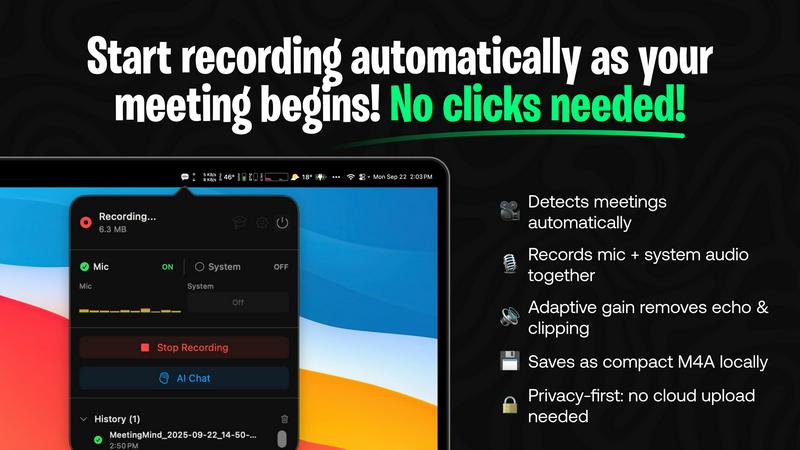
MeetingMind intelligently detects Zoom meetings automatically, eliminating the need for manual clicks. This feature allows users to focus on the discussion without the distraction of starting and stopping recordings, making the whole experience seamless.
Comprehensive Recording
Capture both microphone and system audio in one go, thanks to MeetingMind's adaptive gain technology. This ensures that every voice and sound from your meetings is recorded clearly, allowing for accurate transcriptions and summaries.
AI Assistant
Choose between a local Ollama AI or a cloud-based OpenRouter for your summaries and insights. This flexibility enables users to tailor their experience based on their preferences for speed and functionality, enhancing the overall utility of the software.
Markdown Export
After each meeting, receive AI-generated summaries and transcripts saved directly as formatted markdown files. This feature not only saves time but also makes it easy to share notes with team members or integrate them into other documentation.
Use Cases
Decode This Text
Clarifying Ambiguous Messages
When receiving a text that lacks clarity, such as "Hey, crazy day at work," users can paste the message into Decode This Text to uncover the sender's true sentiment and intent, ensuring a better response.
Navigating Professional Communications
Professionals can utilize Decode This Text to decode ambiguous emails from bosses or colleagues. For example, a one-word email can be analyzed to determine if it conveys anger or simply busyness.
Understanding Personal Relationships
Friends and family often send messages that can be confusing. Decode This Text helps users interpret messages from loved ones, such as why a friend has gone quiet after a fun outing, leading to more profound connections.
Enhancing Communication Skills
Users looking to improve their communication skills can leverage Decode This Text to understand various conversational dynamics, helping them respond more effectively in both personal and professional scenarios.
MeetingMind
Streamlined Team Meetings
With MeetingMind, team leaders can focus on brainstorming and collaboration without worrying about missing key points. The automatic recording and transcription ensure that all ideas are captured accurately, fostering a more productive environment.
Efficient Project Updates
During project update meetings, MeetingMind helps project managers track action items and decisions made in real-time. This clarity allows teams to stay aligned on goals and responsibilities, leading to smoother project execution.
Enhanced Client Calls
For sales professionals, MeetingMind captures vital information during client calls, enabling them to refer back to discussions and commitments made. This feature significantly improves client relationship management and follow-up processes.
Comprehensive Training Sessions
MeetingMind is an invaluable tool for trainers and educators who conduct virtual sessions. The automatic transcription and markdown export allow for easy distribution of training materials, ensuring participants have access to all content covered.
Overview
About Decode This Text
Decode This Text is a revolutionary communication tool designed to help users unravel the often perplexing nature of messages. In our fast-paced digital world, it is common to receive cryptic emails, vague texts, or ambiguous messages that can leave anyone feeling bewildered. This innovative software steps in to provide clarity, allowing users to decode the underlying meanings behind these communications. By simply pasting the text or describing the context of the conversation, users receive a thorough analysis of the emotional tone, intentions, and the best ways to respond. Decode This Text caters to a diverse audience, from professionals looking to navigate workplace communications to friends seeking to clarify personal messages. The tool's primary value proposition lies in its ability to enhance communication skills, foster better relationships, and eliminate misunderstandings. With a user-friendly interface and rapid response time, Decode This Text empowers users to engage confidently in their interactions without the stress of overanalyzing every word.
About MeetingMind
MeetingMind is the next-generation intelligent meeting assistant specifically designed for professionals who want to elevate their meeting experience. This innovative tool is engineered to automatically capture every detail of your meetings, transforming them into searchable and interactive notes that enhance productivity and save valuable time. Whether you are a busy executive, a team leader, or someone who frequently participates in virtual meetings, MeetingMind ensures that no critical detail slips through the cracks. With its effortless one-click recording feature, you can capture both microphone and system audio simultaneously. The advanced WhisperKit-powered transcription provides immediate, speaker-attributed notes in a clean markdown format, making it easy to reference later. Furthermore, the AI assistant tracks action items, summarizes discussions, and allows for real-time querying of insights. Privacy is a top priority; all data is processed locally on your macOS device, ensuring that your sensitive information remains secure and confidential. Experience the transformation in how you document and engage in meetings with MeetingMind.
Frequently Asked Questions
Decode This Text FAQ
How does Decode This Text ensure user privacy?
Decode This Text guarantees 100% anonymity, ensuring that no human reads your texts. Your privacy is paramount, and your conversations remain confidential.
Is it possible to analyze images of conversations?
Absolutely! Users can simply upload screenshots of their chats, and Decode This Text will read and analyze the entire conversation for you, making the process seamless.
What types of messages can I decode?
You can decode any type of message, whether it's a text from a friend, an email from a boss, or even a chat with a client. The tool is designed to handle various communication formats.
How quickly can I expect to receive my analysis?
Users can expect a comprehensive analysis of their messages in just 30 seconds, providing rapid insights that allow for timely responses to important conversations.
MeetingMind FAQ
How does MeetingMind ensure privacy?
MeetingMind prioritizes user privacy by processing all data locally on your Mac. This means that your meetings and sensitive information never leave your device, maintaining confidentiality at all times.
Can I use MeetingMind for meetings other than Zoom?
Currently, MeetingMind is optimized for Zoom meetings. However, it’s designed to evolve, and future updates may include compatibility with other platforms, enhancing its versatility for users.
Is there a limit to the free version?
Yes, the free version of MeetingMind offers 60 minutes of recording per day. This is perfect for short meetings and daily standups, which allows users to determine if they want to upgrade for unlimited recording in the future.
How do updates and support work?
MeetingMind operates on a one-time purchase model, which includes lifetime updates without the need for recurring subscriptions. Users can check the Mac App Store for details on updates and support options available.
Alternatives
Decode This Text Alternatives
Decode This Text is a cutting-edge tool that falls under the Productivity & Management category, designed to unravel the complexities of communication. It allows users to decode messages that might otherwise lead to confusion, such as vague emails or texts. With its rapid analysis capabilities, Decode This Text has gained popularity among individuals seeking to improve their communication skills and enhance their relationships. Users often seek alternatives to Decode This Text for various reasons, including pricing options, specific features that may better suit their needs, or compatibility with different platforms. When exploring alternatives, it's essential to consider factors such as ease of use, the depth of analysis provided, and the speed of response to ensure that you find a tool that aligns with your communication goals and enhances your understanding of complex conversations.
MeetingMind Alternatives
MeetingMind is an innovative tool designed to transform the way professionals conduct and manage their virtual meetings. As an intelligent meeting assistant, it captures, transcribes, and summarizes discussions in real-time, ensuring that no important insights are overlooked. This product falls under the productivity and management category, making it an essential resource for busy professionals and team leaders who rely on efficient communication. Despite its impressive features, users often seek alternatives to MeetingMind for various reasons, including pricing concerns, specific feature sets, or platform compatibility. When looking for an alternative, it’s crucial to consider factors such as ease of use, the quality of transcription accuracy, data privacy measures, and the ability to integrate with existing tools. Finding the right fit will ultimately enhance your productivity and streamline your meeting processes, ensuring you get the most out of your virtual discussions.