
BRCKS vs Cosy
Side-by-side comparison to help you choose the right AI tool.

Trusted by industry experts, BRCKS is the WhatsApp-connected platform that automatically organizes all your construction project updates in one place.
Last updated: April 4, 2026

Cosy automates Slack onboarding and intros to build a thriving community effortlessly.
Last updated: February 28, 2026
Visual Comparison
BRCKS

Cosy
Feature Comparison
BRCKS
BRCKS Bot for WhatsApp
Stop app switching forever. The BRCKS Bot lets your entire team update projects, check tasks, and get instant answers directly from WhatsApp. Simply text the bot, and it automatically logs conversations, creates tasks, and updates checklists in the main BRCKS platform. This seamless integration means your team stays in their favorite messaging app while you maintain perfect, organized project records without the chaos.
Free Subcontractor Access
Invite every single trade to your projects without worrying about extra costs. Subcontractors get full, free access to their assigned projects, including checklists, team calendars, files, and schedules. You only pay for your core internal team members. This removes a major barrier to collaboration, ensuring every stakeholder is on the same page and accountable, leading to smoother workflows and fewer delays.
Dedicated Client Portal
Keep your clients informed and happy without giving them access to your internal tools. The Client Portal provides homeowners with a beautiful, read-only view of their project's progress. They can see milestone updates, photos, and key decisions in real-time, which builds trust and transparency while keeping them out of the day-to-day operational chatter, ensuring they are in the loop but not in the way.
Unified Project Feed & Checklists
See every project update, message, and task completion in one chronological Feed, so you never miss a beat. Combine this with powerful, assignable Checklists to break down complex projects into manageable daily tasks. Monitor progress in real-time, assign work to specific team members, and ensure nothing falls through the cracks from first fix to final sign-off, dramatically improving on-site delivery.
Cosy
Automated Onboarding Sequences
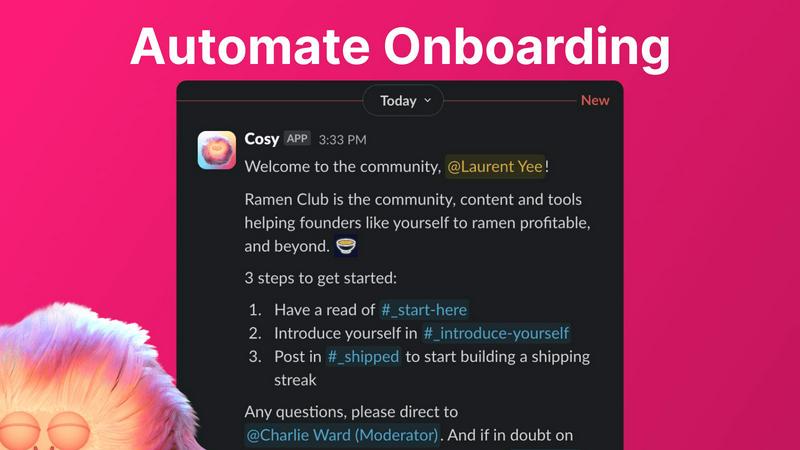
Stop manually welcoming every new face! Cosy lets you create and automate up to 10 distinct onboarding welcome DM sequences, sent from you, a team member, or the Cosy bot itself. Fully customize messages with member names, links, and emojis, and schedule them to send immediately or on a delay (minutes, hours, or even months later). This ensures every member feels personally welcomed the moment they join, even while you sleep, saving you hours of repetitive administrative work and never dropping the ball on a first impression.
Automated Member Introductions
Foster genuine connections and break the ice on autopilot. Cosy automatically introduces opted-in community members to each other via DMs on a regular cadence you control (every 1-4 weeks). Introductions happen in a 3-person DM with the Cosy bot, and you can customize the intro message. It randomly matches members to enhance serendipity while avoiding recent matches, effortlessly growing engagement and helping your community members build their networks without any manual effort from you.
Slack-Native Member Directory
Build a living, searchable directory of your community without anyone ever leaving Slack. Create custom profile fields (text, single-select, or multi-choice) and notify all members to fill out their profiles with one click. New joiners get a prompt 24 hours after arriving. Members can then search for keywords and filter profiles directly within Slack using the Cosy app or a simple /member-directory slash command, making it easy for people to find the right help and connections.
Content Highlights & Moderation Alerts
Instantly surface the best of your community and stay on top of conversations. Use quick slash commands to find the top 10 most engaged posts in a specific channel (/most-engaged-messages) or across all public channels. You can also instantly flag abusive or spam messages for quick moderation action. This feature helps you celebrate great content, identify trending discussions, and maintain a healthy, positive community environment effortlessly.
Use Cases
BRCKS
Streamlining Daily Site Communication
Site managers and foremen use BRCKS to replace chaotic WhatsApp groups and endless email chains. By centralizing all site updates, photo sharing, and quick questions through the BRCKS Bot, teams maintain a clear, searchable record of all communications. This eliminates "he said, she said" disputes, saves over an hour daily in chasing information, and ensures every team member has immediate access to the latest instructions and updates.
Managing Subcontractor Coordination
General contractors and builders leverage BRCKS to seamlessly coordinate multiple trades. With free access for all subcontractors, each trade can view their specific schedules, upload completion photos, and mark off checklist items directly. This visibility prevents scheduling conflicts, ensures tasks are completed in the correct sequence, and reduces costly delays by over 60%, as issues are identified and resolved in hours, not days.
Enhancing Client Reporting & Transparency
Residential builders and renovation specialists use the Client Portal to provide unparalleled transparency to homeowners. Instead of fielding constant "how's it going?" calls, clients can log in to see recent photos, completed milestones, and next steps. This professional approach builds immense trust, reduces client anxiety, and minimizes disruptive site visits, leading to higher client satisfaction and more referrals.
Centralizing Project Documentation
Project managers and construction directors utilize BRCKS as the single source of truth for all project documentation. All meeting notes, site reports, material invoices, and planning files are stored in one organized, cloud-based location. This creates a clear audit trail for decisions, simplifies handover processes, and ensures critical information is never lost, protecting the business from risk and disputes.
Cosy
For Scaling Startup Communities
Startup founders and ecosystem builders use Cosy to automate onboarding for hundreds of new members monthly, ensuring each founder, investor, or developer receives a personalized welcome and immediate access to resources. The automated introductions help forge valuable partnerships and mentor-mentee relationships at scale, turning a large member base into a tightly-knit, supportive network without constant manual intervention.
For Professional Network & Membership Groups
Associations, guilds, and professional networks leverage Cosy's member directory to help members find peers with specific skills, industries, or interests. Automated weekly introductions facilitate peer-to-peer learning and business development, dramatically increasing member retention and perceived value by ensuring everyone can easily connect with the right people within the private Slack community.
For Creator-Led Communities
Content creators, course instructors, and influencers use Cosy to maintain a warm, engaged space for their audience. They automate welcome sequences that guide new members to key resources and content, while the content highlights feature allows them to easily spot and amplify the most valuable discussions and user-generated content, fostering a stronger sense of community and belonging among followers.
For Internal Company Communities & ERGs
Companies running large internal Slacks or Employee Resource Groups (ERGs) use Cosy to onboard new hires into specific channels with tailored information. The introduction feature helps break down silos by connecting employees from different departments, fostering cross-collaboration and a more inclusive company culture, all managed seamlessly within their existing Slack workspace.
Overview
About BRCKS
BRCKS is the construction industry's game-changing project management and communication platform, designed to eliminate the chaos of WhatsApp, email, and scattered documents for good. Built specifically for residential builders, tradespeople, and homeowners, BRCKS centralizes every critical project element into one simple, practical, and easy-to-use hub. It keeps all project conversations, checklists, tasks, files, photos, and meeting notes in one secure place, ensuring nothing gets lost and every decision is recorded. The revolutionary "BRCKS Bot" integrates directly with WhatsApp, allowing your team to work from the apps they already use while every update automatically flows into your controlled project platform. This means zero training, zero disruption, and an end to chasing updates. Trusted by industry experts, construction teams report saving over 2 hours daily. With groundbreaking features like completely Free Subcontractor access and a dedicated Client Portal, BRCKS offers one unified platform for your entire project team—from directors to trades to clients—streamlining day-to-site communication, action tracking, and client updates to boost delivery and cut risk dramatically.
About Cosy
Tired of your Slack workspace feeling like a ghost town instead of a vibrant community? You're not alone. Cosy is the revolutionary, Slack-native platform that's taking community building by storm, transforming passive chat rooms into thriving, engaged, and self-sustaining ecosystems—completely on autopilot. Designed explicitly for community builders, managers, and leaders who are stretched thin, Cosy automates the tedious, time-consuming tasks that drain your energy. Its powerful yet simple mission is to automate the mundane to unlock meaningful, human connections. Imagine personally welcoming every new member, even at 4:30 AM, or having your members discover each other through serendipitous, automated introductions. All while building a rich, searchable member directory without anyone ever leaving the comfort of Slack. Trusted by forward-thinking community leaders worldwide, Cosy is the secret weapon for scaling your community's warmth, value, and engagement while clawing back hours of manual effort every single week. It's not just another tool; it's your 24/7 community co-pilot, engineered to make your Slack the vibrant, connected hub it was always meant to be.
Frequently Asked Questions
BRCKS FAQ
How does BRCKS work with WhatsApp?
BRCKS integrates with WhatsApp through the intelligent "BRCKS Bot." Your team members simply message the bot as they normally would in a group chat. The bot automatically recognizes project-related updates, tasks, and photos, and logs them directly into the correct project within the BRCKS platform. Your team gets to stay in WhatsApp with zero disruption, while you gain an organized, central record of everything.
Do my subcontractors really get free access?
Yes, absolutely. One of BRCKS's core principles is removing cost barriers to collaboration. You can invite an unlimited number of subcontractors and trades to your projects. They will get full access to view and update tasks, checklists, calendars, and files relevant to their work on that specific project at no cost to you or to them. You are only billed for your core, internal team members.
Is the Client Portal secure and private?
The Client Portal is designed with security and privacy as a top priority. It provides clients with a read-only, tailored view of their specific project. They cannot see internal team conversations, financial data, or other clients' projects. It gives them transparency on progress, photos, and milestones without exposing your operational tools or sensitive information, keeping everything secure and professional.
What if my team isn't tech-savvy?
BRCKS is built for real construction teams, prioritizing simplicity and practicality over complex features. The integration with WhatsApp means most daily communication requires no new behavior. The main platform is intuitive and clean, designed for quick adoption. Most teams require no formal training and are up and running immediately, focusing on building, not learning complicated software.
Cosy FAQ
How does Cosy handle privacy and data?
Cosy is built with privacy as a core principle. It only accesses and uses data from public Slack channels and information from members who have opted into features like the directory or introductions. All data is handled securely, and Cosy complies with major data protection regulations. You maintain full control over what data is collected in your member directory.
Can I customize the automated messages?
Absolutely! Every automated message, from onboarding welcomes to member introductions, is fully customizable. You can insert member names, use emojis, include links to important resources, and set specific time delays for when messages are sent, allowing you to maintain your community's unique voice and tone.
What happens if a member replies to an automated DM?
If the onboarding DM is sent from you or a team member's account, the recipient can reply just like a normal DM, and the reply goes to that person's Slack inbox. If the message is sent from the Cosy bot, the bot does not currently respond to replies, keeping interactions clean and intentional.
Is there a free plan or trial?
Yes! Cosy offers a generous free plan for communities with up to 250 members. For larger communities, there is a full 30-day free trial for the unlimited members plan, allowing you to test all premium features thoroughly before making any commitment.
Alternatives
BRCKS Alternatives
BRCKS is a popular construction project management and communication platform designed to bring order to the chaos of residential building sites. It falls squarely into the productivity and management software category, helping teams centralize conversations, tasks, and documents that often get lost across emails, WhatsApp, and scattered files. Its rise in popularity has many teams exploring the wider software landscape. Users often seek alternatives for various reasons, including budget constraints, the need for different feature sets like advanced scheduling or accounting integrations, or a requirement for software that works on specific platforms. Some teams may also look for solutions that scale differently for very large or very small operations. When evaluating other options, key factors to consider include core functionality for daily site communication, ease of adoption for all team members and clients, robust mobile access, and security for sensitive project data. The goal is to find a tool that genuinely streamlines workflow without adding complexity, much like the top-rated platforms in this space.
Cosy Alternatives
Cosy is a Slack-native automation platform designed to help community builders and managers scale engagement effortlessly. It falls squarely into the productivity and management category, automating critical tasks like onboarding, member intros, and spam control to turn a Slack workspace into a thriving hub. Users often explore alternatives for various reasons. Budget constraints, the need for different feature sets, or a requirement to work across multiple platforms like Discord or Microsoft Teams can prompt the search. Some teams may also seek more advanced analytics or deeper customization options beyond what a single tool offers. When evaluating alternatives, focus on core needs. Prioritize automation capabilities for onboarding and engagement, seamless integration with your existing communication stack, and robust spam moderation tools. The right tool should feel like an invisible co-pilot, amplifying your community's warmth without adding administrative overhead.