

Alternatives to Picture Enhancer
Picture Enhancer is the free AI tool that deblurs, upscales, and restores your photos in seconds without any software install.
Explore 20 alternatives to Picture Enhancer. Compare features, pricing, and find the best fit for your needs.

EveryGen AI
AI image and video generator with browser-based creative tools and text rewriting. Freemium.
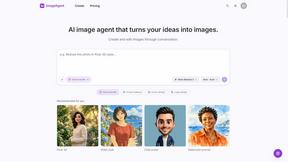
ImageAgent
Create and edit AI images through conversation, using text or reference images and refining results in chat.
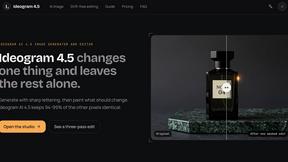
Ideogram 4.5
AI image generator and editor with Pixel Lock: change one region of an image while 94-99% of untouched pixels stay identical.
GenX
All-in-one AI workspace to generate images, videos, and audio with multiple leading AI models.
AiAgeFilter
Free AI age filter: upload an adult portrait, add 10-40 years, meet your older self. No app needed.

AppIconGenerator
Generate iOS and Android app icons from any image and export all platform sizes for free.


Earth Zoom Out AI
Turn any photo into an Earth Zoom Out video, from a close-up to a cosmic Earth view with realistic satellite transitions.

Design.com AI Image Generator
Turn text prompts into polished, copyright-safe visuals that plug directly into branded templates
GPT Image Hub
Curated image prompts, reusable templates, and multi-model AI image generation in one workspace.
Nano AI
Create and edit AI images, generate videos, and compare models in one creative workbench.
AiArter
AI product photos and UGC video ads for Amazon, Etsy and Shopify sellers, made from one phone photo.

OG Image Generator
Paste a URL and AI designs on-brand Open Graph images from your page's colours, fonts and logo. Free, no sign-up.

Ozil Goal AI
Make the Ozil goal AI video from one photo. You chip the keeper and roll it into the empty net. 15 seconds, 9:16, 720p, no watermark.

FreeVideoGenerator
Free AI video generator: turn text prompts and photos into video clips with Sora 2, Veo 3.1, Wan and more. Free starter credits, no watermark download
ImageGenerator
Create and edit AI images online with multiple models, text-to-image, image-to-image, background removal, and upscaling.
AIPetGen
AIPetGen turns a photo of your dog, cat, or other pet, or a written description, into a new picture or a short animation.
nanobanana 21
A fast, simple image studio powered by Nano Banana 2.1 — create and edit high-quality images with readable text and consistent characters.

Raindance AI
Turn two authorized portraits into a seaside golden-hour video: a wooden dock, two people taking turns singing, and a slow pullback to the sunset. Pre
About Picture Enhancer Alternatives
Picture Enhancer has quickly become a go-to free online tool for anyone needing to fix blurry, low-resolution, or damaged photos directly in a browser. It sits squarely in the image generation and enhancement category, using AI to deblur, upscale, and restore images without requiring any software download. While its pay-per-success credit model and free guest tries make it incredibly accessible for casual use, many power users start searching for alternatives when they hit the three-try guest limit or need to process high volumes of images without the per-job credit cost. Others might be looking for a different feature set, like advanced colorization, batch processing with no caps, or a platform that integrates directly with their social media or e-commerce workflow. When evaluating an alternative to Picture Enhancer, the key factors to consider are the pricing structure, the quality of the AI enhancement, and the platform’s limitations. Look for a tool that offers a transparent pricing model, whether that’s a flat monthly fee, a one-time purchase, or a generous free tier that doesn’t cap your usage per IP. You’ll also want to compare the output resolution and fidelity, especially for “Super” level upscales, and check if the tool supports your essential file formats like JPG, PNG, and WebP. Finally, think about your workflow—if you’re a seller processing thousands of listings, a batch upload feature is non-negotiable, while a casual user might prioritize a simple drag-and-drop interface and instant previews.
FAQs about Picture Enhancer Alternatives
What is Picture Enhancer?
Picture Enhancer is a free online AI photo enhancer that allows you to deblur, upscale, and restore images directly in your web browser without any software installation. It supports common file formats like JPG, PNG, and WebP, and offers three intensity levels: Standard, Strong, and Super. The tool provides a before-and-after preview and delivers a watermark-free download upon successful processing.
Is Picture Enhancer free to use?
Yes, Picture Enhancer is free for guest users who get three lifetime tries per IP address without needing to sign up. After that, you can sign in to use credits, with new accounts receiving starter credits. Credits are charged only on successful enhancements, at a rate of 2 credits for Standard, 4 for Strong, and 6 for Super intensity. Paid users can purchase monthly plans or permanent credit packs that never expire.
Who is Picture Enhancer for?
Picture Enhancer is designed for creators, e-commerce sellers, and everyday users who need sharper, higher-quality images quickly. It is ideal for enhancing social media posts, product listings on online marketplaces, screenshots, and family photos. The tool caters to both casual users who can use the free guest tries and power users who need batch processing or higher intensity upscales through paid credits.
What are the main features of Picture Enhancer?
The main features include AI-powered deblurring, upscaling, and restoration of images. Users can choose from three intensity levels (Standard, Strong, Super) and preview the result before downloading. The tool supports batch enhancement of up to 10 images for paid users, and it works entirely in the browser with no software installation required. Credits are only deducted when the enhancement succeeds, ensuring you never pay for failed attempts.