Picture Enhancer
Picture Enhancer is the free AI tool that deblurs, upscales, and restores your photos in seconds without any software install.
Visit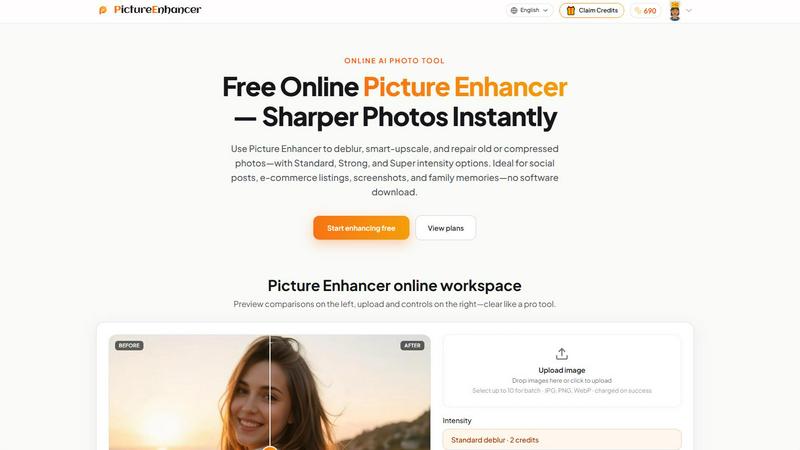
About Picture Enhancer
Picture Enhancer is completely changing the game for anyone who needs sharper, clearer images in seconds. This free online AI photo enhancer is built for creators, sellers, and everyday users who are tired of blurry photos, low-resolution screenshots, or damaged old family pictures. The tool is incredibly straightforward: you upload a JPG, PNG, or WebP photo, pick your mode (Deblur, Upscale, or Restore), and choose your intensity (Standard, Strong, or Super). Then you get a live before-and-after preview with a slider to compare results, and you download a watermark-free image instantly when the job succeeds. What makes Picture Enhancer so popular right now is that guests get three free lifetime tries per IP with absolutely no signup required. Once you sign in, you receive starter credits to keep going. Credits are only charged on successful enhancements — Standard costs 2 credits, Strong costs 4, and Super costs 6. Paid users unlock the Super intensity tiers and batch enhance up to 10 images at once. Monthly subscription plans grant fresh credits each cycle, while permanent credit packs never expire. This tool is going viral for social posts, e-commerce listings, screenshots, and family photo restoration because it delivers professional-grade results without any software download or watermark nonsense.
Features of Picture Enhancer
AI Deblur Mode
Picture Enhancer uses advanced AI to rebuild edges and texture from camera shake, soft focus, and mild motion blur. You can choose Standard, Strong, or Super deblur intensity so that faces, text, and details read clearly again. This feature is a lifesaver for anyone who snaps quick photos on their phone and needs them to look crisp for social feeds or professional use. The AI intelligently analyzes the blur pattern and reconstructs lost detail, making even slightly out-of-focus images look sharp and vibrant. It works especially well on portraits, product shots, and any image where clarity matters most.
Smart Upscale Mode
Need to enlarge a small image without losing quality? Picture Enhancer offers 2x and 4x enlargement that adds realistic detail instead of just stretching pixels. This is perfect for social media cover photos, product hero shots, or print previews when you start from a tiny file. The AI understands the content of your image and fills in missing information naturally, so upscaled photos look like they were taken at a higher resolution originally. You can choose Standard, Strong, or Super upscale intensity depending on how much enlargement you need and how much detail you want to preserve.
Old Photo and Damage Restore Mode
One of the most loved features is the ability to reduce scratches, fade, and compression artifacts from old scanned photos. Strong and Super restore intensity modes handle heavier damage on scanned family prints, bringing back colors and details you thought were lost forever. The AI intelligently detects and removes dust spots, scratches, and discoloration while preserving the original character of the photo. This feature is going viral among people restoring vintage family albums and sharing the results on social media.
Batch Enhance for Paid Users
Subscribers and permanent pack buyers can process up to 10 images in a single batch, saving massive amounts of time for creators and sellers who need to enhance multiple photos at once. Each image in the batch can be individually configured with different modes and intensities, giving you total control. Credits are only charged on successful results, so you never waste credits on failed enhancements. This feature is a game-changer for e-commerce sellers who need to upscale and deblur entire product catalogs quickly.
Use Cases of Picture Enhancer
Portraits and Everyday Photos
Whether you are posting selfies, family photos, or casual portraits to social media, Picture Enhancer reduces mild blur so faces and clothing look cleaner and more professional. The AI deblur mode is particularly effective for photos taken in low light or with slight camera shake. Users are sharing their before-and-after results all over Instagram and TikTok, showing how a slightly blurry photo can become a crisp, shareable image in seconds. This use case is perfect for influencers, content creators, and anyone who wants their personal photos to look their best.
E-commerce and Product Shots
Online sellers are using Picture Enhancer to upscale product detail and tame compression noise so their listings stand out from the competition. The smart upscale mode makes small product images look high-resolution and professional, which directly impacts conversion rates. Sellers can batch enhance up to 10 product photos at once, saving hours of manual editing time. The before-and-after slider lets you compare quality instantly, ensuring every product shot meets your standards before you upload it to your store.
Screenshots and UI Captures
If you create tutorials, support threads, or documentation archives, Picture Enhancer sharpens text edges in screenshots so everything reads clearly. This is incredibly useful for tech writers, customer support teams, and anyone who needs to share clear visual instructions. The deblur mode works wonders on compressed screenshots that have lost detail, making text and UI elements crisp again. Users love that they can enhance screenshots without needing expensive design software or complex workflows.
Old Photo Memories
Repairing fade, scratches, and compression artifacts on scanned family prints has never been easier. Picture Enhancer helps users restore vintage photos so they are ready to share on social media or print for family albums. The Strong and Super restore modes handle heavy damage, and the results are often emotional for users who see their childhood memories come back to life. This use case is driving massive word-of-mouth growth as people share restored photos of grandparents, old vacations, and family gatherings.
Frequently Asked Questions
What is Picture Enhancer?
Picture Enhancer is a free online AI photo enhancer that lets you deblur, smart upscale, and restore old or compressed photos. You upload a JPG, PNG, or WebP image, choose your mode and intensity, and download a watermark-free result. Guests get three free lifetime tries per IP without signing up. Signed-in users receive starter credits, and credits are only charged on successful enhancements. It is designed for creators, sellers, and everyday users who need sharper images fast.
Can I try Picture Enhancer without signing in?
Yes, absolutely. Guests get three free lifetime tries per IP address with no signup required. You can upload an image, choose any mode and intensity, preview the before-and-after result, and download a watermark-free file. This is perfect for testing the tool before committing to a paid plan. Once you use your three guest tries, you will need to sign in and use credits to continue enhancing photos.
How does billing work after sign-in?
When you sign in, you receive starter credits to begin enhancing. Credits are charged only on successful results — Standard costs 2 credits, Strong costs 4, and Super costs 6. If an enhancement fails for any reason, you are not charged. Paid users can choose between monthly subscription plans that grant fresh credits each cycle or permanent credit packs that never expire. Subscribers also unlock Super intensity tiers and batch enhance capabilities.
Which modes does Picture Enhancer support?
Picture Enhancer supports three core modes: Deblur (rebuilds edges and texture from camera shake and soft focus), Upscale (2x or 4x enlargement that adds realistic detail), and Restore (reduces scratches, fade, and compression artifacts). Each mode offers Standard, Strong, and Super intensity tiers. Super tiers are available only to paid users. You can preview results with a before-and-after slider before downloading.
Will downloads include a watermark?
No, Picture Enhancer provides watermark-free output on every successful enhancement. Whether you are a guest user or a paid subscriber, your downloaded images will not have any watermarks. This is a major reason why creators and sellers love the tool — they get professional results without any branding or distractions on their final images.
What is the difference between subscription and permanent credit packs?
Monthly subscription plans grant you a set number of credits each billing cycle, which is great for users who enhance photos regularly. Permanent credit packs never expire, so you buy credits once and use them whenever you need without worrying about monthly renewals. Both options unlock Super intensity tiers and batch enhance capabilities. Choose a subscription if you enhance photos frequently, or choose a permanent pack if you prefer a one-time purchase.
Are my photos safe?
Yes, Picture Enhancer uses private processing to complete your enhancement requests. Your images are used only to fulfill your enhancement and are not stored or shared. The tool is designed with privacy in mind, so you can upload personal photos, product images, and family memories with confidence. Processing happens securely and results are delivered quickly.
Where do I check balance and history?
Signed-in users can check their credit balance and enhancement history in the My Assets section of the website. This area shows your remaining credits, past enhancements, and allows you to revisit and download previous results. It is a convenient way to track your usage and manage your account.
Explore more in this category:
Similar to Picture Enhancer

EveryGen AI
AI image and video generator with browser-based creative tools and text rewriting. Freemium.
ImageAgent
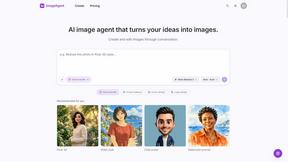
Create and edit AI images through conversation, using text or reference images and refining results in chat.
Ideogram 4.5
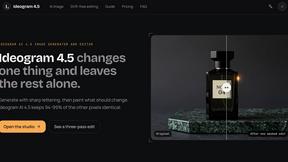
AI image generator and editor with Pixel Lock: change one region of an image while 94-99% of untouched pixels stay identical.

GenX
All-in-one AI workspace to generate images, videos, and audio with multiple leading AI models.
AiAgeFilter
Free AI age filter: upload an adult portrait, add 10-40 years, meet your older self. No app needed.

AppIconGenerator
Generate iOS and Android app icons from any image and export all platform sizes for free.
picttool
Create and edit images with a collection of easy-to-use AI tools