
Thank You Email AI
Join 10k+ successful candidates who use AI to craft personalized, professional thank you emails after interviews in seconds.
Visit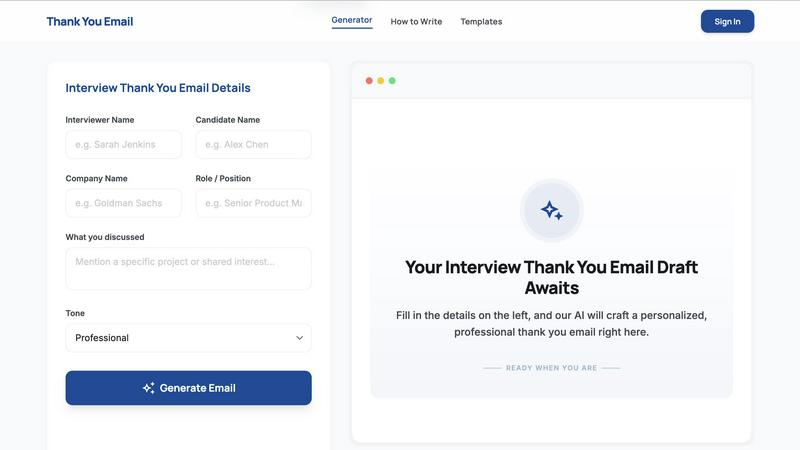
About Thank You Email AI
Thank You Email AI is a specialized, purpose-built tool designed to solve one of the most common and stressful post-interview tasks: writing a compelling, personalized thank you email. While the concept sounds simple, most candidates get stuck. Generic templates feel impersonal and fail to capture the specific conversation, while general-purpose AI tools often require multiple rounds of prompts and adjustments to get something usable. This tool eliminates that friction entirely. It is designed specifically for the interview follow-up moment, turning your raw conversation details into a clear, natural, and professional email in seconds. No prompt engineering, no awkward tone, and no wasted time. The product is built for anyone navigating the job market, from entry-level interns to seasoned executives across industries like tech, finance, consulting, healthcare, and creative fields. Its core value proposition is hyper-personalization and speed. By inputting a few key details like the interviewer's name, your name, the company, the role, and specific points you discussed, the AI instantly generates a draft that feels authentic and tailored. It supports multiple tones, including Professional, Warm, and Concise, allowing you to match the company culture and your personal style. With over 10,000 successful candidates already using it, Thank You Email AI has become the go-to resource for leaving a lasting impression without the anxiety of writing from scratch.
Features of Thank You Email AI
Hyper-Personalized Input Fields
The generator is built around a simple, intuitive form that asks for the critical details of your interview. You provide the interviewer's name, your name, the company, the role, and most importantly, specific touchpoints from your conversation. This structured input allows the AI to craft a message that references real discussion points, making the email feel genuinely personal and thoughtful rather than a generic template.
Multi-Tone Selection for Perfect Fit
Recognizing that company cultures vary, the tool offers three distinct tone options: Professional, Warm, and Concise. This feature ensures your email matches the expected communication style of the industry or specific employer. Whether you need a formal note for a banking role, a warm message for a startup, or a short and direct email for a busy hiring manager, you can select the tone with one click.
One-Click Generation and Live Preview
After filling in your details and selecting a tone, the AI generates a polished draft instantly. The output appears in a live preview pane on the right side of the screen, allowing you to see exactly what the email looks like before you copy it. This eliminates the back-and-forth of other AI tools, giving you a final product in seconds without any need for prompt engineering.
Instant Copy and Send Functionality
The tool is designed for speed and efficiency. Once you are satisfied with the generated email, you can copy the entire draft to your clipboard with a single click. This streamlined workflow minimizes friction, allowing you to move from input to sending in your email client in under a minute, which is critical given the recommended 24-hour window for sending a follow-up.
Use Cases of Thank You Email AI
Post-Interview Follow-Up for Final Round Candidates
After a final round interview, candidates need to express strong interest without sounding pushy. This tool helps craft a message that reiterates enthusiasm for the role and the company, references key conversations from the final round, and reinforces why you are the best fit. The AI ensures the tone remains confident and grateful, striking the perfect balance for a critical career moment.
Thank You Email After a Phone or Video Screen
Initial recruiter screens and hiring manager calls are often short but crucial. A quick, professional thank you email can set you apart from other candidates. The tool's "Concise" tone is perfect for this scenario, generating a short, specific note that acknowledges the conversation, confirms your interest, and keeps the momentum going without overwhelming the recipient.
Follow-Up After an Internship Interview
Students and early-career candidates can use this tool to craft a thank you email that emphasizes a learning mindset and initiative. By inputting details about projects discussed and the interviewer's advice, the AI generates a message that highlights your enthusiasm to learn and contribute, which is often more important for internship roles than demonstrating deep experience.
Follow-Up After No Response from a Recruiter
When a week has passed without hearing back, sending a polite follow-up can be tricky. The tool can generate a "No Response" follow-up email that is professional and respectful, not impatient. It helps you check in, reiterate your interest, and ask for a timeline update in a way that keeps the door open and maintains a positive impression.
Frequently Asked Questions
When is the best time to send a thank you email after an interview?
Ideally within 24 hours of your interview. Sending it sooner shows enthusiasm and keeps you top-of-mind, but ensure the content is thoughtful and specific to your conversation. Sending it too late, like after 48 hours, can make it seem like an afterthought. This tool helps you generate and send it quickly, respecting this critical time window.
Is it okay to use an AI thank you email generator after an interview?
Yes, it is perfectly acceptable. The key is to use the output as a strong starting point and ensure it sounds like you. The best AI generators, like this one, are designed to create a personalized draft based on your specific input. You should always review the email, add a personal touch if needed, and ensure it accurately reflects your voice and the conversation you had.
How long should a thank you email after an interview be?
A thank you email should be concise, typically between 3 to 5 short paragraphs. It should be long enough to express gratitude, reference a specific point from the conversation, and reiterate your interest, but short enough to be read quickly. The tool's "Concise" tone is perfect for creating a focused message that stays on point.
What subject line should I use for a thank you email after an interview?
A clean, professional subject line is crucial. Good examples include "Thank You - [Your Name] - [Role] Interview" or "Follow-up on [Role] Interview." The subject line should be clear and include your name and the role so the recruiter can easily identify your email. The tool can help you draft appropriate subject lines that match the tone of your email.
Explore more in this category:
Similar to Thank You Email AI
AIVideoAgent
Turn text ideas or reference images into videos through conversation, with agent-assisted prompts and a choice of video models.

Easemic
Open-source Android comic & manga reader with encrypted cloud streaming and AI ad-page stripping.
Booksmaker.ai
Books Maker AI is the AI-powered platform that turns your idea into a professional book.
LaunchIntel
Your AI agent picks relevant directories, submits your product in your browser and tracks every step. One-time purchase.
GenX
All-in-one AI workspace to generate images, videos, and audio with multiple leading AI models.
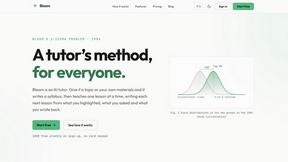
Bloom
An adaptive AI tutor that turns topics or your materials into courses, lessons, and answers tailored to how you learn.
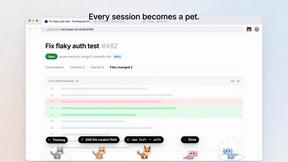
Agent Pets
Your Claude Code & Codex sessions as pets in Chrome. Approve, deny and reply to your coding agents from any tab.
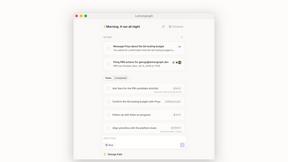
Lemongraph
Almost every conversation ends with a promise. Lemongraph keeps track of them for you and lines up your day the way you would.