retroshelf
Retroshelf automatically logs your retro handheld gaming sessions so you can track playtime, discover trending games, and connect with the community.
Visit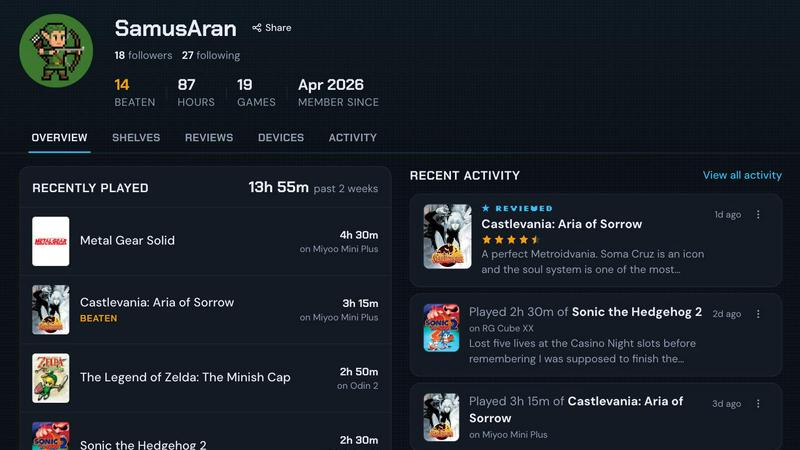
About retroshelf
retroshelf is a revolutionary play-tracking and discovery app built exclusively for the retro handheld gaming community. It solves a problem every handheld enthusiast knows well: keeping track of what you have played, finished, or replayed across multiple devices, spreadsheets, and your own memory. Instead of juggling notes or relying on fragmented logs, retroshelf automatically captures every gaming session through a tiny plugin that runs directly on your handheld device. The moment you start a game, retroshelf logs the title, the exact playtime, and the specific handheld you are using. This creates a browsable, public shelf that showcases your current gaming activity, completed titles, reviews, and replays all in one place. The app is designed for players using muOS and OnionOS, the most popular custom firmware for retro handhelds like Miyoo, Anbernic, and Odin. Beyond personal tracking, retroshelf is a social discovery platform. You can see what other players are picking up, finishing, and replaying right now. You can filter shelves by device to find games that perform well on your specific hardware. Reviews come with device context, so a five-star rating on a Miyoo means something different than on a high-end Odin. retroshelf turns scattered gaming sessions across handhelds into a beautiful, legible timeline of your year in gaming. It is currently in closed beta, inviting early adopters to help shape the community from the ground up. For anyone who loves retro handhelds and wants a smarter, more connected way to log and discover games, retroshelf is the missing piece.
Features of retroshelf
Automatic Session Logging
A tiny plugin runs silently on your handheld device and captures every gaming session as you play. It logs the game title, the minutes played, and the specific handheld you are using. There is no manual input required. Your shelf updates while you are still on the couch, making it effortless to maintain a complete history of your gaming life.
Public Shelf with Device Context
Your profile displays a public shelf that shows exactly what you are playing, what you have finished, what you are reviewing, and what you are replaying. Every entry retains the device context, so visitors know whether you played a game on a Miyoo Mini, an Anbernic RG35XX, or an Odin 2. This turns a simple log into a meaningful story about your hardware and software choices.
Browse by Device and Popularity
You can filter the entire community by device type to see what games are trending on specific handhelds. Popular this week shows what people are picking up, finishing, and replaying right now. This feature helps you discover hidden gems that work well on your exact hardware, saving you from trial and error with incompatible or poorly performing titles.
Reviews with Hardware Context
Star ratings on retroshelf are never just numbers. Every review includes the handheld it was played on, giving context to the score. A game might be a 4 out of 5 on a powerful Odin but only a 2 on a lower-end Miyoo. This contextual feedback helps you make smarter purchasing and playing decisions based on your own device.
Use Cases of retroshelf
Tracking Your Year in Retro Gaming
A player owns three different handhelds and often forgets which games they started on which device. With retroshelf, every session is logged automatically. At the end of the year, they can browse a complete timeline showing what they played, where they played it, and how long they spent. This turns scattered gaming moments into a coherent, nostalgic record.
Discovering Games That Work on Your Specific Handheld
A user just bought an Anbernic RG40XX and wants to know which games the community is actually finishing on that device. They filter retroshelf by Anbernic, see the most popular and highest-rated titles for that hardware, and skip the frustration of downloading games that run poorly. The device-specific discovery saves hours of trial and error.
Sharing Your Gaming Journey with Friends
A retro gaming enthusiast wants to show friends what they have been playing without sending screenshots or updating a spreadsheet. They share their public retroshelf profile. Friends can see the current game, the device used, playtime, and any reviews. It becomes a living, always-updated portfolio of their handheld gaming life.
Reviewing Games with Credibility
A power user finishes a game on a Miyoo Mini and wants to leave a review that reflects the handheld experience. On retroshelf, their review automatically includes the device context. Other players who own the same handheld can trust the rating because it matches their hardware reality. This makes reviews far more useful than generic star ratings on other platforms.
Frequently Asked Questions
How does the automatic logging plugin work?
The plugin is a tiny file you drop onto your handheld's SD card. It runs in the background on muOS or OnionOS and detects when you launch a game. It captures the game title, the time you start playing, and the time you stop. This data is then synced to your retroshelf account. There is no manual input, no buttons to press, and no interruption to your gameplay.
Which handhelds and operating systems are supported?
retroshelf currently supports devices running muOS and OnionOS. These are the most popular custom firmware options for retro handhelds from brands like Miyoo, Anbernic, and Odin. The team is actively working on expanding support to more operating systems and devices as the closed beta progresses.
Is my shelf public by default?
Yes, your shelf is designed to be public so you can share your gaming journey with the community. You can see what others are playing, and they can see your activity. This social aspect is core to retroshelf's discovery features. If you have specific privacy concerns, the team is gathering feedback during the closed beta to shape future privacy controls.
How do I join the closed beta?
You can join the closed beta by signing up on the retroshelf website. The team is opening access in small waves, prioritizing retro handheld players who want to help shape the community from the beginning. Once accepted, you will receive instructions on how to install the plugin on your device and link your account.
Explore more in this category:
Similar to retroshelf

Wheel of Names Picker AI
Wheel of Names Spin Wheel Picker tool for classrooms or events

wery.ai
Wery is an AI-powered virtual creative studio for entertainment content.

Snapkin
Snapkin is a calorie tracker you use by photographing your plate.

AI Face Swap Video
Swap any face into any video online with AI in minutes. Upload a clip and a photo, get natural lighting and expressions. Free credits on sign-up.

AIPetGen
AIPetGen turns a photo of your dog, cat, or other pet, or a written description, into a new picture or a short animation.

AIdorable
Adopt a virtual baby who grows, learns, and remembers you.

Travel Safety Map
Advisories, scams, traffic and emergency contacts per country.