
QuickTextTools
QuickTextTools gives you 76+ free, browser-based text utilities to instantly process, format, and optimize content with no sign-up needed.
Visit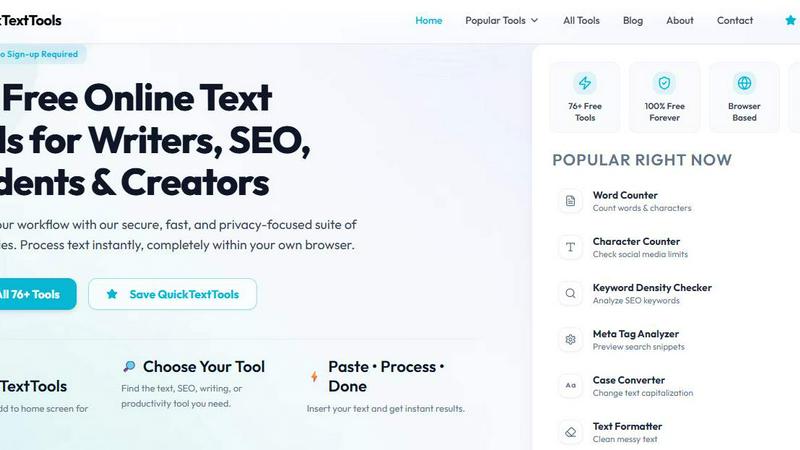
About QuickTextTools
QuickTextTools is taking the internet by storm as the ultimate free, browser-based productivity suite that everyone is talking about. With over 76 powerful tools packed into one seamless platform, it has quickly become the go-to resource for writers, marketers, developers, students, SEO professionals, and content creators who want to work smarter, not harder. What makes QuickTextTools a viral sensation is its incredible simplicity: there is no software to download, no sign-up required, and no hidden costs. Everything runs instantly and securely within your own browser, meaning your data never leaves your device. This privacy-first approach has earned rave reviews from users who value both speed and security. The platform covers everything from text formatting tools and SEO analysis utilities to writing assistants, keyword management tools, and developer utilities. Whether you need to clean up a messy keyword list, analyze SEO meta tags, convert text case formatting, or improve your writing process, QuickTextTools delivers practical solutions that help users work more efficiently. The most popular tools include the Word Counter, Character Counter, Keyword Density Checker, Meta Tag Analyzer, Case Converter, and Text Formatter, all of which are used by thousands daily. With new tools being added regularly and a growing community of loyal users, QuickTextTools is the fastest way to supercharge your productivity without the hassle, making it the most talked-about free toolkit online right now.
Features of QuickTextTools
76+ Free Browser-Based Tools
QuickTextTools boasts an ever-expanding library of over 76 free tools that cover every aspect of text processing, SEO analysis, writing improvement, and developer needs. These tools are 100% free forever with no sign-up required, making them accessible to everyone instantly. Each tool is designed to be fast, intuitive, and privacy-focused, running entirely within your own browser to ensure your data never leaves your device. This massive collection has made QuickTextTools a viral favorite among productivity enthusiasts.
Privacy-First and Secure Processing
One of the most celebrated features of QuickTextTools is its commitment to your privacy. All text processing happens directly in your browser, meaning your sensitive data, passwords, or confidential content are never sent to any server. This security-first approach has attracted a huge following of users who need to handle private information without risk. You can paste, process, and get results with complete peace of mind, knowing your data stays with you.
Instant Results with No Setup Required
QuickTextTools eliminates all friction from your workflow. There are no complicated setups, no software downloads, and no account creations. Simply visit the site, choose your tool, paste your text, and get instant results. This zero-barrier approach has made it incredibly popular among busy professionals and students who need quick answers without wasting time. The viral appeal of "paste, process, done" has turned QuickTextTools into a daily essential for thousands.
Regularly Updated with Trending New Tools
QuickTextTools is constantly evolving with new, trending tools added regularly based on user demand. Recent additions include a QR Code Generator, Random Password Generator, Pomodoro Timer, YouTube Title Generator, Instagram Caption Generator, and Hashtag Generator. This commitment to staying current with what users need most has kept the platform fresh and highly relevant, driving its viral growth and making it the most talked-about free tool suite online.
Use Cases of QuickTextTools
SEO Content Optimization for Marketers
Digital marketers and SEO professionals use QuickTextTools to optimize their content for search engines and improve rankings. The Keyword Density Checker helps analyze keyword frequency to avoid over-optimization, while the Meta Tag Analyzer and SEO Title Generator allow you to preview and perfect search snippets. The Keyword Builder helps expand your keyword list, and the Text Cleaner removes unwanted formatting from copied content. This complete SEO toolkit saves hours of manual work and helps marketers create content that ranks higher and drives more traffic.
Academic Writing and Research for Students
Students and researchers rely on QuickTextTools to streamline their writing and research processes. The Word Counter and Character Counter ensure essays and assignments meet strict length requirements. The Reading Time Calculator helps estimate presentation durations, while the Text Compare Tool allows students to quickly spot differences between drafts. The Case Converter and Text Formatter clean up messy text copied from PDFs or websites, making it easy to integrate research into papers. These tools help students save time, avoid formatting errors, and submit polished work.
Content Creation for Writers and Bloggers
Writers and bloggers use QuickTextTools to accelerate their content creation workflow and improve quality. The Sentence Counter helps maintain optimal sentence length for readability, while the Keyword Density Checker ensures proper keyword usage without stuffing. The Case Converter quickly formats titles and headings, and the Text Cleaner removes unwanted HTML or special characters from copied content. The Instagram Caption Generator and Hashtag Generator are perfect for social media posts, helping writers create engaging content that gets more likes and shares.
Development and Data Processing for Developers
Developers and technical users find QuickTextTools invaluable for coding and data tasks. The JSON Formatter helps debug and beautify JSON data, the Base64 Encoder and URL Encoder handle encoding needs, and the QR Code Generator creates scannable codes instantly. The Text Compare Tool is perfect for comparing code snippets, while the Duplicate Line Remover cleans up lists and data sets. The Random Password Generator creates secure passwords for applications. These developer tools save time and reduce errors in technical workflows.
Frequently Asked Questions
Is QuickTextTools really free forever?
Yes, QuickTextTools is 100% free forever with no hidden costs, subscriptions, or premium tiers. All 76+ tools are available to everyone without any payment required. There is no sign-up process, no credit card needed, and no limitations on usage. You can use all the tools as many times as you want, completely free. This commitment to being free has made QuickTextTools a viral favorite among users worldwide.
Do I need to create an account or sign up?
No, there is absolutely no sign-up required to use QuickTextTools. You can start using any tool immediately without providing any personal information, email address, or creating an account. Simply visit the website, choose your tool, paste your text, and get instant results. This zero-barrier approach is one of the main reasons QuickTextTools has become so popular and widely shared.
How does QuickTextTools protect my privacy and data?
QuickTextTools processes all your text directly within your own browser using client-side technology. This means your data never leaves your device and is never sent to any server. No one can access, store, or see your content. This privacy-first approach ensures that sensitive information like passwords, personal data, or confidential business documents remain completely secure. Your privacy is built into the core of every tool.
What kind of tools are available on QuickTextTools?
QuickTextTools offers over 76 tools organized into five main categories: Writing Tools (Word Counter, Character Counter, Sentence Counter, Reading Time Calculator), SEO Tools (Keyword Density Checker, Meta Tag Analyzer, SEO Title Generator, Keyword Builder), Text Cleaning Tools (Text Cleaner, Remove Extra Spaces, Duplicate Line Remover), Developer Tools (JSON Formatter, Base64 Encoder, URL Encoder, QR Code Generator), and Productivity Tools (Pomodoro Timer, Text Sorter, Random Word Generator). New tools are added regularly based on user requests.
Explore more in this category:
Similar to QuickTextTools

@fuck.it - email with attitude
Private email. Pure. Secure. Exclusive. No ads, no tracking, no data selling. GDPR compliant, EU-hosted.

FreeVideoGenerator
Free AI video generator: turn text prompts and photos into video clips with Sora 2, Veo 3.1, Wan and more. Free starter credits, no watermark download


Verla AI
Verla is an AI academic assistant for university and college students, combining AI essay writing, academic research, AI detection, AI humanization

Panzoe
Panzoe is an all-in-one AI platform for personal productivity, business automation, AI assistants, content creation, and custom AI solutions.

Memorable Contact
Memorable Contact helps you remember people, save conversation details, find contacts using AI-powered search, and share digital business cards
Novastart
Novastart brings apps and files onto an infinite canvas where people and AI agents can work together.

AUTOMATER.ai
A tray helper for every AI coding tool: sessions, alerts and usage in one place