
KPI Studio
Transform your data into stunning animated video charts in just 60 seconds with KPI Studio—no design skills required.
Visit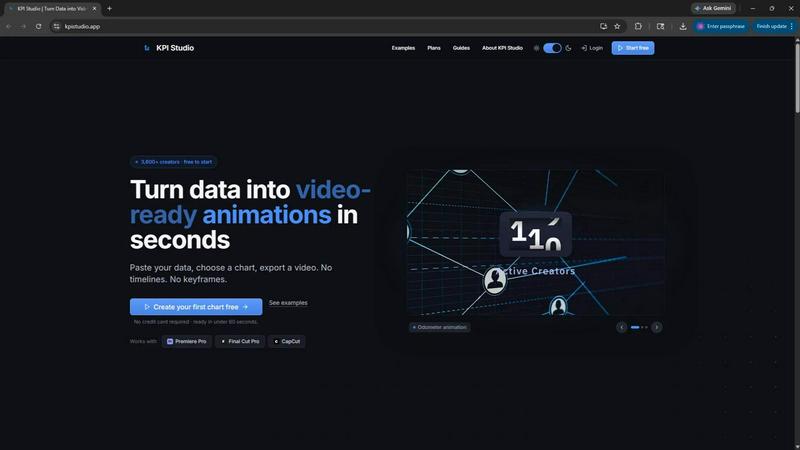
About KPI Studio
KPI Studio is a revolutionary tool designed specifically for data-driven video creators who face challenges in integrating charts and visuals into their content. The traditional workflow for creating visual data representations often feels clunky and inefficient—ranging from amateurish screenshots to time-consuming After Effects projects. KPI Studio addresses these pain points by streamlining the entire process. With a user-friendly interface, creators can simply paste their data, select a chart type, and export stunning, fully animated visuals in under 60 seconds. This means no more complicated timelines or keyframes. The exports are compatible with popular editing software like Premiere Pro, Final Cut, and After Effects, offering seamless integration into any project. KPI Studio is built for creators who operate on tight schedules, ensuring that when you need a dynamic chart today, it is ready for you instantly. Additionally, for those looking to customize further, JSON export options allow for deeper editing in custom workflows, making KPI Studio the perfect companion for any content creator looking to elevate their video production quality.
Features of KPI Studio
Instant Chart Creation
Creating charts has never been easier. Simply paste your data into KPI Studio, choose from a variety of chart types, and watch as your data transforms into an animated visual ready for export in less than a minute. This feature eliminates tedious manual design work and allows creators to focus more on content.
Video-Ready Exports
KPI Studio offers exports in multiple formats including MP4, GIF, MOV, and PNG, all with transparent backgrounds. This means that once you export your animated charts, they can be dropped directly into your editing timeline—no additional editing necessary. This feature ensures that your visuals maintain a professional appearance without the hassle.
Flexible Output Resolutions
Whether you're creating content for YouTube, Instagram, or TikTok, KPI Studio has you covered with various output resolutions including widescreen, square, and vertical formats. This flexibility allows creators to tailor their visuals to the specific needs of their platforms, maximizing viewer engagement.
JSON Export for Advanced Editing
For creators looking to push their visuals to the next level, KPI Studio provides a JSON export option. This feature allows for deeper customization and integration into custom workflows, making it ideal for advanced users who want more control over their animated KPIs.
Use Cases of KPI Studio
Social Media Content Creation
KPI Studio is perfect for social media managers and video creators who need to produce engaging content quickly. With the ability to create professional-looking animated charts in seconds, they can keep their audience engaged and informed without sacrificing quality or time.
YouTube Video Production
YouTube creators can leverage KPI Studio to enhance their videos with dynamic visual data. Whether it's showcasing growth metrics, comparisons, or statistics, creators can easily add eye-catching animations that increase viewer retention and engagement.
Client Projects for Agencies
Digital marketing agencies can use KPI Studio for client projects that require quick turnarounds. By utilizing the software, agencies can produce high-quality animated visuals for presentations or reports, ensuring they meet client expectations without the usual time constraints.
Educational Content Development
Educators and e-learning creators can benefit from KPI Studio by incorporating animated KPIs into their teaching materials. Visual representations of data can help convey complex information more effectively, enhancing learning experiences for students.
Frequently Asked Questions
How does KPI Studio simplify the video creation process?
KPI Studio simplifies video creation by allowing users to paste their data, select a chart type, and export animated visuals in under 60 seconds. This eliminates the need for complicated design tools and long rendering times.
What editing software is compatible with KPI Studio exports?
KPI Studio exports are compatible with popular video editing software including Premiere Pro, Final Cut, CapCut, and After Effects, allowing for seamless integration into your editing workflow.
Can I customize the charts after exporting?
Yes, KPI Studio offers a JSON export option for users who want to customize their charts further. This feature allows for deeper editing and integration into custom workflows for more advanced users.
Is there a free version of KPI Studio available?
Absolutely! KPI Studio offers a free version that allows users to try out the tool with unlimited PNG exports and three animated exports, making it accessible for creators who want to test the software before committing to a subscription.
Similar to KPI Studio

Leadeon
AI growth tool for X and LinkedIn: write posts in your voice, schedule at your best times, find leads on X and see what works.

ZombieTrend AI
Turn two photos into a cinematic zombie love story video. Free scene preview, no sign-up needed.
Vidpop
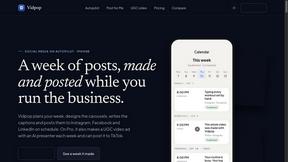
Vidpop plans, designs and posts three carousel posts a week for your business, with captions, and on Pro an AI-presenter UGC video ad. iPhone app.

qwenimage-21
AI image generation and editing with detailed prompts, multiple references, portrait and typography refinement, and transparent RGBA output.

99x Prompts
Discover 50,000+ ready-to-use AI prompts for text, image, and video generation. Save time and create better results with AI.