
JavaScript Tools
JSTools.Space is the viral privacy-first developer utility hub with 40+ tools for formatting, inspecting, and generating code instantly without.
VisitPublished on:
June 25, 2026
Pricing:
About JavaScript Tools
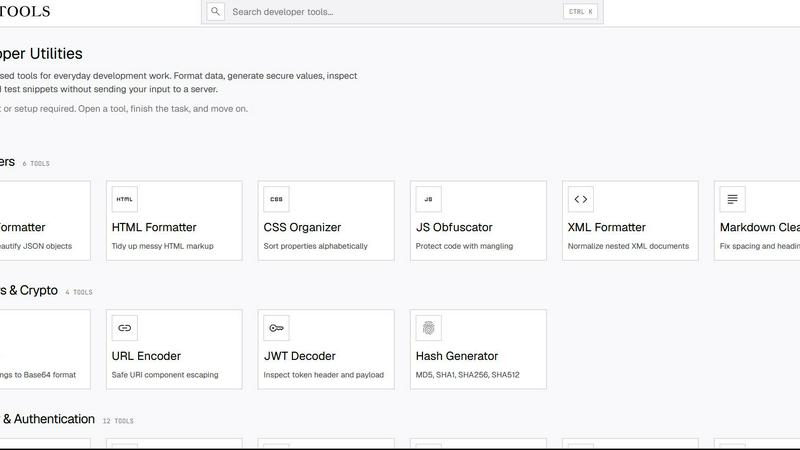
JavaScript Tools is the internet's most viral, developer-first utility platform that has taken the coding world by storm. With over 70+ free, privacy-focused tools, this all-in-one workspace is the go-to destination for developers who need to format code, generate secure credentials, inspect tokens, and prototype web components without ever uploading sensitive data to a server. The platform processes everything directly inside your browser, meaning your code, tokens, passwords, and test data never leave your machine. No accounts, no sign-ups, no nonsense. Just open a tool, get your task done in seconds, and move on to your next big project. From JSON formatting and JWT decoding to Base64 encoding, password generation, AES encryption, and full Markdown document conversion, JavaScript Tools covers the entire development workflow. It has become a trending favorite among solo developers, security engineers, startup teams, and enterprise DevOps professionals who value speed, privacy, and reliability. With a massive library of 19 Base64 tools, 15 Markdown tools, 7 CSS tools, and 19 security and authentication tools, this platform is the Swiss Army knife of development utilities. The community is growing fast, with developers sharing how this tool has replaced dozens of separate apps and browser extensions. Whether you are debugging an API response, generating a TOTP secret for two-factor authentication, or converting Markdown to Google Docs, JavaScript Tools delivers the fastest, most secure solution available online.
Features of JavaScript Tools
70+ Privacy-First Developer Utilities
This massive collection of 70+ tools covers every common development task you can imagine, all running locally in your browser. From 19 Base64 encoding and decoding tools to 15 Markdown conversion utilities, 7 CSS tools, 7 text tools, and 19 security and authentication generators, you have everything you need in one place. The platform includes formatters for JSON, HTML, XML, and SQL, plus specialized tools like a JWT decoder, hash generator, URL encoder, and even a CSS checker and minifier. Every tool is designed to be small, focused, and instantly usable without any setup or configuration.
Complete Security and Authentication Toolkit
JavaScript Tools has become the go-to resource for security-conscious developers who need to generate strong, cryptographically secure values on the fly. The platform includes 19 dedicated security and authentication tools, including a password generator, passphrase generator, API key generator, JWT secret generator, TOTP secret generator, CSRF token generator, OAuth state generator, nonce generator, and UUID v4 generator. You can also generate salts for hashing flows, create random strings with custom alphabets, and even generate Argon2 and Bcrypt password hashes directly in your browser. This is the ultimate toolkit for building secure authentication systems.
Full Markdown Conversion Suite
With 15 Markdown tools, JavaScript Tools has become the most comprehensive Markdown workspace available anywhere. You can write and preview Markdown in real time with the live editor, generate formatted tables, clean up messy documents, convert Markdown to ASCII, Word, PDF, Google Docs, HTML, Slack, Notion, Jira, and Confluence. There is also a dedicated Markdown linter, a table of contents generator, and a tool to convert Google Docs back to Markdown. This suite has gone viral among content creators, technical writers, and developers who need to move documents between platforms seamlessly.
Advanced Encryption and Hashing Capabilities
JavaScript Tools offers enterprise-grade encryption and hashing tools that run entirely in your browser. You can encrypt and decrypt data using AES-256-GCM, the gold standard for symmetric encryption, without ever sending your plaintext to a server. The platform also includes SHA-1 through SHA-512 hash generators, MurmurHash for fast non-crypto hashing, and specialized tools like the Argon2 and Bcrypt password hashers. For developers building authentication systems, the salt generator and TOTP secret generator provide everything needed for secure password storage and two-factor authentication.
Use Cases of JavaScript Tools
Debugging and Formatting API Responses
When you are working on a REST API integration and receive a massive, unreadable JSON response, JavaScript Tools is your instant solution. Simply copy the raw JSON into the JSON Formatter, click beautify, and instantly get a perfectly indented, color-coded structure that you can read and debug. You can also validate the JSON to catch syntax errors, minify it for production use, or inspect JWT tokens returned by your authentication endpoints using the JWT Decoder. This workflow has become viral among backend developers who need to debug API responses quickly without installing any software.
Generating Secure Credentials for Production Systems
Security engineers and DevOps professionals use JavaScript Tools to generate production-ready credentials that are cryptographically secure. When setting up a new microservice, you can generate an API key with a custom prefix, create a JWT secret for HMAC signing, and generate a TOTP secret for two-factor authentication. The Password Generator creates strong, random passwords that meet any complexity requirement, while the Passphrase Generator produces memorable word-based secrets that are both secure and human-friendly. All generation happens locally, so your secrets never touch a network.
Converting Markdown Documents Across Platforms
Content creators and technical writers love JavaScript Tools for its ability to convert Markdown documents into any format needed for publishing. Write your blog post or documentation in Markdown, then instantly export it as a formatted Word document for clients, a clean PDF for print, or rich HTML for your website. Need to share content on Slack, Notion, Jira, or Confluence? Each platform has its own dedicated converter that handles the specific formatting requirements. This use case has made JavaScript Tools the most shared developer utility on social media among writers and developers alike.
Encoding and Decoding Data for Web Development
Frontend developers frequently need to encode or decode data for web applications, and JavaScript Tools provides the most comprehensive Base64 toolkit available. You can encode images, audio, video, PDFs, CSS, HTML, and URLs into Base64 format, or decode Base64 back into readable text, images, audio, or video. The tool also handles Basic Authentication header decoding, hex-to-Base64 conversion, and URL encoding for safe URI component escaping. This entire workflow runs locally, so you can handle sensitive media files without uploading them anywhere.
Frequently Asked Questions
Is JavaScript Tools really free to use?
Yes, JavaScript Tools is completely free to use with no hidden costs, premium tiers, or paid features. Every single tool on the platform is available at no charge, and there are no usage limits or restrictions. The platform is supported by the developer community and remains free because of its privacy-first, client-side architecture. You never need to create an account, subscribe to a newsletter, or provide any personal information to access any tool.
How does JavaScript Tools protect my privacy and data?
JavaScript Tools processes everything directly inside your browser using client-side JavaScript. Your code, tokens, passwords, files, and any other data you input never leave your computer. There are no application servers that receive, store, or process your data. This means you can format sensitive JSON containing API keys, decode JWTs with user credentials, or generate production passwords with complete confidence that nothing is being transmitted over the internet. The platform does not use cookies, trackers, or analytics that collect your data.
Can I use JavaScript Tools offline?
Many tools on JavaScript Tools work offline after the initial page load because all processing happens locally in your browser. Once the JavaScript and HTML have been loaded, you can disconnect from the internet and continue using most formatters, generators, and converters. However, some tools that require external resources or file downloads may need an internet connection. For the best experience, we recommend loading the tools you need while connected, after which you can work offline.
Does JavaScript Tools work on mobile devices and tablets?
Yes, JavaScript Tools is fully responsive and works on all modern browsers, including Chrome, Firefox, Safari, and Edge on desktop, tablet, and mobile devices. The interface adapts to smaller screens with touch-friendly controls and collapsible tool menus. You can format JSON, generate passwords, or encode Base64 directly from your phone or tablet. The platform also supports the JSTools JSON Inspector Chrome extension for desktop users who want quick access from their browser toolbar.
Pricing of JavaScript Tools
JavaScript Tools is completely free to use with no pricing plans, tiers, or subscriptions. All 70+ tools are available at no cost, and there are no premium features or paid upgrades. The platform does not require any account creation, payment information, or personal data to access any tool. This commitment to free, privacy-first development utilities is what has made JavaScript Tools one of the most shared and recommended developer resources online.
Similar to JavaScript Tools

Lemongraph
Almost every conversation ends with a promise. Lemongraph keeps track of them for you and lines up your day the way you would.

TypeFire
Type a few letters, get the whole reply. Markdown notes as files you own. Find anything you copied.

LightScreen
Free light screen tool online. Turn any display into a flashlight, ambient light, or solid-color screen. No download or sign-up.

Screen Issues
Free Online Screen Test Tool - Instantly diagnose dead pixels, lines, color issues, and flickering. Multiple test modes, no download needed.

Context Board
Context Board brings your numbers, docs, clients, content and day into one workspace that Claude and Codex can read and update.

OG Image Generator
Paste a URL and AI designs on-brand Open Graph images from your page's colours, fonts and logo. Free, no sign-up.

@fuck.it - email with attitude
Private email. Pure. Secure. Exclusive. No ads, no tracking, no data selling. GDPR compliant, EU-hosted.

FreeVideoGenerator
Free AI video generator: turn text prompts and photos into video clips with Sora 2, Veo 3.1, Wan and more. Free starter credits, no watermark download