
Huebert
Huebert is your go-to toolkit for effortlessly creating stunning color palettes and UI themes in seconds, backed by AI and expert support.
Visit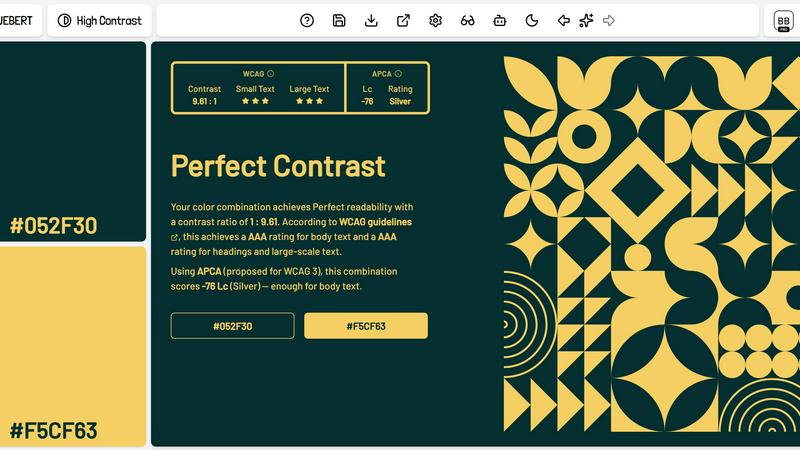
About Huebert
Huebert is revolutionizing the way web creatives approach color design. This professional color toolkit is tailored specifically for designers, developers, and anyone looking to enhance their visual projects with stunning color palettes and UI themes. At its core, Huebert empowers users to create aesthetically pleasing designs with minimal effort. With features like an intelligent color palette generator, high contrast generator, and shadcn/ui theme generator, users can easily build cohesive designs that are both visually appealing and accessible. The toolkit is not just about generating colors; it also provides essential tools for color blindness simulation and compliance checks, ensuring that your designs meet the highest standards of readability and inclusivity. Whether you are a seasoned professional or just starting, Huebert is here to streamline your design process and unleash your creativity.
Features of Huebert
Palette Generator
With Huebert's Palette Generator, you can craft stunning color palettes in mere seconds. This feature is highly configurable, allowing you to generate between 1 to 10 colors with AI assistance. It includes an interactive color wheel for precise adjustments and ensures your designs are accessible through WCAG and APCA contrast checks. You can even simulate color blindness to see how your palette will appear to everyone.
High Contrast Generator
The High Contrast Generator is indispensable for creating foreground and background color pairs that ensure strong readability. This tool validates your color choices against WCAG and APCA standards, allowing you to design with confidence. With configurable ranges and palette sampling, you can generate themes that not only look great but are also easy on the eyes for all users.
Shadcn/UI Theme Generator
Generate production-ready themes in a flash with the Shadcn/UI Theme Generator. This feature allows you to create full themes with just one click or with the help of AI. You can preview your themes in both light and dark modes on real components, ensuring a seamless design experience. Import themes from pasted CSS and customize colors, typography, and spacing with ease.
Image Color Picker
The Image Color Picker makes extracting color palettes from images a breeze. You can pull 1 to 10 colors from any image, edit and lock your selections, and choose from various extraction modes. This feature is perfect for ensuring that your designs are aligned with the colors present in your visual assets, allowing for greater cohesion across your projects.
Use Cases of Huebert
Designing Accessible Websites
Web developers can use Huebert to create accessible websites that comply with color contrast standards. By utilizing the high contrast generator, they can ensure that text is legible against various backgrounds, improving the overall user experience for all visitors.
Crafting Unique Brand Palettes
Businesses looking to establish a strong visual identity can leverage Huebert's palette generator to create unique brand colors. This feature allows for the generation of distinct color schemes that resonate with their target audience, enhancing brand recognition and loyalty.
Creating Eye-Catching Social Media Graphics
Marketers can harness the power of Huebert to design eye-catching graphics for social media. With the image color picker, they can extract colors from images and create cohesive graphics that attract attention and encourage engagement.
Streamlining UI/UX Design Processes
UI/UX designers can streamline their workflow by using the shadcn/ui theme generator to quickly create and test themes. This feature allows for rapid prototyping and iteration, making it easier to deliver polished designs to clients or stakeholders.
Frequently Asked Questions
What platforms does Huebert support?
Huebert is a web-based application, making it accessible from any device with an internet connection. This means you can work on your color designs from your desktop, laptop, or even mobile devices without any hassle.
Can I export my palettes and themes?
Yes! Huebert offers multiple export options including CSS, SCSS, Tailwind, JSON, CSV, and more. This flexibility ensures that you can easily integrate your designs into your projects regardless of the technology stack you are using.
Is there a free trial available?
Absolutely! Huebert offers a free Basic plan that allows you to use essential features like the basic color palette generator, background generator, and image color picker. This is a great way to explore the toolkit before committing to a paid plan.
How does the AI assistance work in Huebert?
The AI assistance in Huebert helps you generate color palettes and themes based on your inputs and preferences. It analyzes color combinations to suggest visually appealing options, saving you time and enhancing your design process.
Similar to Huebert

Memorable Contact
Memorable Contact helps you remember people, save conversation details, find contacts using AI-powered search, and share digital business cards

BillionVerify
BillionVerify is a professional email verification service built to solve one problem: bad email data costs businesses money.
screenRIG
Signage and kiosk infrastructure for AI agents. Your agent publishes images, video, streams, web pages and apps to screens via one plugin.screenRIG is
nanobanana 21
A fast, simple image studio powered by Nano Banana 2.1 — create and edit high-quality images with readable text and consistent characters.

AUTOMATER.ai
A tray helper for every AI coding tool: sessions, alerts and usage in one place

Honer AI
Android AI assistant with chat, web search, photo and document analysis, and voice input.

WidgIq
Provide an AI-powered customer support widget for your website