
Clockbeam
Clockbeam is a no-cost browser clock with seconds, fullscreen styles and time tools for people who want time visible while they work.
Visit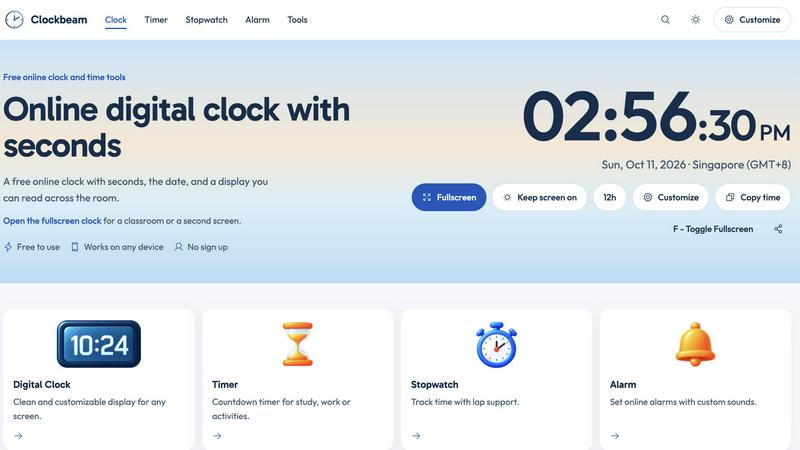
About Clockbeam
A second screen can serve as a simple time display with Clockbeam. The browser clock shows seconds and date, and fullscreen mode is suited to a classroom or desk setup. Its appearance can be switched among minimal, flip, analog and scenic styles. Time follows the device clock and zone unless another zone is selected.
Clockbeam also offers a countdown, lap stopwatch, alarm, Pomodoro timer, world clock and meeting planner. Those options make it useful when a visible clock is only one part of a work or study routine. Saved settings and named setups remain in the browser; export JSON when you want to keep a copy elsewhere. For dependable reminders, consider the operating constraint: the browser tab must stay open on an awake device for alarms and Pomodoro chimes. The product does not supply a separate time synchronization service.
Features of Clockbeam
- Digital display with seconds and date
- Fullscreen and multiple visual clock styles
- Timer, stopwatch, alarm and focus intervals
- World clock and meeting time planner
Use Cases of Clockbeam
- Keep time visible on a spare work display
- Run a study countdown or Pomodoro session
- Compare time across cities for meeting planning
- Save and export a preferred browser setup
Frequently Asked Questions
Can I use it on a tablet?
Yes. Clockbeam says it works on desktop, tablet and mobile devices.
Does Clockbeam have its own time server?
No. It follows the device clock and does not add a separate synchronization service.
How do I keep a saved setup?
Settings are stored in the browser. Export JSON for a copy, since clearing site data removes local saves.
Pricing of Clockbeam
Free to use; no account required.
Explore more in this category:
Similar to Clockbeam
Ardelia
Ardelia brings free calculators, planners, and templates together to help people move from everyday work questions to practical next steps.

Infograph
Infograph transforms articles, notes, and calls into shareable visual stories, with fast diagrams and source-checked numbers.

小蜜蜂AI
小蜜蜂AI is a Windows work assistant that combines AI conversations, visual workflows and tool configuration in one workspace.

Leadmatically
Leadmatically helps small businesses spot buyer requests on five social platforms and manage first outreach and replies from one inbox.
GigUp
GigUp helps Upwork freelancers spot relevant new jobs through profile based matching, alerts, and proposal drafts that they review before applying.

Safe Outreach
Look up a Chrome extension against LinkedIn's published detection list, with explanations of list results, browser coverage and session handling.

RenewRoster
RenewRoster helps agencies track client domain and SSL expiries, send branded reminders, and automate renewal workflows.

Nitrozen
Nitrozen connects changelog publishing with developer workflows, offering APIs and release tools alongside public pages and an embeddable widget.