
archmaster
Archmaster is the viral AI tool that transforms your room or building photos into photorealistic designs in seconds, trusted by 800+ designers and.
Visit
About archmaster
Archmaster is an AI-powered interior design and architectural rendering platform that is taking the design world by storm. Trusted by over 800 designers and homeowners, this tool allows you to upload a photo of any room, exterior, or outdoor space, choose a style, and get a photorealistic render back in seconds. No 3D modeling software, no CAD files, and no designer required. The core value proposition is simple: transform your space instantly. Whether you are a homeowner planning a renovation, a renter visualizing non-permanent changes, a real estate agent creating virtual staging, or an interior designer generating early-stage client concepts, Archmaster delivers professional-grade results in under 60 seconds. The platform offers 20 distinct style presets, ranging from Scandinavian minimalist to Cyberpunk drama, and includes six powerful capabilities: interior redesign, exterior redesign, sketch-to-image conversion, AI render enhancement, architecture video generation, and targeted AI inpainting. Additionally, Archmaster provides a suite of free tools including a room size calculator, paint calculator, renovation cost estimator, and color palette generator. The platform is designed for anyone who wants to see their space redesigned without the hassle of learning complex software or hiring expensive professionals. With a viral and trending appeal, Archmaster is the go-to solution for instant, AI-driven design transformations that are both accessible and impressive.
Features of archmaster
Interior AI Design
This feature allows you to redesign any interior space, including living rooms, bedrooms, bathrooms, and kitchens. Simply upload a photo of your current room, select from 20 style presets, and watch as the AI generates a photorealistic redesign. The before/after slider functionality makes it easy to see the dramatic transformation, from a cozy bohemian bedroom to a sleek modern living room. This feature is perfect for homeowners and renters looking to visualize new decor, furniture arrangements, or complete room makeovers without any design software skills.
Exterior and Facade Design
Transform the look of your home's exterior, front yard, or outdoor spaces with a single click. Upload a photo of your building facade, choose a style like Mediterranean, Rustic, or Tropical, and receive a stunning photorealistic render of your redesigned exterior. This capability is ideal for homeowners planning curb appeal improvements, real estate agents staging properties for sale, or architects presenting facade renovation concepts to clients. The AI handles all the complex lighting, texture, and material changes automatically.
Sketch to Render
Convert your hand-drawn architectural sketches into photorealistic images instantly. This feature is a game-changer for architects and designers who want to quickly visualize their concepts. Simply upload a photo or scan of your sketch, and the AI transforms it into a detailed, lifelike render complete with lighting, textures, and materials. This eliminates the need for time-consuming manual rendering and allows for rapid iteration during the design process.
AI Render Enhancer
Upscale and sharpen any architectural visualization to print-ready quality with this feature. Whether you have a low-resolution render from another tool or want to enhance an existing Archmaster output, the AI Render Enhancer improves clarity, detail, and overall image quality. This is essential for creating professional presentations, marketing materials, or portfolio pieces that need to look their best. The enhancement process takes just seconds and uses one credit.
Use Cases of archmaster
Home Renovation Planning
Homeowners planning a major renovation can use Archmaster to visualize their ideas before spending any money. Upload a photo of your outdated kitchen, choose a modern or Scandinavian style, and see exactly how new countertops, cabinets, and layouts would look. This allows you to experiment with multiple design options, compare styles, and make confident decisions before hiring contractors or purchasing materials. The photorealistic renders help you communicate your vision clearly to architects and builders.
Real Estate Virtual Staging
Real estate agents can dramatically improve property listings by virtually staging empty or outdated rooms. Instead of paying for physical staging or expensive photography, agents can upload photos of vacant spaces and instantly transform them into beautifully furnished, stylish rooms. This helps potential buyers visualize the potential of a property, leading to faster sales and higher offers. The before/after slider is a powerful marketing tool that showcases the property's transformation.
Interior Designer Concept Presentation
Interior designers can use Archmaster to generate early-stage client concepts quickly and affordably. Instead of spending hours creating mood boards or rough sketches, designers can upload a client's room photo, apply different style presets, and present multiple photorealistic options in minutes. This speeds up the client approval process, reduces the need for expensive revisions, and allows designers to focus on the creative aspects of their work. The tool is also useful for creating portfolio pieces.
Architectural Visualization for Clients
Architects can use the Sketch to Render feature to turn their hand-drawn concepts into photorealistic images that clients can easily understand. This is particularly valuable during the initial design phase when clients may struggle to interpret technical drawings. By providing a realistic visualization of the proposed design, architects can secure client buy-in faster, reduce misunderstandings, and make adjustments before detailed plans are created. The Architecture Video feature can also create short walkthroughs for immersive presentations.
Frequently Asked Questions
What is a credit?
A credit is the unit of currency used on Archmaster. Each generation, upscale, or edit costs 1 credit. Multi-view generation costs 3 credits, and architecture video generation costs 5 credits. The weekly plan provides 30 credits that auto-renew each week. You can use your credits for any combination of features, and unused credits do not roll over to the next week.
What photo formats are supported?
Archmaster supports standard photo formats including JPEG, PNG, and other common image file types. For best results, upload a clear, well-lit photo of the room or exterior you want to redesign. The AI works with photos taken from any angle, but a straight-on shot of the space typically yields the most accurate and impressive results. There is no need for special equipment or professional photography.
Can it redesign building exteriors?
Yes, absolutely. Archmaster has a dedicated Exterior and Facade Design feature that allows you to transform the look of building exteriors, front yards, and outdoor spaces. You can upload a photo of your home's facade and apply any of the 20 style presets, from Mediterranean to Cyberpunk. The AI will generate a photorealistic render showing the redesigned exterior, including changes to paint colors, materials, landscaping, and architectural details.
Are my uploaded photos used to train AI?
Archmaster takes your privacy seriously. The platform's privacy policy outlines how your uploaded photos are handled. Generally, your photos are used only to generate the renders you request and are not used to train the AI models without your explicit consent. For specific details, you should review the full Privacy Policy available on the Archmaster website. You can also delete your account and associated data at any time.
Can I cancel any time?
Yes, you can cancel your Archmaster subscription at any time. The weekly plan auto-renews unless you cancel before the next billing period. Once you cancel, you will continue to have access to your remaining credits until the end of the current billing week, after which your account will revert to a free tier with limited functionality. There are no hidden fees or long-term contracts, making it easy to try the service risk-free.
Pricing of archmaster
Archmaster offers a straightforward weekly plan with no hidden fees. The plan costs $9.99 per week and provides 30 credits that auto-renew each week. One credit covers one generation, upscale, or edit. Multi-view generation costs 3 credits, and architecture video generation costs 5 credits. This simple pricing structure allows users to generate up to 30 high-quality renders per week for a low weekly fee, making it an affordable alternative to hiring professional designers or purchasing expensive software. There are no long-term contracts, and you can cancel at any time. For users who need more credits or additional features, full pricing details are available on the Archmaster website.
Similar to archmaster

ArchOne AI
All-in-one AI spatial design visualization platform for interior, exterior and landscape design.

RoofReport
Upload your house photo and RoofReport instantly shows you real roof colors from top brands with zero signup.
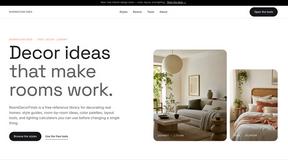
RoomDecorFinds
RoomDecorFinds gives you free style guides, color palettes, and layout tools to design real homes that actually work.
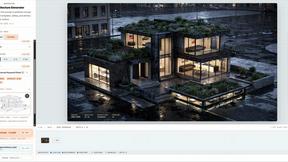
AI Architecture Generator
Turn your sketch or prompt into a photorealistic 3D render in 30 seconds with AI.
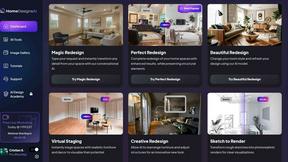
HomeDesignsAI
Transform your home and garden in under 30 seconds with HomeDesignsAI, the world's leading AI tool for stunning redesigns.
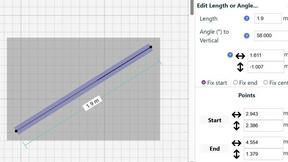
SimpleDraw
Create stunning floor plans online effortlessly with SimpleDraw, the free tool for precise and easy scale drawings.