
Seedance 2 AI Video Generator vs Veo 4 AI Video Generator
Side-by-side comparison to help you choose the right AI tool.

Seedance 2 AI Video Generator
Transform text, images, or clips into stunning videos quickly with Seedance 2.0's intuitive AI technology.
Last updated: March 1, 2026

Veo 4 AI Video Generator
Transform ideas into stunning cinematic videos in minutes with Veo 4's powerful AI-driven video generation.
Last updated: February 28, 2026
Visual Comparison
Seedance 2 AI Video Generator

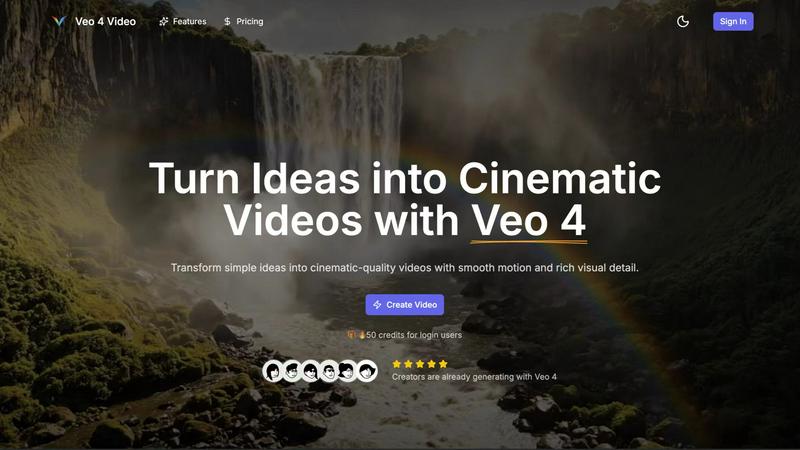
Veo 4 AI Video Generator
Feature Comparison
Seedance 2 AI Video Generator
Text to Video
Seedance 2.0 offers a robust text-to-video feature that allows users to generate cinematic videos directly from written prompts. This functionality ensures that your creative ideas can be transformed into visual narratives with minimal effort, making it perfect for storytellers and content creators.
Image to Video
With the image-to-video capability, Seedance 2.0 enables users to convert still images into dynamic video content. This feature focuses on maintaining style consistency from the reference inputs, ensuring that the final product aligns with your original vision, whether for marketing or artistic purposes.
Video to Video
Seedance 2.0's video-to-video feature allows users to restyle existing footage seamlessly. By using source clips as a foundation, you can generate new videos that retain the essence of the original while introducing fresh elements, making it a great tool for remixes and adaptations.
Rapid Iteration
Designed for speed, Seedance 2.0 facilitates rapid iteration across various video projects. This feature is particularly beneficial for producing multiple versions of ads, social media content, or product demos quickly, ensuring that your creative output remains agile and responsive to trends.
Veo 4 AI Video Generator
Text-to-Video Engine
The Text-to-Video Engine allows users to describe a scene in detail, which Veo 4 then transforms into a coherent cinematic clip. By specifying elements like time of day, camera movement, and mood, creators can ensure that the final video aligns perfectly with their vision. This feature enhances control over the video creation process, making it less random and more tailored.
Image-to-Video Motion
With the Image-to-Video Motion feature, users can take a still image and animate it into a lively video. By uploading one or two images, Veo 4 creates smooth transitions between frames, allowing users to dictate how the scene begins and ends. This feature is perfect for breathing life into static visuals and enhancing storytelling.
Fast & Quality Modes
Veo 4 offers two operational modes: Fast and Quality. The Fast mode is ideal for quick tests or rough drafts, while the Quality mode ensures clearer details and smoother motion for polished final outputs. This flexibility allows creators to choose the production speed that best fits their project needs.
Prompt Translation Built-in
The built-in prompt translation feature enables users to write their ideas in their preferred language and automatically translate them into English. This functionality improves clarity in the text-to-video prompts, making it easier for users from different linguistic backgrounds to generate accurate and compelling videos.
Use Cases
Seedance 2 AI Video Generator
Marketing Campaigns
Seedance 2.0 is perfect for creating eye-catching promotional videos that can enhance marketing campaigns. By generating clips quickly, marketers can test different creative approaches and refine their strategies based on audience engagement.
Social Media Content
The platform excels in producing engaging social media videos that stand out in crowded feeds. With features that allow for fast creation and multiple iterations, users can keep their content fresh and relevant across their channels.
Product Demonstrations
Businesses can utilize Seedance 2.0 to create polished product demos that showcase features and benefits effectively. The ability to generate videos from both text and images means that even complex products can be presented clearly and attractively.
Creative Projects
Artists and creators can leverage Seedance 2.0 for various creative projects, from music videos to visual art pieces. The flexibility of input modes—text, image, or video—enables a broad range of artistic expressions and storytelling techniques.
Veo 4 AI Video Generator
Product Ads
Veo 4 is a game changer for product advertising, allowing businesses to transform brief pitches into impactful promo clips. These visually compelling videos can be used on landing pages and in paid campaigns, driving engagement and conversions.
Social Shorts
For social media marketers, generating loopable B-roll from hooks, captions, or story beats is effortless with Veo 4. The platform's ability to create engaging short clips makes it perfect for platforms like TikTok and Instagram Reels, where attention spans are short.
Educational Content
Educators can leverage Veo 4 to create informative and engaging video content that enhances learning experiences. By transforming written lessons or presentations into dynamic videos, educators can captivate students and retain their attention more effectively.
Event Highlights
Veo 4 can be used to create stunning highlight reels from events such as conferences, weddings, or corporate gatherings. By animating key moments and capturing the essence of the event, users can share memorable clips that resonate with viewers long after the event has concluded.
Overview
About Seedance 2 AI Video Generator
Seedance 2 AI Video Generator is a revolutionary tool designed to streamline the video creation process for creators, marketers, and agencies. This powerful software transforms text prompts, reference images, or existing footage into polished cinematic videos with remarkable speed and efficiency. With Seedance 2.0, users can expect a fast, all-in-one workflow that eliminates the heavy editing overhead typically associated with video production. The platform harnesses advanced AI technology to ensure consistent references, smooth motion transitions, and easy prompt control, making it ideal for those who need high-quality video outputs in less time. Whether you are creating promotional content, social media clips, or engaging visual storytelling, Seedance 2.0 empowers you to bring your vision to life quickly and effectively.
About Veo 4 AI Video Generator
Veo 4 AI Video Generator is an innovative tool that harnesses the capabilities of artificial intelligence to convert text and images into breathtaking cinematic videos. This cutting-edge platform is tailored for creators, marketers, and anyone eager to produce high-quality video content swiftly and effortlessly. With Veo 4, users can turn simple text prompts or images into visually engaging narratives without needing advanced technical skills or extensive video editing experience. The user-friendly interface allows for rapid video creation, enabling users to generate stunning clips in just a few minutes. Whether for dynamic social media content, promotional videos, or artistic animations, Veo 4 provides the versatility and sophistication required to manifest creative ideas. The inclusion of synchronized audio enhances the storytelling, making Veo 4 an essential tool for modern content creators seeking to captivate their audiences with immersive video experiences.
Frequently Asked Questions
Seedance 2 AI Video Generator FAQ
How does Seedance 2 AI Video Generator work?
Seedance 2.0 uses advanced AI technology to transform text, images, or existing video clips into polished cinematic videos. Users input their desired content, and the software generates videos quickly while maintaining quality and style consistency.
What types of videos can I create with Seedance 2.0?
With Seedance 2.0, you can create a variety of videos, including promotional campaigns, social media clips, product demonstrations, and creative art projects. The versatility of input modes allows for diverse outputs tailored to your needs.
What are the resolution and format options for videos?
Seedance 2.0 supports video outputs up to 1080p resolution and provides the final product in MP4 format (H.264), ensuring compatibility across all platforms and devices.
Is there support for audio generation in Seedance 2.0?
Yes, Seedance 2.0 includes audio synthesis capabilities, allowing users to generate synchronized audio with video in a single pass. This feature encompasses sound effects, background music, and voiceovers, enhancing the overall production quality.
Veo 4 AI Video Generator FAQ
How quickly can I generate a video using Veo 4?
Using Veo 4, you can create a compelling cinematic video in just a few minutes. The intuitive interface and advanced AI technology streamline the video production process, allowing for rapid generation.
Do I need any video editing skills to use Veo 4?
No, Veo 4 is designed for users of all skill levels. Its user-friendly interface allows anyone, regardless of technical expertise, to create high-quality videos effortlessly.
What formats can I export my videos in?
Veo 4 allows you to export your videos in multiple aspect ratios, including Auto, 16:9, and 9:16. You can produce clean 1080p videos without watermarks, making them ready for immediate sharing.
Can I animate multiple images in a single video?
Yes, you can upload one or two images to create animations. By providing a start and end frame, Veo 4 will generate the motion in between, allowing for dynamic storytelling through visuals.
Alternatives
Seedance 2 AI Video Generator Alternatives
The Seedance 2 AI Video Generator is an innovative tool designed to transform text, images, and clips into high-quality cinematic videos swiftly. As a member of the video generation category, it streamlines the creative process, allowing users to produce polished clips through a simple and efficient workflow. However, users often seek alternatives due to various factors such as pricing constraints, specific feature requirements, or compatibility with different platforms and operating systems. When searching for an alternative to Seedance 2, it’s essential to consider several key factors. Look for platforms that offer similar capabilities in creating cinematic videos while ensuring they meet your budget and specific needs. User-friendly interfaces, robust editing features, and seamless integration with existing workflows can make a significant difference in your overall experience.
Veo 4 AI Video Generator Alternatives
Veo 4 AI Video Generator is a cutting-edge tool in the realm of video production, specializing in transforming text and images into captivating cinematic videos. It caters to a diverse audience, including content creators, marketers, and anyone seeking to produce high-quality video content swiftly and effortlessly. Users often explore alternatives to Veo 4 for various reasons, such as pricing, specific feature sets, or compatibility with their preferred platforms. When searching for an alternative, it's essential to identify key factors that align with your needs, including ease of use, the range of creative options available, and the quality of output. The right choice should empower you to create visually stunning videos without the steep learning curve typically associated with video editing software.