
HeyVid vs Refbox
Side-by-side comparison to help you choose the right AI tool.

HeyVid is your all-in-one AI platform for generating stunning videos and images quickly and easily, perfect for creators of all levels.
Last updated: April 4, 2026

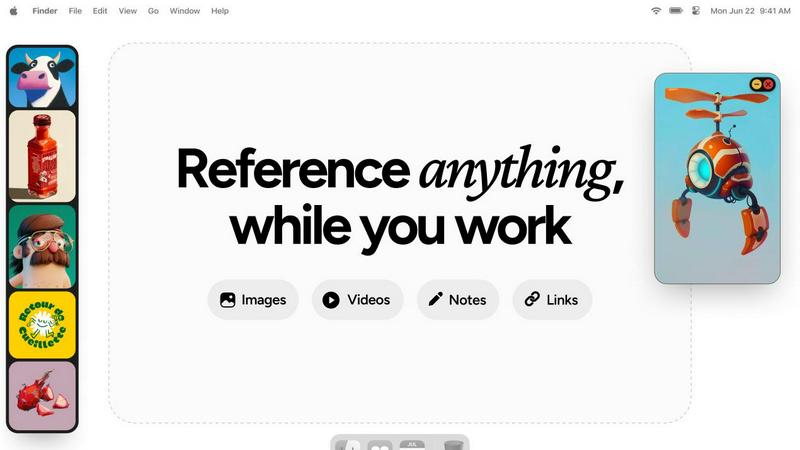
Refbox keeps your images and notes visible above your workspace for instant reference.
Last updated: February 28, 2026
Visual Comparison
HeyVid

Refbox
Feature Comparison
HeyVid
Text to Video
Transform your written content into engaging videos with the Text to Video feature. Simply input your text, and watch as HeyVid creates a visually stunning video that captures your message in a compelling format. This feature is perfect for marketers looking to present information dynamically.
Image to Video
With the Image to Video functionality, you can take still images and bring them to life. By adding motion and effects, HeyVid allows you to create captivating videos from your existing images, enhancing your storytelling capabilities and making your content more engaging.
AI Voice Generation
HeyVid’s AI Voice feature offers realistic voiceovers that can be integrated into your videos. Choose from various voice options and languages to deliver your message effectively. This feature is essential for educators and creators who wish to add a professional touch to their content.
AI Music Integration
Enhance your visuals with the AI Music feature, allowing you to select background tracks that perfectly match the tone of your video. This capability ensures that your content resonates emotionally with your audience and elevates the overall viewing experience.
Refbox
Always-on-Top Floating Frames
Keep your inspiration literally in sight. Pin images, videos, GIFs, and notes in resizable frames that float above every other application on your desktop. This means no more alt-tabbing or window juggling. You can minimize frames to peek at apps behind them or lock them in place to work directly over your reference, ensuring your focus stays razor-sharp on the task at hand without ever losing sight of your inspiration.
Infinite Canvas & Instant Collections
Organize your visual chaos into a serene, productive workspace. Refbox provides an infinite canvas to lay out all your references at once for a comprehensive mood board view, or flip through them like a slideshow for quick comparisons. You can create multiple, separate collections (like "Character Design" or "UI Inspo") and swap between them instantly with a single click, keeping every project neatly organized and ready in seconds.
Advanced Media Controls & Utilities
Go beyond simple viewing with a suite of powerful creative utilities. Scrub through video and GIFs frame-by-frame for perfect timing analysis. Use the built-in color picker on any media to grab and copy hex codes instantly. Crop images to focus on details, take direct screenshots of websites by pasting a URL, and even view SVG files as images. These little touches are designed to save you hours of tedious work.
Markdown Notes & Smart Shortcuts
Jot down ideas, instructions, or checklists without ever leaving your creative app. Refbox's notes support markdown for rich text styling, making them powerful and organized. Full control is at your fingertips with extensive keyboard shortcuts—use arrow keys to swap references, quick keys to show/hide your entire Refbox, and more. This level of control creates a frictionless, fast-paced workflow that feels like second nature.
Use Cases
HeyVid
Social Media Content Creation
HeyVid is a game-changer for social media marketers. Create eye-catching videos and images tailored for platforms like Instagram, Facebook, and TikTok. The ability to generate content quickly helps maintain a consistent posting schedule and engage your audience effectively.
Educational Videos
Educators can utilize HeyVid to produce informative and engaging tutorials or presentations. With the ability to create videos from scripts, instructors can enhance their teaching materials, making learning more interactive and enjoyable for students.
Marketing Campaigns
For businesses looking to launch marketing campaigns, HeyVid offers the perfect solution. Generate professional-grade promotional videos that capture attention and convey brand stories in a visually appealing manner. This can significantly boost customer engagement and conversion rates.
Crowdfunding Initiatives
If you are looking to fund your project, HeyVid can help create compelling crowdfunding videos. Use the platform to showcase your vision and goals through engaging visuals, encouraging potential backers to support your campaign with confidence.
Refbox
3D Modeling & Concept Art
For 3D artists and concept designers, visual accuracy is everything. Refbox allows you to pin orthographic views, texture references, and mood boards directly over your modeling software like Blender or ZBrush. You can lock reference frames and work behind them, compare anatomy images side-by-side, and step through GIFs frame-by-frame to study motion, all without breaking your immersive creative state.
UI/UX & Web Design
Streamline your design process by keeping style guides, component libraries, and competitor screenshots in floating windows right next to Figma or Sketch. Quickly color-pick from references, take instant screenshots of live websites for inspiration, and use markdown notes to hold user stories or design specs. This keeps all critical information visible, boosting both speed and consistency in your work.
Animation & Motion Graphics
Animators require precise timing and constant visual feedback. With Refbox, you can pin storyboards, video reference clips, and animation cycles in a floating window above your timeline in After Effects or Toon Boom. The ability to scrub through video references frame-by-frame is a game-changer for nailing complex movements, ensuring your creative vision translates perfectly into motion.
Digital Illustration & Painting
Illustrators and digital painters can create the perfect, clutter-free digital studio. Keep your inspiration images, color palettes, and brush settings visible without covering your canvas in Photoshop or Procreate. Use collections to separate references for different projects like character design and backgrounds, and utilize the pixel-perfect rendering mode to study pixel art without blurry scaling.
Pricing Comparison
HeyVid
HeyVid is currently offering a limited-time deal with annual plans at 50% off. This includes access to all features, enabling users to generate high-quality videos and images at a fraction of the cost. Don't miss out on this opportunity to elevate your content creation experience!
Refbox
Refbox operates on a simple, one-time purchase model, not a subscription. This means you pay once and own the Pro version forever, including all future updates. The free version provides access to the core floating frame functionality, perfect for trying it out. The one-time Pro upgrade unlocks the full suite of advanced features like unlimited collections, markdown notes, GIF frame control, the color picker, and more, making it a valuable, permanent investment in your creative toolkit.
Overview
About HeyVid
HeyVid is your all-in-one AI video and image generator that redefines the way content creators, marketers, and businesses produce high-quality visuals. With its intuitive interface, HeyVid allows users to transform text into captivating videos and images effortlessly. Whether you're a seasoned professional or just starting your content creation journey, this platform caters to all skill levels. By harnessing the power of advanced AI models, HeyVid enables the rapid generation of stunning visuals, tailored to your unique vision. From social media posts to professional marketing materials, HeyVid is designed to streamline your creative workflow, making the process fast, simple, and incredibly professional. Its diverse array of features, including text-to-video, image-to-video, and voice generation, positions it as a powerful tool for entrepreneurs, educators, and marketers alike. Join the growing community of satisfied users and elevate your content creation game with HeyVid.
About Refbox
Refbox is the game-changing floating reference app that's taking the creative world by storm. Designed for professionals who can't afford distractions, it eliminates the endless tab-switching and folder-digging that kills your creative flow. Imagine having all your inspiration—images, GIFs, videos, and notes—pinned in resizable, always-on-top windows right over your work. Whether you're deep in a 3D model, fine-tuning an animation, crafting a UI, or sketching concept art, your references are instantly accessible, keeping you in the zone. Creatives from graphic designers to pixel artists are raving about how it has made their process "100x times easier" and given them "seamless access" to everything they need. With the ability to pull media from anywhere, organize it into collections, and use powerful tools like frame-by-frame GIF scrubbing and markdown notes, Refbox transforms a cluttered desktop into a streamlined, focused command center. It's not just a tool; it's the ultimate companion for anyone who wants their creativity to flow without interruption.
Frequently Asked Questions
HeyVid FAQ
How does HeyVid work?
HeyVid uses advanced AI technology to transform text, images, and voice prompts into high-quality videos and images. Simply choose a model, input your content, and let the AI handle the rest.
Can I customize the videos created with HeyVid?
Yes, HeyVid allows extensive customization options. Users can adjust aspects like video length, resolution, and add voiceovers or music to ensure the final product aligns with their vision.
What types of content can I create with HeyVid?
You can create a wide range of content, including promotional videos, educational tutorials, social media posts, and crowdfunding pitches. The platform supports various formats, making it versatile for different needs.
Is there a limit to how many videos I can generate?
While there are credits required for video generation, HeyVid offers various pricing plans that allow users to create multiple videos based on their needs. Check the website for details on plans and credits.
Refbox FAQ
What platforms does Refbox support?
Refbox is currently available for macOS and Windows, providing a seamless, native experience on both major desktop operating systems. This ensures that whether you're on a MacBook or a Windows PC, you can enjoy the same powerful, floating reference workflow that is revolutionizing how creatives work.
How do I get media into Refbox?
Adding references is incredibly flexible and fast. You can drag and drop files directly from your computer, paste image URLs or website links from your clipboard (which Refbox can automatically screenshot), or simply copy an image from anywhere (like a browser) and paste it directly into a new frame. It's designed for the way creatives naturally gather inspiration.
Can I use Refbox with multiple monitors?
Absolutely! Refbox is built for professional setups. Your floating reference frames can be moved and placed on any monitor in your workspace. This allows you to dedicate one screen entirely to your Refbox canvas and collections while using your primary display for your main creative application, creating an expansive and highly efficient workflow.
Is there a free trial or version?
Yes, Refbox offers a free version with core functionality so you can experience the transformative workflow firsthand. For access to advanced features like unlimited collections, markdown notes, the advanced color picker, and website screenshotting, you can upgrade to the Pro version with a simple, one-time purchase, not a subscription.
Alternatives
HeyVid Alternatives
HeyVid is an innovative all-in-one AI video and image generator that caters to users looking for fast, simple, and professional content creation solutions. It falls within the productivity and management category, making it an essential tool for marketers, content creators, and businesses aiming to enhance their visual storytelling. As users explore their options, they often seek alternatives to HeyVid for various reasons, including pricing concerns, specific feature sets, or compatibility with certain platforms. When searching for an alternative, it’s important to consider factors such as ease of use, the quality of output, versatility in content types, and customer support. Users should also evaluate the pricing structure to ensure it aligns with their budget while still meeting their creative needs. The right alternative should not only offer comparable features but also enhance the user experience and facilitate seamless content generation.
Refbox Alternatives
Refbox is a popular floating reference app in the productivity and management category, designed to keep inspiration visible above your workspace. It has become a go-to tool for creatives seeking to streamline their workflow and eliminate constant window switching. Users often explore alternatives for various reasons, such as budget constraints, the need for specific features not offered, or compatibility with different operating systems. Finding the right tool depends on your unique workflow and requirements. When evaluating other options, consider key factors like the ability to pin content on top of other apps, support for different media types, organizational features, and overall ease of use. The goal is to find a solution that seamlessly integrates into your creative process without causing disruption.