
Pipeline vs Playwriter
Side-by-side comparison to help you choose the right AI tool.

Pipeline
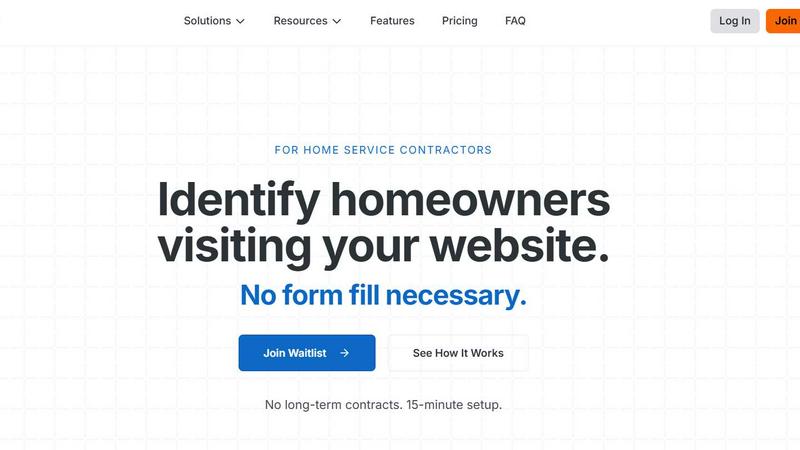
Unlock 11x more leads by identifying anonymous website visitors with Pipeline, no forms needed.
Last updated: February 28, 2026

Playwriter
Playwriter transforms your Chrome into a powerful AI-controlled browser, leveraging existing sessions for seamless automation and real-time debugging.
Last updated: March 18, 2026
Visual Comparison
Pipeline
Playwriter

Feature Comparison
Pipeline
Visitor Identification
Pipeline’s core feature is its ability to identify visitors to your website, capturing essential contact information like names, addresses, and emails without requiring them to fill out a form. This means you can engage with potential leads who might otherwise remain anonymous.
Automated CRM Integration
Pipeline seamlessly integrates with popular CRM platforms such as ServiceTitan, HubSpot, Jobber, and Pipedrive. This ensures that all captured leads are automatically pushed to your CRM, simplifying your workflow and allowing for immediate follow-up actions.
Real-Time Notifications
Stay informed with real-time notifications through Slack and email whenever a visitor is identified. This feature ensures that you never miss an opportunity to reach out to potential leads and can act quickly to convert them into customers.
Hot Leads and Hot Pages
Pipeline provides insights into which pages on your website are generating the most interest and which leads are the hottest. This allows you to focus your marketing efforts on high-engagement areas, maximizing your chances of conversion.
Playwriter
Seamless Browser Integration
Playwriter connects your AI agents to your live Chrome session, complete with all your extensions, logins, and cookies. This eliminates the hassle of managing multiple accounts and the risk of bot detection, providing a seamless browsing experience.
Full Automation API
With Playwriter, agents gain access to the complete Playwright API through a single execution tool. This means no wrappers or schema bloat, allowing your agents to execute any Playwright code with ease and efficiency.
Real-Time Collaboration
Experience true collaboration with Playwriter. You can see everything your agent does in real time, allowing for instant human intervention when needed. Whether it's solving captchas or navigating consent walls, you're always in control.
Advanced Debugging and Snapshots
Playwriter includes a powerful debugger with breakpoints and live code editing, plus accessibility snapshots that are significantly smaller in size. This allows for quick diagnostics and ensures that your agents can efficiently handle tasks without excessive memory usage.
Use Cases
Pipeline
HVAC Contractors
HVAC contractors can leverage Pipeline to capture details of visitors who are browsing their services online. With the ability to identify potential clients, they can follow up with targeted email campaigns, significantly increasing their chances of booking appointments.
Plumbing Services
For plumbing companies, Pipeline offers a solution to convert anonymous traffic into actionable leads. Contractors can use the information captured to reach out and provide quotes or schedule inspections, ensuring they don’t miss out on potential business.
Roofing Businesses
Roofing contractors can utilize Pipeline to generate leads from homeowners actively searching for roofing services. By capturing and engaging these leads, they can enhance their outreach and improve their chances of securing jobs.
Landscaping Companies
Landscaping businesses can benefit from Pipeline by turning website visitors into leads without requiring form submissions. This enables them to send personalized offers and updates to interested homeowners, driving more business through targeted outreach.
Playwriter
Automated Testing
Developers can utilize Playwriter to automate browser testing, allowing agents to run through test cases in real-time while maintaining full access to existing browser sessions for accurate results.
Data Scraping
With Playwriter, data scientists can automate the collection of web data without the usual hurdles of logging in or dealing with bot detection, making it easier to gather insights from various online sources.
User Experience Improvements
UX researchers can leverage Playwriter to simulate user interactions in real time, allowing them to observe how agents navigate sites and identify areas for improvement without losing context.
Task Automation
Businesses can streamline repetitive online tasks such as form submissions, data entry, or content gathering by deploying Playwriter, saving time and resources while ensuring accuracy in execution.
Overview
About Pipeline
Pipeline is an innovative tool designed specifically for home service companies that enables businesses to identify anonymous website visitors, increasing the potential for lead generation. Unlike traditional methods that rely on form submissions, Pipeline captures valuable visitor information such as names, emails, and addresses without requiring any form fill-out. This capability allows companies to tap into an average of 40% of their website traffic, significantly enhancing the lead conversion rate compared to the industry average of just 4%. By integrating seamlessly with existing CRM systems, Pipeline empowers contractors to automate their outreach efforts, facilitating email campaigns, call scheduling, text reminders, postcard drops, and even door knocking. The result? A fully optimized pipeline filled with qualified leads, ready to convert into loyal customers. With a simple setup process and no long-term contracts, Pipeline is a game-changer for contractors seeking to maximize their online presence and capture missed opportunities.
About Playwriter
Playwriter is a groundbreaking tool designed to empower AI agents with unparalleled access to your actual browser session. Unlike traditional AI agents that operate in isolated environments with no access to personal logins, extensions, or cookies, Playwriter allows agents to work seamlessly within your existing Chrome setup. This innovative Chrome extension and CLI provide full automation capabilities, enabling agents to perform tasks as if they were you. With features like accessibility snapshots, a comprehensive debugger, and network interception, Playwriter enhances productivity while ensuring a collaborative experience. Ideal for developers, testers, and anyone looking to automate repetitive web tasks, Playwriter not only saves time but also minimizes bot detection risks, making it a must-have tool for modern web automation.
Frequently Asked Questions
Pipeline FAQ
How does Pipeline identify my website visitors?
Pipeline uses a simple line of code that you add to your website’s header. This script identifies visitors’ names, addresses, and emails in real-time, allowing you to capture leads without any form requirements.
Is there a long-term contract for using Pipeline?
No, Pipeline does not require any long-term contracts. You can start using the service with a straightforward setup process and enjoy the benefits without any long-term commitments.
What types of CRM systems does Pipeline integrate with?
Pipeline integrates with several popular CRM platforms, including ServiceTitan, HubSpot, Jobber, and Pipedrive. It also offers Zapier integrations, allowing for further customization and connectivity with other tools.
How quickly can I start seeing results with Pipeline?
Many users report seeing results almost immediately after implementation. Once the script is installed, you can begin capturing visitor information and engaging with leads, leading to increased conversions right away.
Playwriter FAQ
How does Playwriter ensure security?
Playwriter operates entirely on your local machine, meaning no data is sent to remote servers. The extension creates a secure WebSocket connection, ensuring your browsing session remains private.
Can Playwriter work with other programming environments?
Yes, Playwriter is designed to work seamlessly with various MCP clients, including Cursor, Claude, VS Code, and others, enhancing its versatility in different programming environments.
Is there any technical support available for Playwriter?
Playwriter is open-source and MIT licensed, which means you can access community support through forums and GitHub. Additionally, documentation is available to help you get started quickly.
What platforms does Playwriter support?
Currently, Playwriter is a Chrome extension and is designed for use with environments that can run Playwright, ensuring it fits well within modern web development workflows.
Alternatives
Pipeline Alternatives
Pipeline is a cutting-edge marketing tool designed to identify anonymous traffic on your website, enabling home service companies to capture more leads. By recognizing up to 40% of website visitors who do not fill out forms, Pipeline dramatically increases the volume of potential contacts flowing into your sales pipeline—up to ten times the standard conversion rates. This specialized software seamlessly integrates with CRM systems, enhancing communication through various channels like emails, calls, texts, and even direct mail campaigns. Users often seek alternatives to Pipeline for various reasons, including pricing considerations, the need for specific features, or compatibility with existing platforms. When searching for an alternative, it's essential to evaluate factors such as lead identification capabilities, ease of integration with your current tools, and the overall return on investment. The right choice will not only meet your immediate marketing needs but also support your long-term growth strategy.
Playwriter Alternatives
Playwriter is an innovative automation tool designed to enhance user control over Chrome using AI, specifically through Command Line Interface (CLI) or Multi-Client Protocol (MCP). As part of the automation category, it allows users to leverage their actual browser sessions, complete with existing logins and extensions, thereby providing a seamless experience that AI agents typically lack. Users often seek alternatives to Playwriter due to various factors such as pricing, specific feature sets, or compatibility with different platforms. When exploring alternatives, it's essential to consider aspects like ease of use, integration capabilities, and any additional functionalities that may enhance your automation tasks. A thorough understanding of your needs will guide you in selecting the right tool that aligns with your operational requirements.