
MemMachine vs Prompt Builder
Side-by-side comparison to help you choose the right AI tool.

MemMachine
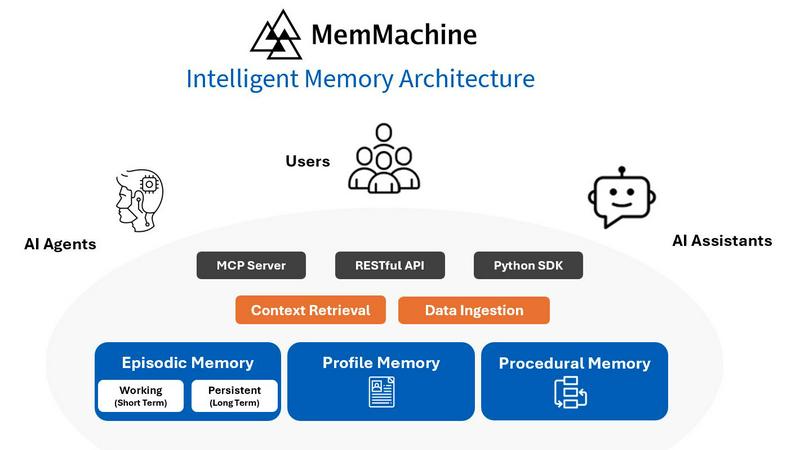
MemMachine empowers AI agents with lasting memory for personalized interactions that evolve with user preferences.
Last updated: February 28, 2026

Prompt Builder
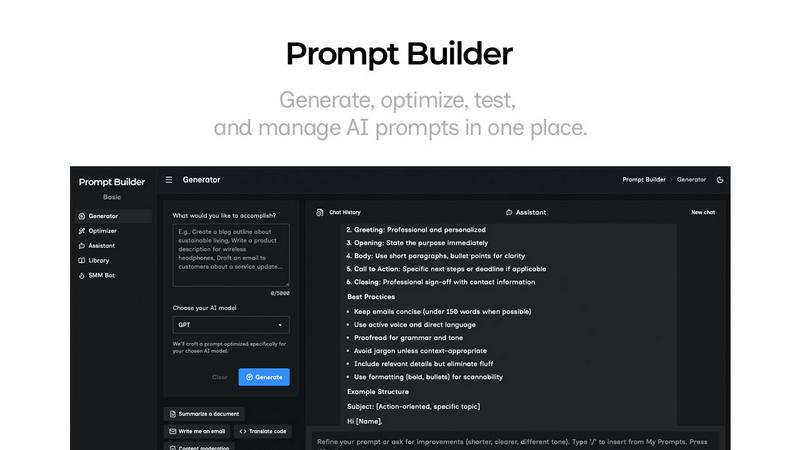
Generate, optimize, test, and manage AI prompts in one place. Turn an idea into a ready-to-use prompt in seconds.
Visual Comparison
MemMachine
Prompt Builder
Overview
About MemMachine
MemMachine is an innovative open-source memory layer that revolutionizes the way AI agents and applications operate, transforming them into intelligent, personalized assistants. Unlike traditional AI systems that forget interactions after each session, MemMachine empowers applications to learn, store, and recall vital information from past engagements. This advanced capability enhances user interactions by providing context and continuity, allowing for a more intuitive and customized experience. Ideal for developers and teams aiming to create sophisticated AI solutions, MemMachine builds a persistent memory across various agents and large language models, adapting to individual user preferences and behaviors. This transformational tool is perfectly suited for diverse sectors such as healthcare, customer service, and beyond, enabling organizations to deliver remarkably personalized experiences that evolve over time.
About Prompt Builder
Prompt Builder is a prompt engineering workspace for writing, testing, and saving prompts. Describe the task in plain English, and it helps you create a prompt that matches the model you choose. Start with a draft, refine it in chat, save or pin versions, then run them when you are ready. It works with GPT, Claude, Gemini, Llama, Mistral, DeepSeek, Grok, Perplexity, and more. You also get an Optimizer, an assistant for quick tests, and a library of reusable prompts and templates from the community. Turn an idea into a ready-to-use prompt in seconds. Refine it in chat, save it to your Library, and run it anytime.