
Meme Builder AI vs Prompt Builder
Side-by-side comparison to help you choose the right AI tool.

Meme Builder AI
Join 15 million meme makers and instantly create viral content with AI from text or 1000+ templates.
Last updated: February 28, 2026

Prompt Builder
Generate, optimize, test, and manage AI prompts in one place. Turn an idea into a ready-to-use prompt in seconds.
Visual Comparison
Meme Builder AI

Prompt Builder
Overview
About Meme Builder AI
Meme Builder AI is the internet's viral content engine, exploding in popularity with over 1 million signups and 15 million AI memes generated. It's the ultimate free AI meme generator and meme maker online, designed to transform anyone into a meme lord in seconds. Forget complicated editing software or needing design skills. This tool is built for the fast-paced world of internet culture, serving social media managers, marketers, students, content creators, and casual users alike. You just describe your meme idea, and the platform's powerful AI takes over, intelligently selecting the perfect trending template from a massive library and generating witty, context-aware captions that are guaranteed to hit the mark. It's more than just a generator; it's your shortcut to relevance, empowering you to create professional, hilarious, and share-ready memes instantly to react to pop culture, spice up campaigns, or just have fun with friends. Join the conversation and start creating viral content today.
About Prompt Builder
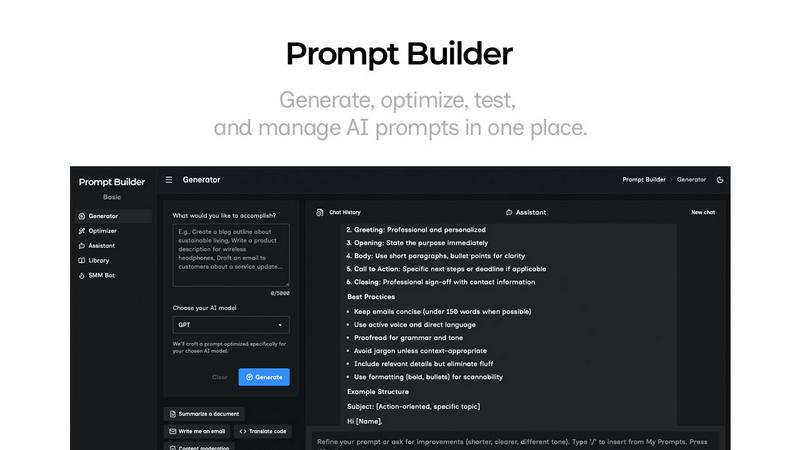
Prompt Builder is a prompt engineering workspace for writing, testing, and saving prompts. Describe the task in plain English, and it helps you create a prompt that matches the model you choose. Start with a draft, refine it in chat, save or pin versions, then run them when you are ready. It works with GPT, Claude, Gemini, Llama, Mistral, DeepSeek, Grok, Perplexity, and more. You also get an Optimizer, an assistant for quick tests, and a library of reusable prompts and templates from the community. Turn an idea into a ready-to-use prompt in seconds. Refine it in chat, save it to your Library, and run it anytime.