
Melograph vs Sovideo
Side-by-side comparison to help you choose the right AI tool.

Join thousands of musicians turning tracks into viral videos instantly with Melograph.
Last updated: February 28, 2026

Join thousands creating viral AI videos and images with top models like Sora 2 and Veo 3 in one powerful platform.
Last updated: February 28, 2026
Visual Comparison
Melograph

Sovideo
Feature Comparison
Melograph
Audio-Reactive Waveform Visuals
Watch your music come to life instantly. The moment you upload your audio track, Melograph's engine generates a dynamic, reacting waveform that pulses and moves in perfect sync with your beat and melody. This isn't a static image; it's a living visualization that makes your sound a visual experience, captivating viewers from the very first second.
Premium, Style-Specific Templates
Choose from a curated library of beautifully designed templates that do the creative heavy lifting for you. Whether your track is a minimal lo-fi beat, a cinematic orchestral piece, a retro synthwave anthem, or a futuristic bass drop, there's a template crafted to match that exact vibe. This ensures your visuals always complement and enhance your music's aesthetic.
No-Edit, Browser-Based Simplicity
The entire process happens right in your web browser—no software downloads, no upload waits for rendering. The interface is built for speed, not complexity. You select, customize, and export without ever touching a timeline. It's so intuitive that if you can pick a template and type a title, you can create professional visuals.
Platform-Optimized, Watermark-Free Exports
Get ready-to-post videos in 1080p quality, formatted to look flawless on every platform. The text stays readable on mobile, the motion is smooth, and the final MP4 is delivered without any ugly watermarks. All plans include commercial use rights, so you can use your visuals for releases, promotions, and monetized content without worry.
Sovideo
All-in-One AI Powerhouse
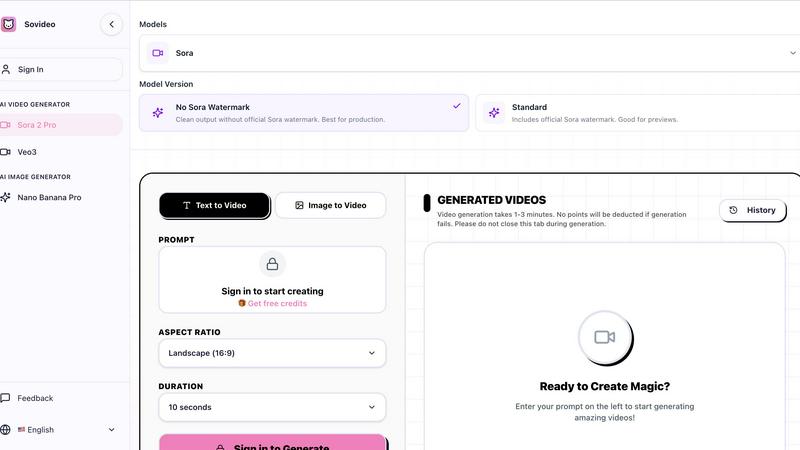
Why switch between ten different apps? Sovideo consolidates the world's top-tier AI models into a single, seamless dashboard. Generate breathtaking videos with Sora 2 or Veo 3, then create matching promotional images with Seedream 4.5 or Nano Banana Pro—all without ever leaving the tab. This unified approach streamlines your entire creative workflow, making professional-grade visual production accessible and incredibly efficient for projects of any scale.
Browser-Based, Zero-Installation Magic
Get started in seconds, not hours. Sovideo's entirely web-based platform means there's absolutely no software to download, install, or update. Access the full suite of powerful AI tools from any computer with an internet connection. This eliminates technical barriers and setup friction, letting you focus purely on creation. Your projects and generation history are managed in the cloud, offering flexibility and letting your creativity flow from anywhere.
Sora 2-Ready Professional Workflows
Sovideo is built for the Sora 2 era, providing specialized tools to harness its full potential. Go beyond basic generation with features designed for production, like the option for clean, watermark-free outputs perfect for final client delivery. The platform helps you iterate quickly, manage prompts, and compare results, giving you a structured environment to "ship Sora videos" faster and with higher quality than anywhere else.
Creator-Centric Community & Tools
Sovideo is more than software; it's a thriving hub for creators. The platform showcases real user creations, providing endless inspiration and social proof of what's possible. Built-in features like generation history and easy iteration tools allow you to refine your prompts and build upon your successes, fostering a cycle of continuous improvement and viral content creation, just like the top creators sharing their wins on social media.
Use Cases
Melograph
Indie Artist Music Releases
Independent musicians can instantly create a compelling visualizer for their new single or EP release. This provides a professional asset for YouTube, streaming platform canvases, and social media announcements, helping the music stand out and engage listeners visually from day one, all without a budget for a video editor.
Social Media Content for Producers & DJs
Producers and DJs can quickly turn snippets of their latest tracks, drops, or mixes into eye-catching videos for TikTok, Instagram Reels, and YouTube Shorts. This constant stream of fresh, audio-synced content is perfect for building hype, showcasing skills, and growing an audience on visual-first platforms.
Label & Artist Marketing Campaigns
Record labels and marketing teams can ensure consistent, high-quality visual branding across their entire roster. By using Melograph, they can rapidly produce uniform visualizers for multiple artists and releases, maintaining a professional standard and cohesive look for all promotional materials efficiently.
Engaging Visual Backdrops for Live Streams
Streamers and performers can use Melograph to generate unique, real-time visual backdrops for their live streams on Twitch, YouTube, or Instagram Live. By using an instrumental track or their streaming audio, they can create a dynamic, ever-changing visual environment that enhances the viewer experience.
Sovideo
Viral Social Media & Short-Form Content
Dominate TikTok, Instagram Reels, and YouTube Shorts. Creators are using Sovideo to rapidly produce eye-catching, trend-aligned ASMR videos, satisfying loops, and narrative clips that regularly garner hundreds of thousands of views. The speed from idea to finished video (often under 15 minutes) allows for rapid testing and posting, making it the ultimate tool for building a viral social media presence and monetizing content quickly.
Professional Marketing & Advertising
Revolutionize your content marketing strategy. Marketers and agencies use Sovideo to generate high-quality ad concepts, product visualizations, and branded video content at a fraction of the traditional cost and time. Create multiple variations for A/B testing, produce assets for different platforms, and maintain a consistent visual brand—all with the power of leading AI models, enabling small teams to compete with large agency outputs.
Independent Film & Concept Art
Democratize filmmaking and visual storytelling. Aspiring directors and artists are leveraging Sovideo to produce full-scale movie scenes, proof-of-concept trailers, and detailed concept art. By translating written scripts or storyboards into moving visuals, creators can pitch ideas more effectively, visualize complex scenes, and even produce entire indie films, as showcased by users creating 70-minute features in mere months.
Rapid Prototyping & Creative Ideation
Accelerate the brainstorming and prototyping phase for any visual project. Designers, product developers, and content teams use Sovideo to quickly visualize ideas, create mood boards, and generate multiple artistic directions from simple text descriptions. This rapid iteration capability fuels creativity, helps align teams, and turns abstract concepts into tangible visuals faster than ever before.
Overview
About Melograph
Stop wasting hours in complex video editors. Melograph is the viral, web-based music visualizer that's taking over social feeds, designed exclusively for musicians and creators. It's the secret weapon for indie artists, producers, labels, and DJs who need scroll-stopping, audio-reactive videos but don't have the time or skills for traditional editing. Forget timelines and plugins. With Melograph, you simply pick a stunning premium template—from chill and cinematic to retro and futuristic vibes—upload your track, add your artist name and song title, and export a professional, high-quality MP4 in minutes. Its core value is undeniable: it streamlines the entire visual creation process, letting you focus on your music while effortlessly generating captivating content that looks consistent and premium across TikTok, Instagram Reels, YouTube Shorts, and more. Join thousands of creators who are ditching the headache and making visuals that truly feel like their sound.
About Sovideo
Sovideo is the viral, all-in-one AI content creation suite that's taking the creator world by storm. It's not just another AI tool; it's the unified workspace where cutting-edge image and video generation converge, empowering everyone from solo creators to marketing teams to produce stunning visual content at lightning speed. Forget juggling multiple subscriptions and complex software—Sovideo brings the industry's most powerful models like OpenAI's Sora 2, Google's Veo 3, Nano Banana Pro, and Seedream 4.5 directly to your browser. No downloads, no technical headaches. Just describe your vision with a text prompt or upload an image, and watch as the platform transforms it into cinematic videos, hyper-realistic images, and engaging social media clips. With thousands of creators already using it to generate viral TikToks, full-length movies, and professional marketing assets, Sovideo is dramatically slashing production time and costs. It’s the secret weapon for the new generation of digital storytellers who need to ship high-quality content faster than ever. Join the movement and see why the community is buzzing—your next viral hit is just a prompt away.
Frequently Asked Questions
Melograph FAQ
Do I need video editing experience to use Melograph?
Absolutely not. Melograph is specifically designed for musicians, not video editors. The process is as simple as choosing a template, uploading your audio, and adding your text. If you can do that, you can create a stunning visualizer in minutes. No technical skills are required.
Will the exported videos work for TikTok, Reels, and Shorts?
Yes, 100%. Melograph exports are optimized for all major social media platforms. The videos are produced in high-quality 1080p with formats and aspect ratios that look perfect on TikTok, Instagram Reels, YouTube Shorts, and other platforms, ensuring your content is always mobile-ready.
Can I use Melograph for multiple songs?
Yes, you can create visualizers for as many songs as you like within the editor. Your ability to export the final MP4 video depends on your chosen plan. The Pay-As-You-Go plan provides one export credit, while subscription plans offer 25 export credits per month for multiple songs.
Is Melograph really web-based, and do I need to upload my audio?
Yes, Melograph runs entirely in your web browser—no download required. Your audio is processed locally in your browser for speed and privacy; it is not uploaded to a server. This means faster rendering times and peace of mind regarding your unreleased music files.
Sovideo FAQ
What AI models does Sovideo support?
Sovideo integrates multiple state-of-the-art AI models to give you the best possible output for any task. This includes OpenAI's Sora 2 and Google's Veo 3 for advanced video generation, alongside top image models like Seedream 4.5 and Nano Banana Pro. This multi-model approach ensures you have the right tool for creating everything from photorealistic images to cinematic, high-motion videos.
Do I need a Sora 2 API key to use Sovideo?
No, you do not need your own API key. Sovideo provides direct access to Sora 2 and all its other integrated models through its platform subscription. Simply sign up for a Sovideo plan, and you can start generating videos with Sora 2 immediately through their user-friendly interface, which includes specialized features for getting the most out of the model.
How long does it take to generate a video?
Video generation times are typically between 1 to 3 minutes, depending on the model, duration, and complexity of your prompt. The platform will show you the estimated time, and it's recommended not to close the browser tab during the process. Importantly, Sovideo does not deduct your credits if a generation attempt fails, ensuring you only pay for successful creations.
Can I create videos for commercial use?
Yes, absolutely. Sovideo is designed for professional and commercial production. A key feature is the ability to generate videos using Sora 2 without the official Sora watermark, providing a clean output that is perfect for client work, advertising, and monetized social media content. Always check the specific terms of service for the latest details on commercial licensing.
Alternatives
Melograph Alternatives
Melograph is a viral web-based music visualizer that instantly transforms audio tracks into stunning, professional videos. It belongs to the category of automated video creation tools, designed specifically for musicians and creators who want to skip the complexity of traditional editing software. Users often search for alternatives for a few key reasons. Some need different pricing models or free tiers, while others seek specific features, templates, or platform compatibility that might better fit their unique creative workflow or distribution needs. It's a common step in finding the perfect tool. When evaluating other options, focus on core needs: the quality and style of visual templates, export resolution, ease of use, and how well it integrates with your music promotion strategy. The goal is to find a tool that saves you time while delivering visuals that truly amplify your sound and brand identity.
Sovideo Alternatives
Sovideo is a powerful, all-in-one AI platform that's taking the creator world by storm, specializing in generating stunning images and videos from simple text or image prompts. It sits at the exciting intersection of AI art and video generation, offering a streamlined, browser-based workspace that's beloved by marketers, social media teams, and digital artists alike. Even with its viral popularity, users often explore other options. Common reasons include budget constraints, the need for a different feature mix like more advanced editing tools or specific AI models, or simply a preference for a different user interface. Some creators might be looking for a platform with a stronger focus on either images or videos, rather than a combined tool. When searching for a different platform, it's crucial to identify your core needs. Consider the primary type of content you create, the importance of specific AI models, your budget for subscriptions or credits, and how much you value an intuitive, no-download workflow. The best choice always aligns with your specific creative workflow and project demands.