
LessonPlanGenerator vs YouTube to Transcript
Side-by-side comparison to help you choose the right AI tool.

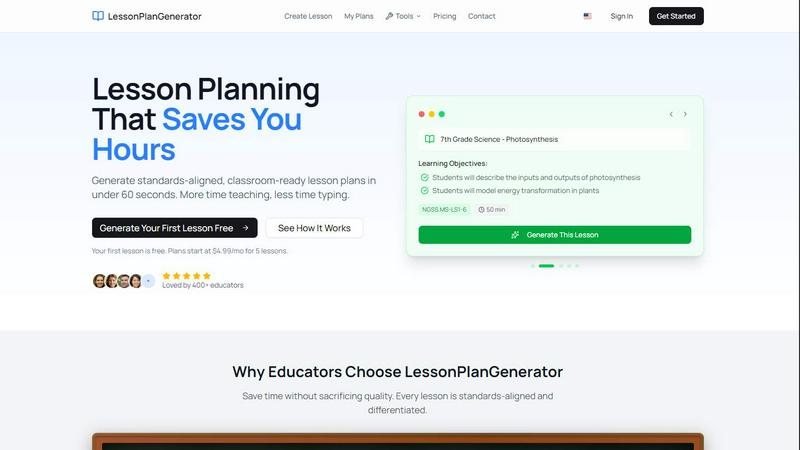
LessonPlanGenerator
Generate standards-aligned lesson plans in under 60 seconds, giving teachers more time to inspire and teach.
Last updated: February 28, 2026

YouTube to Transcript
Instantly extract free, accurate transcripts from any YouTube video without limits or sign-up in over 100 languages.
Last updated: March 3, 2026
Visual Comparison
LessonPlanGenerator
YouTube to Transcript

Feature Comparison
LessonPlanGenerator
60-Second Generation
Teachers can quickly generate complete lesson plans in just 60 seconds by entering essential details such as topic, grade, and subject. This rapid generation process eliminates the frustration of staring at blank templates, giving educators more time to prepare for effective teaching.
Standards Aligned
LessonPlanGenerator is built with integrated standards alignment, including Common Core State Standards (CCSS), Next Generation Science Standards (NGSS), and various state standards. Visual alignment checks help educators identify gaps before administrative reviews, ensuring compliance and educational quality.
Differentiation Built In
The platform automatically incorporates differentiation strategies into every lesson plan, accommodating English Language Learners (ELL), students with Individualized Education Programs (IEPs), and gifted students. This feature helps teachers address the diverse needs of their classrooms without additional effort.
Export Anywhere
With a simple click, educators can export their lesson plans to Google Docs or download them as PDFs. This feature ensures that lesson plans are formatted and ready for immediate use, whether for a substitute teacher or to present during administrative observations.
YouTube to Transcript
Completely Free
Enjoy unlimited access to YouTube to Transcript without any hidden fees or premium tiers. This service is entirely free forever, making it accessible to anyone who needs it.
Multi-language Support
With the ability to translate transcripts into over 125 languages, YouTube to Transcript caters to a diverse global audience. This feature ensures that language barriers are eliminated, allowing users from various backgrounds to benefit from the service.
No Video Duration Limit
Whether you want to transcribe a short clip or a lengthy documentary, YouTube to Transcript has no restrictions on video duration. This flexibility allows users to extract text from any video, regardless of length.
Clean Formatting
Transcripts are exported in a clean and organized format, making them perfect for SEO optimization, note-taking, or repurposing content for different platforms. This feature helps users maximize their productivity.
Use Cases
LessonPlanGenerator
Classroom Teachers
Classroom teachers can leverage LessonPlanGenerator to create tailored lesson plans that meet their specific curriculum needs. By generating high-quality plans quickly, they can focus more on student engagement and less on administrative tasks, enhancing their overall teaching effectiveness.
Homeschool Families
Homeschool educators benefit from the flexibility of LessonPlanGenerator, which allows them to create lesson plans that suit their family’s unique schedule. With multiple grade levels supported under one subscription, families can easily adapt their teaching methods without being locked into a rigid curriculum.
Instructional Coaches
Instructional coaches use LessonPlanGenerator to assist teachers in developing quality lesson plans that are standards-aligned. By offering support in planning, coaches can facilitate professional development and improve teaching strategies among their peers.
Substitute Teachers
Substitute teachers can rely on LessonPlanGenerator to access ready-made lesson plans that align with the curriculum and meet specific classroom standards. This feature ensures that students receive uninterrupted learning experiences, even in the absence of their regular teacher.
YouTube to Transcript
Content Creation
Content creators can easily convert their YouTube videos into written format, enabling them to create blog posts, articles, and other content types without starting from scratch.
Academic Research
Students and researchers can utilize the tool to transcribe educational videos, lectures, and webinars, allowing for easier study and analysis of the material presented.
Accessibility Improvements
By providing transcripts for videos, creators can enhance accessibility for hearing-impaired individuals or non-native speakers, fostering inclusivity in their audience.
Language Learning
Language learners can benefit from transcripts as they can read along while watching videos, improving their comprehension and vocabulary in the target language.
Overview
About LessonPlanGenerator
LessonPlanGenerator is an innovative AI-powered Software as a Service (SaaS) designed specifically for educators looking to streamline the process of creating lesson plans. This tool empowers teachers to generate high-quality, standards-aligned lesson plans in under 60 seconds, allowing them to focus more on teaching rather than the time-consuming task of planning. Unlike generic AI chatbots, LessonPlanGenerator adopts a curriculum-first approach, letting educators select their grade level, subject, state standards, time constraints, and classroom context for tailored results. Beyond lesson plans, it offers the ability to create assessments, rubrics, worksheets, and supporting materials, all aligned with the same educational standards. This comprehensive tool is ideal for K-12 teachers, substitute teachers, instructional coaches, and homeschool educators who desire efficiency, quality, and compliance with administrative requirements while minimizing the stress of lesson planning.
About YouTube to Transcript
YouTube to Transcript is a revolutionary online tool designed to simplify the way we interact with video content. This powerful utility allows users to convert any YouTube video into a high-quality, readable transcript in mere seconds. Whether you are a content creator looking to repurpose your videos into blog posts, a student needing to capture lectures for study, or a researcher delving into video-based data, this tool is crafted for you. The main value proposition lies in its sheer ease of use: simply paste the video's URL, click generate, and receive an accurate transcript instantly. With no registration required and its 100% free model, YouTube to Transcript has quickly become a popular choice among thousands of users worldwide. Say goodbye to tedious note-taking and hello to efficiency.
Frequently Asked Questions
LessonPlanGenerator FAQ
Is there a free option?
Yes, LessonPlanGenerator offers a free option where you can generate your first lesson at no cost. This allows educators to explore the platform without any commitment.
How does pricing work?
LessonPlanGenerator offers various subscription plans starting as low as $4.99 per month for five lessons. This flexible pricing structure allows educators to choose a plan that best suits their lesson planning needs.
What subjects and grades do you support?
LessonPlanGenerator supports a wide range of subjects and grade levels, specifically designed for K-12 education. This makes it versatile for various teaching contexts and subjects.
Which standards are supported?
The platform supports multiple standards, including Common Core State Standards (CCSS), Next Generation Science Standards (NGSS), and various state-specific standards, ensuring comprehensive alignment for lesson plans.
YouTube to Transcript FAQ
Is YouTube to Transcript free to use?
Yes, YouTube to Transcript is completely free to use with no hidden costs or subscription fees. You can generate as many transcripts as you need without any charge.
How do I get a transcript of a YouTube video?
To get a transcript, simply copy the URL of the YouTube video you want to transcribe, paste it into the input field on the website, and click the "Generate" button.
How long does it take to generate the transcript?
The transcript generation process is incredibly fast, typically taking only a few seconds. You will receive your transcript almost instantly after clicking the generate button.
Can I download the transcript?
Absolutely! Once the transcript is generated, you have the option to either copy the text directly to your clipboard or download it as a TXT file for easy access and storage.
Alternatives
LessonPlanGenerator Alternatives
LessonPlanGenerator is an innovative AI-powered lesson planning tool designed specifically for educators. It falls into the Education & Learning category and assists teachers in creating high-quality, standards-aligned lesson plans, assessments, and rubrics in a matter of minutes. As the demands of education continue to evolve, many users seek alternatives to LessonPlanGenerator for various reasons, including pricing, specific feature sets, or platform compatibility that better suits their individual teaching needs. When looking for an alternative, it’s essential to consider factors such as the ease of use, the range of customizable features, and the alignment with educational standards. Additionally, understanding the support and resources available for educators using the platform can greatly enhance the teaching experience. Ultimately, the right alternative should empower teachers to streamline their planning while enhancing their instructional delivery.
YouTube to Transcript Alternatives
YouTube to Transcript is a cutting-edge web-based utility that falls under the categories of Education & Learning, Productivity & Management, and Video. This innovative tool empowers users, including content creators, students, and researchers, to effortlessly extract high-quality transcripts and subtitles from any YouTube video by simply pasting the URL. Its appeal lies in its completely free access, multi-language support, and user-friendly interface that eliminates the frustration often associated with other platforms. Many users seek alternatives to YouTube to Transcript for a variety of reasons, such as pricing concerns, feature limitations, or specific platform needs. When considering an alternative, it's important to look for factors like ease of use, language support, and the ability to handle various video lengths without restrictions. A good alternative should also prioritize clean formatting for effective content repurposing, ensuring that it meets the diverse requirements of users in today's fast-paced digital landscape.