
Image to Image AI vs Image3D AI
Side-by-side comparison to help you choose the right AI tool.

Image to Image AI
Transform any image effortlessly with our AI tool, creating stunning variations in just four simple steps.
Last updated: February 28, 2026

Image3D AI
Turn any 2D image into a high-quality 3D model instantly, trusted by thousands of creators worldwide.
Last updated: March 1, 2026
Visual Comparison
Image to Image AI
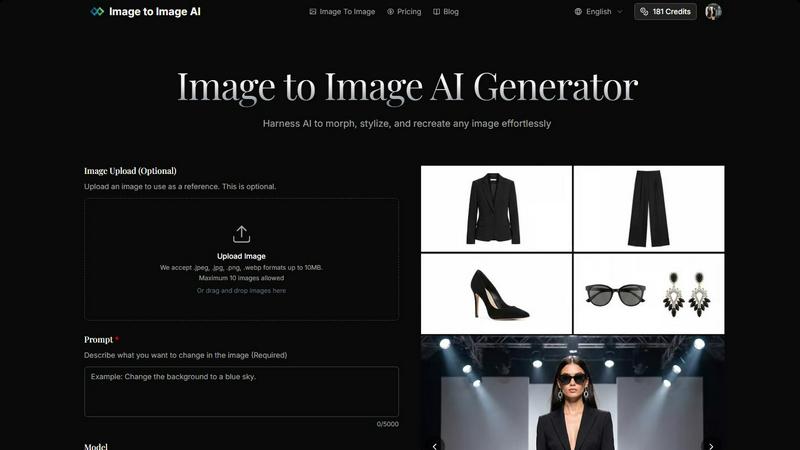
Image3D AI
Feature Comparison
Image to Image AI
Powerful AI Models
Image to Image AI supports a variety of advanced models, such as Nano Banana and GPT-4o Image, allowing you to select the best fit for your project. This ensures that you can achieve optimal results tailored to your specific needs, whether for artistic expression or commercial applications.
Multiple Aspect Ratios and Resolutions
The platform offers flexibility in output by providing various aspect ratios (1:1, 16:9, 9:16, etc.) and resolutions (1K, 2K, 4K). This adaptability enables users to create visuals suited for different platforms, enhancing engagement across social media, websites, and marketing materials.
Intuitive Image Transformation Process
Creating stunning image variations is streamlined into four simple steps: upload your image, describe your desired changes, adjust settings, and generate your transformed image. This process is designed to be user-friendly, requiring no prior design experience.
High-Quality Outputs
With a focus on delivering professional-quality results, Image to Image AI ensures that the transformed images are sharp and suitable for commercial use. This means you can confidently utilize the outputs for product visualizations, marketing campaigns, and more without compromising on quality.
Image3D AI
Powered by Hunyuan 3D Engine
Experience professional-grade 3D generation powered by Tencent's cutting-edge Hunyuan 3D technology. This powerhouse engine is what sets us apart, delivering high-precision, physically accurate 3D reconstructions that other simple converters can't match. It's the secret behind our stunning, production-ready models with realistic textures and materials, making complex AI inference accessible with a single click.
Dual Generation Modes
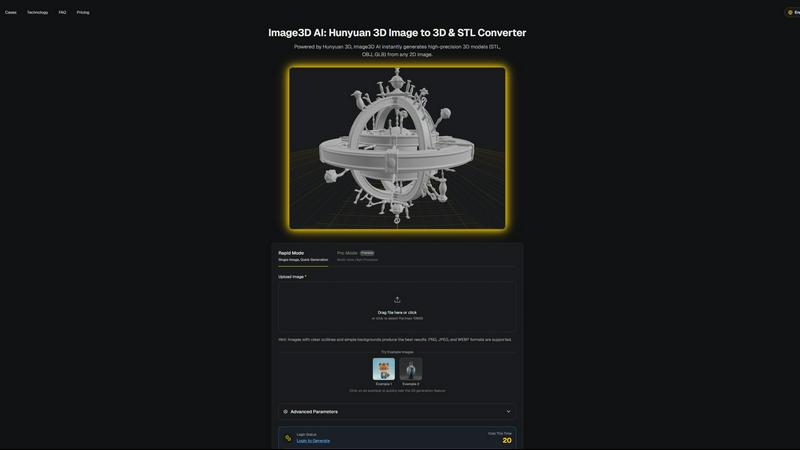
Choose the perfect mode for your project. Rapid Mode offers lightning-fast generation from a single image, ideal for quick concepts and logos. For the highest quality, Pro Mode utilizes multi-view images to perform a physically accurate reconstruction of real-world objects, delivering superior detail and precision that seasoned pros demand for their most important work.
Multi-Format Export for Any Workflow
Your generated 3D model is ready for anything. Download your creation in STL format for immediate 3D printing, as an OBJ file for editing in traditional software like Maya or Blender, or as a modern GLB file perfect for web display, AR experiences, and game engines like Unity and Unreal Engine. We ensure seamless integration into your existing professional pipeline.
Smart Input Optimization & Examples
Get the best results every time with our intelligent guidance and free example library. Our system provides hints for optimal images clear outlines and simple backgrounds and allows you to test the AI instantly with curated sample images. This means you can experience the magic of 3D conversion with zero cost and no login required, reducing trial and error.
Use Cases
Image to Image AI
Marketing Campaigns
Marketers can leverage Image to Image AI to create multiple variations of campaign assets quickly. By transforming existing images, they can maintain brand consistency while exploring diverse creative directions, enhancing the overall appeal of their campaigns.
Concept Art Development
Artists and designers can utilize this tool to visualize concepts by morphing and stylizing reference images. This capability allows for rapid prototyping of ideas, making it easier to communicate and collaborate on creative projects.
Social Media Content Creation
Social media managers can generate eye-catching visuals tailored for specific platforms. By adjusting aspect ratios and styles, they can create engaging content that captures the attention of their audience, boosting interaction and engagement.
Product Visualization
E-commerce businesses can produce high-quality product images that stand out. By transforming simple photographs into polished product shots, brands can enhance their online presence and attract more customers with visually appealing listings.
Image3D AI
For 3D Printing Enthusiasts
Instantly turn product photos, sketches, or digital designs into high-precision, watertight STL files ready for the printer. Our image to STL converter eliminates the need for manual modeling, allowing makers and hobbyists to rapidly prototype, create custom figurines, or produce functional parts in minutes instead of days, supercharging the entire making process.
For Game Developers & Animators
Rapidly generate game-ready 3D assets from character concept art, prop sketches, or reference images. With PBR material support and clean geometry, the models you create are optimized for immediate import into Unity or Unreal Engine. This drastically speeds up prototyping and asset production, letting developers focus on gameplay and storytelling.
For E-Commerce & Marketing
Transform flat product photos into interactive 3D models and AR experiences that captivate customers. Showcase products from every angle on your website, create engaging social media content, and provide immersive AR previews. This technology is revolutionizing online shopping, reducing returns, and boosting conversion rates for forward-thinking brands.
For Architects & Product Designers
Quickly generate 3D conceptual models from sketches, floor plans, or product design drafts. This capability saves immense modeling time from scratch, allowing architects and designers to visualize ideas, present concepts to clients, and iterate on designs with unprecedented speed and efficiency, all from a simple 2D input.
Overview
About Image to Image AI
Image to Image AI is a cutting-edge platform that empowers users to transform and recreate images using advanced artificial intelligence. Designed for a diverse audience, including designers, marketers, and creative enthusiasts, this tool allows you to upload reference images or generate new visuals from text prompts. The platform boasts a user-friendly interface where you can upload multiple images, provide detailed prompts, and receive high-quality outputs in various aspect ratios and resolutions. With support for over nine AI models, including the powerful GPT-4o Image and specialized video models, you can create stunning visuals tailored to your needs. Whether you're looking to enhance product photography, craft compelling social media content, or explore artistic concepts, Image to Image AI delivers professional-grade results with unmatched efficiency. The platform operates entirely in the browser and is accessible in both English and Chinese, making it a versatile solution for users worldwide.
About Image3D AI
Stop wasting hours in complex 3D software. Image3D AI is the revolutionary, professional-grade tool that's taking the creator world by storm, transforming any simple 2D image into a stunning, production-ready 3D model in mere seconds. Built on the powerhouse Tencent Hunyuan 3D engine, it democratizes 3D creation, solving the age-old problem of complex modeling and making it accessible to everyone from complete beginners to seasoned pros. Simply upload a photo, sketch, or logo, and watch as our advanced AI generates a high-fidelity 3D asset complete with realistic textures and materials. Whether you're a 3D printing enthusiast craving a perfect, watertight STL file, a game developer needing rapid prototypes, or an e-commerce brand looking to create interactive AR experiences, Image3D AI supercharges your workflow. Join the thousands of designers, makers, and innovators worldwide who are already ditching traditional, time-consuming methods. No Blender, no steep learning curve just incredible 3D results in minutes. It's the fastest way to go from a flat idea to a volumetric reality, trusted by a global community of creators.
Frequently Asked Questions
Image to Image AI FAQ
How does Image to Image differ from Text to Image generation?
Image to Image focuses on transforming existing images based on user-defined prompts, allowing for modifications while maintaining the original structure. In contrast, Text to Image generates visuals solely from textual descriptions without requiring a reference image.
What types of images work best with the transformation?
For optimal results, it is recommended to use clear images with good lighting and resolution. Images that align with your desired output aspect ratio will yield the best transformations, enhancing the overall quality of the final output.
How much control do I have over the transformation process?
Users have significant control over the transformation parameters, including the ability to specify aspect ratios, output formats, and the degree of change from the original image. This flexibility allows for precise customization according to individual project needs.
How long does the transformation process take?
The transformation process is remarkably quick, typically completing in seconds. This rapid turnaround time enables users to iterate and explore various creative directions without lengthy delays, streamlining the overall workflow.
Image3D AI FAQ
What image formats do you support?
We support all common image formats including PNG, JPEG, and WEBP. For the best 3D generation results, we recommend using high-contrast images (under 10MB) with clear outlines and simple backgrounds. Avoid blurry or poorly lit photos to ensure the AI can accurately interpret the shapes and details for conversion.
What is the difference between Rapid Mode and Pro Mode?
Rapid Mode is for single-image conversion, offering a fantastic balance of speed and quality for logos, sketches, and concepts. Pro Mode is our premium, high-precision option that uses multiple views (e.g., front, side, back) of an object to create a physically accurate and detailed 3D reconstruction, ideal for real-world objects and professional projects.
Which 3D file format should I download?
The best format depends on your use case. Choose .STL for 3D printing, as it's the industry standard for slicer software. The .OBJ format is perfect for further editing in 3D software like Blender or Maya. For web, AR, and game engines, the .GLB format is the modern standard as it packs the model, textures, and materials into a single, efficient file.
Do I need any 3D modeling experience to use Image3D AI?
Absolutely not! Image3D AI is specifically designed to democratize 3D creation. You need zero 3D skills or software knowledge. The process is as simple as uploading an image and clicking "Generate." Our tool handles all the complex modeling, topology, and texturing, making professional 3D asset creation accessible to complete beginners.
Alternatives
Image to Image AI Alternatives
Image to Image AI is a web-based platform that harnesses the power of artificial intelligence to transform images and create new visuals from text prompts or reference images. It falls under the category of AI Assistants, catering to users who need high-quality imagery for various applications, from social media content to marketing campaigns. As this technology evolves, many users seek alternatives due to reasons like pricing structures, feature sets, or specific platform requirements that better align with their needs. When looking for an alternative to Image to Image AI, consider factors such as the range of models offered, the quality of the outputs, and the usability of the platform. Users should also evaluate the pricing model and whether it fits their budget, alongside the availability of customer support and community engagement. Ultimately, the right alternative should meet the user’s specific creative needs while ensuring a seamless experience.
Image3D AI Alternatives
Image3D AI is a viral, AI-powered tool that instantly transforms 2D images into high-quality 3D models, revolutionizing the design tools category. It's trusted by thousands for its speed and professional-grade results, making 3D creation accessible to everyone from beginners to pros. Even with its popularity, creators often explore alternatives for various reasons. Some might need a different pricing model, specific features not covered, or a platform that integrates with a unique workflow. The search for the perfect tool is a normal part of finding the right fit for a project's budget and technical requirements. When evaluating other options, focus on what matters most for your work. Key considerations include the quality and realism of the 3D output, the range of export formats for your pipeline, the ease of use, and the overall value. The goal is to find a solution that removes complexity without compromising on the quality you need to bring your ideas to life.