
File Studio vs SkillForge
Side-by-side comparison to help you choose the right AI tool.

File Studio
Join thousands who trust File Studio to convert, edit, and secure files 100% offline on your computer.
Last updated: February 28, 2026

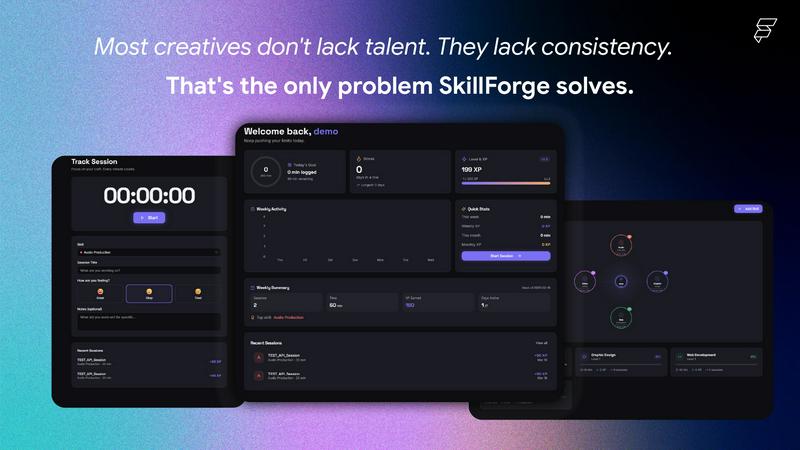
Skillforge is a gamified skill tracking app for creatives!
Visual Comparison
File Studio

SkillForge
Overview
About File Studio
Tired of uploading your sensitive documents to sketchy online converters? Welcome to File Studio, the desktop app that's taking the privacy-conscious world by storm. This isn't just another tool; it's your personal, 100% offline command center for PDFs and images. Trusted by over 100,000 photographers, freelancers, and remote workers, File Studio is built for one core principle: your files never, ever leave your computer. Imagine handling passports, client contracts, or proprietary images with complete peace of mind. With a powerful suite of 15 tools, you can merge, split, and password-protect PDFs, or convert between 20+ formats like HEIC, WebP, and RAW files—all without an internet connection. Ditch the subscriptions and account logins; File Studio offers a simple, one-time purchase for both Mac and Windows. It’s the reliable, powerful, and private file management solution everyone is switching to. Join the movement and take back control of your digital workflow.
About SkillForge
I built SkillForge because I kept running into the same problem — I'd practice audio production or graphic design for a few days, then completely lose the habit with zero record of my progress. Every productivity app I tried was either too generic or made for corporate project management, not for creatives who just want to get better at their craft.
The core idea was simple: what if practicing your skill felt like levelling up in a game?
So I built a skill tracker where every minute you practice earns real XP, builds streaks, and unlocks badges. The more you show up, the more you level up — from Level 1 to Level 10 across any creative discipline you choose (audio, design, dev, video, photography, and more).
What surprised me most during development was how much the AI Coach feature resonated with early testers. Instead of just logging time, the AI analyzes your session history and tells you exactly what to work on next — it noticed patterns in people's practice that they hadn't noticed themselves.
A few things I'm proud of:
🔥 Streak system that actually keeps you accountable
🤖 GPT-4o-mini powered coaching that builds you a personalised 7-day plan
📶 Fully offline-first — your sessions save locally and sync when you reconnect
👥 A community feed so you're not grinding alone
This started as a personal tool and grew into something I genuinely use every day. I'd love to hear what you think — especially from fellow creatives.