
BabyVideo.ai vs Seedance 2.0 AI Video Generator
Side-by-side comparison to help you choose the right AI tool.

BabyVideo.ai
Create magical AI baby videos from photos in seconds, loved by thousands of parents.
Last updated: March 1, 2026

Seedance 2.0 is an AI video generator that creates stunning cinematic clips from text, images, or audio effortlessly.
Last updated: February 28, 2026
Visual Comparison
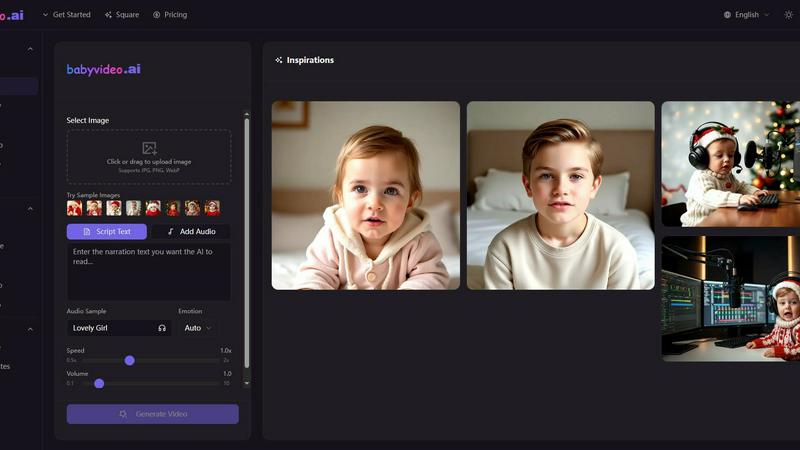
BabyVideo.ai
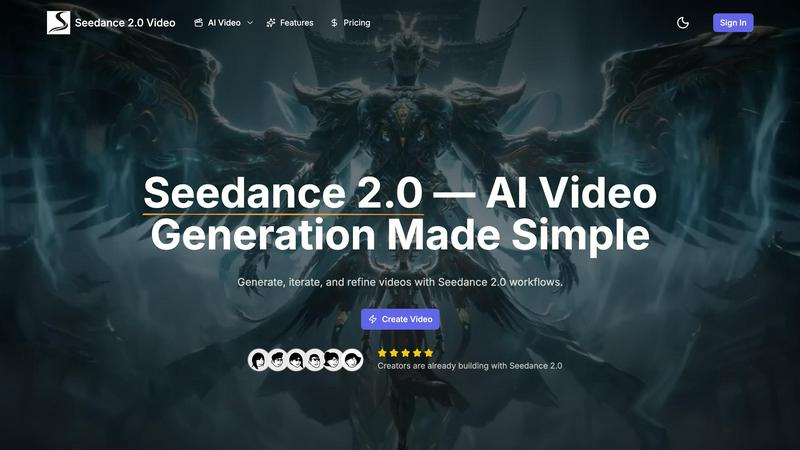
Seedance 2.0 AI Video Generator
Feature Comparison
BabyVideo.ai
AI Baby Video Generator
This is the core, viral engine of BabyVideo.ai. Simply upload a photo or type a text description, and the AI generates an adorable video clip. Choose from popular templates like sleeping, smiling, crawling, or "growing up" scenes. You can customize duration and style, and within seconds, receive a video with natural movements and cinematic quality, perfect for creating precious memories or future baby predictions that captivate audiences.
AI Baby Podcast Creator
Transform a static photo into a talking, podcast-hosting baby! This groundbreaking feature uses advanced AI-powered text-to-speech to sync realistic mouth movements with your script or uploaded audio. With support for 17+ languages and over 100 voice styles, you can create engaging greeting videos, funny skits, or educational clips that look like your baby is truly speaking, driving massive comments and shares.
Dancing Baby Video Maker
Jump on the latest dance trends by creating videos of your baby hitting the moves! You add a dance reference video (or use a provided sample) to define the rhythm and vibe, then upload the character photo. The AI seamlessly drives the character's movements to match the dance, outputting a perfect vertical 9:16 short video ready to go viral on TikTok and Reels.
Baby Singing Video Generator
Make your baby the next singing sensation! Upload a clear photo and add any audio clip—a popular song, humming, or a nursery rhyme. The AI expertly animates the baby's face and mouth to match the audio, creating a convincing "singing" video. It’s incredibly effective for creating charming, musical content that stands out in social media feeds and often gets saved and shared repeatedly.
Seedance 2.0 AI Video Generator
Multi-Model Video Generator
Harness the power of 7+ advanced models including Seedance 2.0, Veo 3, and Kling AI. This feature allows you to generate diverse video content tailored to your creative needs, ensuring high-quality results every time.
Cinematic Camera Control
Elevate your storytelling with professional camera movements such as pan, zoom, and aerial shots. This feature provides you with the tools to create Hollywood-quality footage, bringing a cinematic flair to your videos.
Image Generation
Create stunning visuals with the integrated image generation capabilities of Seedance 2.0. Use models like Seedream and GPT Image to generate illustrations and designs that complement your video content seamlessly.
No Watermark Output
Enjoy the freedom to download your generated content without watermarks. This feature is particularly beneficial for creators working on commercial projects, providing high-resolution outputs that can be used across various platforms.
Use Cases
BabyVideo.ai
Creating Viral Social Media Content
Content creators and influencers are using BabyVideo.ai to produce a constant stream of unique, heart-melting baby content that performs exceptionally well. The platform's templates for dancing, singing, and talking are tailor-made for TikTok, Reels, and Shorts, helping users tap into trending formats and sounds to grow their followers and engagement rates rapidly with minimal effort.
Preserving Family Memories in Motion
Parents and grandparents are bringing their favorite baby photos to life. Instead of a static picture, they can now generate videos of their child smiling, crawling, or laughing. These animated memories are incredibly special for digital family albums, personalized gifts, or simply sharing joyful moments with relatives in a more dynamic and emotional way than a standard photo.
Generating Future Baby Predictions
Couples and expecting parents are fascinated by the ability to visualize their future child. By uploading photos of themselves, they can use BabyVideo.ai to generate "future baby" images and videos, creating cute and speculative content about what their little one might look like. This fun, engaging use case is hugely popular for personal curiosity and shareable social media announcements.
Producing Engaging Marketing Material
Small businesses, daycare centers, child-focused brands, and photographers are leveraging BabyVideo.ai to create standout marketing content. Animated baby clips are excellent for eye-catching ads, engaging email campaigns, or fun social media posts that humanize a brand. The "baby podcast" feature can even be used for unique product explanations or greetings.
Seedance 2.0 AI Video Generator
Marketing & Brand Content
Utilize Seedance 2.0 to craft compelling marketing materials, from product videos to engaging social media posts. The platform's AI capabilities enable you to capture audience attention and boost engagement with ease.
Education & Training
Transform complex ideas into visually appealing educational content. Seedance 2.0 enables educators to create tutorials and e-learning materials that enhance comprehension through engaging visual explanations.
Creative & Cinematic
Bring your artistic visions to life with the ability to produce short films and music clips. The cinematic camera movements and storytelling features make it easier for creators to prototype scenes in a fraction of the time.
Social Media & Viral Content
Stay ahead of trends by creating viral content for platforms like TikTok and Instagram. Seedance 2.0 allows users to generate engaging clips with popular effects, helping your content reach a wider audience.
Overview
About BabyVideo.ai
BabyVideo.ai is the viral AI-powered creative suite exploding across social media, designed to magically transform your simple photos or text prompts into heartwarming, professional-quality baby-style videos in seconds. It's the go-to tool for overjoyed parents, doting families, and savvy content creators who want to produce adorable, engaging content without any complex editing skills or technical know-how. The core magic lies in its simplicity and power: just upload a picture of your little one (or even describe a scene), and watch as advanced AI generates a charming, lifelike clip perfect for dominating feeds on TikTok, Instagram Reels, and YouTube Shorts. Beyond basic animations, BabyVideo.ai is a full creative studio, offering specialized features like Future Baby Predictions, AI Baby Podcasts with realistic text-to-speech, Dancing Baby videos synced to trending dances, and Singing Baby clips. It’s built for speed, ease, and shareability, turning everyday moments into cinematic, viral-ready memories. With a user-friendly interface and instant output, creating magical, share-worthy content that captures hearts and boosts engagement has never been easier or more fun!
About Seedance 2.0 AI Video Generator
Seedance 2.0 is an innovative AI video creation platform that leverages a unified multimodal architecture to produce high-quality video content. Designed for creators of all backgrounds, it allows users to bring their ideas to life by utilizing intuitive text prompts, along with optional image, video, and audio references. The platform excels in generating cinematic clips where visuals and sound are meticulously aligned, resulting in a more immersive viewing experience. Whether you are a marketer, educator, musician, or content creator, Seedance 2.0 offers the tools necessary to streamline your creative process. With over 20 cutting-edge AI models at your disposal, including Seedance 2.0, Veo 3, and Sora 2, you can create professional-grade videos quickly and efficiently, transforming your vision into reality.
Frequently Asked Questions
BabyVideo.ai FAQ
How does BabyVideo.ai work?
BabyVideo.ai uses sophisticated artificial intelligence and generative models. When you upload a photo or enter a text prompt, the AI analyzes the input, applies the chosen template (like "smiling" or "dancing"), and generates a new video frame-by-frame. It animates facial features and body movements to create natural, lifelike videos, all processed on secure cloud servers for speed and convenience.
What kind of photos work best?
For the best results, use clear, high-quality, front-facing photos of a baby or character with good lighting. The face should be visible and not obscured. While the AI is powerful, a clear source image ensures the final video has accurate details and smooth animations, making the output more realistic and share-worthy.
Can I use BabyVideo.ai for free?
Yes! BabyVideo.ai offers a free tier to get you started, allowing you to generate videos and explore basic features. This is perfect for trying out the technology and creating your first few viral clips. For unlimited access, higher quality exports, and all premium features like the Baby Podcast creator, they offer affordable subscription plans.
What video formats and resolutions are supported?
BabyVideo.ai is built for the social media era, primarily outputting vertical 9:16 videos perfect for TikTok, Instagram Reels, and YouTube Shorts. You can typically select resolutions and qualities before generation, with options suitable for standard definition up to high-quality outputs, ensuring your content looks great on any device or platform.
Seedance 2.0 AI Video Generator FAQ
What is Seedance 2.0?
Seedance 2.0 is an AI-powered video creation platform that allows users to generate high-quality videos using text prompts, images, and audio references, all while ensuring seamless integration of sound and visuals.
Is Seedance 2.0 free to use?
Yes, Seedance 2.0 offers a free tier allowing users to create AI-generated videos and images without any upfront costs. You can start creating immediately without a credit card.
What models are supported?
The platform supports over 20 advanced AI models, including Seedance 2.0, Veo 3, Sora 2, and Kling AI, providing users with a variety of tools to create diverse video content.
How does text-to-video generation work?
Users input text prompts which the AI processes to generate videos. The integration of optional visual and audio references enhances the output, ensuring that generated content aligns with the creator's vision.
Alternatives
BabyVideo.ai Alternatives
BabyVideo.ai is a viral AI-powered tool in the video and photo editing category that transforms simple photos or text prompts into adorable, shareable baby-style videos in seconds. It’s designed for effortless creation, making magical memories accessible to everyone. Users often explore alternatives for various reasons, such as seeking different pricing models, specific feature sets like more advanced editing controls, or compatibility with other creative platforms. The need for varied artistic styles or output formats can also drive the search for other options. When evaluating an alternative, consider the core AI capabilities, ease of use, and output quality. Look for tools that balance powerful features with a straightforward process, ensuring you can still create heartwarming, professional-looking baby videos without a steep learning curve.
Seedance 2.0 AI Video Generator Alternatives
Seedance 2.0 AI Video Generator is a cutting-edge platform that empowers users to create cinematic video clips using a unique blend of text, images, videos, and audio. It falls within the realm of AI video creation tools, designed to produce visually stunning and synchronized content effortlessly. However, users often seek alternatives to address specific needs such as pricing, feature sets, or compatibility with various platforms. When searching for an alternative, it's essential to consider the ease of use, the variety of input options, the quality of the final product, and how well the platform aligns with your creative vision. Additionally, assess customer support and community feedback, as these factors can significantly affect your overall experience with the tool.