
Draftsheet AI
Draftsheet AI silently tracks lawyer work to auto-generate timesheets, recovering 48 lost billable minutes daily with enterprise-grade security.
Visit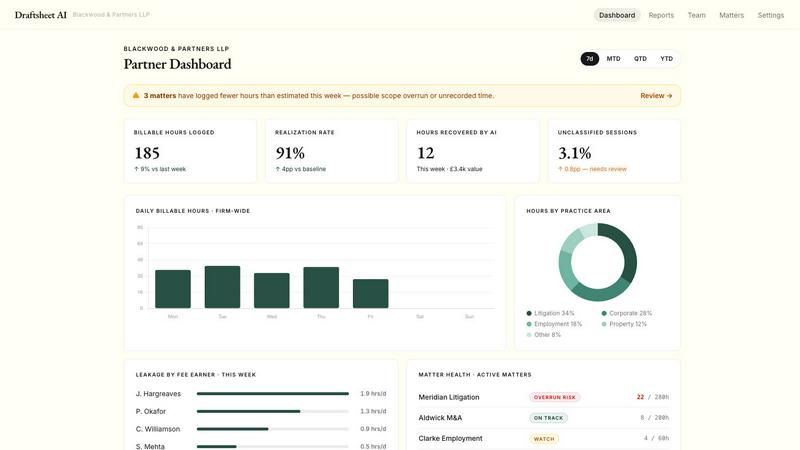
About Draftsheet AI
Draftsheet AI is the silent time capture solution built specifically for law firms, designed to eliminate the 10-15% of billable hours that vanish every year due to bad admin. Every day, your lawyers do work that never makes it onto a timesheet. Client calls run long, documents get reviewed between meetings, and email threads quietly take forty minutes. By the time a lawyer sits down to log their time, the detail is gone. Industry data reports over 12% underbilling. At a 20-lawyer firm billing at £250 an hour, that is roughly £660,000 a year. Draftsheet stops that.
A lightweight app installs on each lawyer's machine with a single click. It runs silently in the background: no timers, no interruptions, nothing for the lawyer to do but their job. It simply observes which documents are open, which applications are active, and which matters are in focus throughout the day. All without ever recording any document's content or inputs. The average fee earner under-reports 48 billable minutes per day. At £250 an hour, that is £48,000 lost per fee earner each year. Draftsheet AI helps you recover that time. As the managing partner, you can see what work was done and how much of that was billed. It is designed for solo practitioners, small firms, and mid-sized firms who want to recover lost revenue without adding admin burden or invading privacy.
Features of Draftsheet AI
Silent Passive Time Capture
The desktop agent runs silently in the background, capturing activity every few seconds. No timers, no forms, no interruptions. Fee earners simply work as usual. The agent captures active application names, window and document titles, browser tab titles and domains, calendar event titles and durations, and active or idle timestamps. It never captures keystrokes, typed text, screenshots, screen recordings, file contents, email body text, full URLs, query strings, or clipboard contents. This is time tracking without the admin pain.
AI Timesheet Generation
At the end of the day, one click generates a complete timesheet. The AI groups activity into sessions, matches clients and matters, assigns billing codes, and writes professional narratives. Fee earners spend just 10 minutes reviewing and approving the day. Every edit a client reassignment, billing code correction, or narrative tweak retrains the fee earner's personal model. It gets better every day, learning each user's preferences and billing habits for increasingly accurate entries.
Revenue Reporting Dashboard
A real-time view of firm-wide billing performance gives practice managers the numbers before the month-end scramble. See hours captured, approved, and exported per fee earner. View utilisation rates by fee earner and team. Track billed versus recorded time to spot leakage at a glance. Get breakdowns by client and matter. Updates are real-time as entries are approved, giving you instant visibility into firm performance.
Direct Billing System Integrations
Draftsheet AI integrates directly with the billing systems law firms already use, including Clio and LEAP. Approved entries push straight into your billing system with one click. No manual re-entry, no CSV exports, no copy-pasting. The integration is built end-to-end for legal billing, not a generic tracker with a law firm skin. This saves hours of admin time each month and ensures every billable minute is captured and billed.
Use Cases of Draftsheet AI
Recovering Lost Billable Time for Managing Partners
Managing partners can see exactly what work was done and how much of that was billed. The revenue reporting dashboard provides a real-time view of firm-wide billing performance. You can spot which fee earners are under-reporting, which clients are being under-billed, and where leakage is happening. With the average fee earner losing 48 minutes per day, a 20-lawyer firm can recover over £660,000 annually. This is not theoretical. It is real revenue that Draftsheet AI helps you capture.
Effortless Daily Time Tracking for Fee Earners
Fee earners hate time tracking. It is interruptive, easy to forget, and painful to reconstruct from memory. Draftsheet AI eliminates all of that. The desktop agent runs silently in the background, capturing activity without any user input. At the end of the day, the fee earner clicks Report and reviews pre-filled entries in under 10 minutes. They approve, reassign, or edit entries, then push directly to their billing system. No more forgetting to start a timer. No more guessing what they did three hours ago.
Accurate Client and Matter Billing for Solo Practitioners
Solo practitioners often wear every hat in the firm, leaving little time for admin. Draftsheet AI captures every document review, every client call, every email thread that eats up time. The AI automatically matches activity to clients and matters, assigns billing codes, and writes narratives. The solo practitioner reviews and approves in minutes, then exports to CSV, PDF, or their billing system. This ensures every minute of work is billed accurately, recovering thousands in lost revenue each year.
Compliance and Privacy for Firm Administrators
Firm administrators need to ensure time tracking is accurate without invading lawyer privacy or creating compliance risks. Draftsheet AI is designed with security first. It never captures keystrokes, screenshots, file contents, email body text, full URLs, or clipboard contents. Activity logs are encrypted, data capture is minimal, and DPA compliance is standard. Administrators get the data they need for accurate billing and utilisation reporting, while lawyers keep their privacy intact. This balance makes adoption easy across the firm.
Frequently Asked Questions
What does Draftsheet AI actually capture on my computer?
Draftsheet AI captures only the metadata needed to build accurate time entries. This includes the active application name (like Word or Outlook), window and document titles (like the file name you are working on), browser tab titles and domains, calendar event titles and durations, and timestamps of when you are active or idle. It never captures keystrokes, typed text, screenshots, screen recordings, file or document contents, email body text, full URLs, query strings, or clipboard contents. Your content remains private and secure.
How long does it take to set up Draftsheet AI for my firm?
Setup is fast and easy. A lightweight app installs on each lawyer's machine with a single click. There is no complex configuration, no server setup, and no IT project. The agent runs silently in the background and starts capturing activity immediately. Import your clients and matters, and the AI begins matching activity right away. Draftsheet AI offers a free pilot period so you can see the value before committing. Most firms are up and running in under an hour.
Does Draftsheet AI integrate with my existing billing system?
Yes, Draftsheet AI integrates directly with the billing systems law firms use most, including Clio and LEAP. Approved time entries push straight into your billing system with one click. No manual re-entry, no CSV exports, no copy-pasting. The integration is built end-to-end for legal billing, not a generic tracker. If your billing system is not listed, Draftsheet AI also supports CSV and PDF export, so you can import entries manually. The team is adding new integrations regularly.
How does Draftsheet AI ensure data security and compliance?
Security is a core design principle. Draftsheet AI never captures keystrokes, screenshots, file contents, email body text, full URLs, or clipboard contents. Activity logs are encrypted both in transit and at rest. Data capture is minimal, limited to the metadata needed for time tracking. Draftsheet AI is DPA compliant as standard. The desktop agent observes which documents are open and which applications are active, but it never reads or records the content of those documents. This gives firms accurate time tracking without compromising lawyer privacy or client confidentiality.
Similar to Draftsheet AI


Arceus Legal
Arceus Legal reviews and negotiates your contracts in hours with upfront pricing, trusted by fast-growing companies for predictable, scalable AI.
Popform
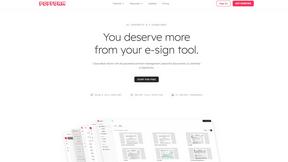
Popform gives you AI-powered contracts and unlimited e-signatures for just $11 a month, used by startups and agencies ditching DocuSign.

Fortress SEO
Fortress SEO propels law firms to the top of search results, driving growth through expert optimization and strategic digital marketing.
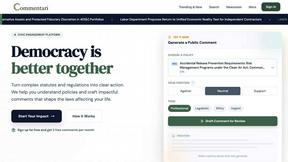
Commentari
Commentari's AI turns your passion into powerful legal comments, helping you shape the laws that impact your life.

TermsBuilder
Create tailored, attorney-built legal documents for your online business with TermsBuilder's easy questionnaire and auto updates.