
Before After Photo Maker vs Supermachine
Side-by-side comparison to help you choose the right AI tool.

Before After Photo Maker
Join thousands creating viral before-and-after comparisons instantly with our free, professional photo maker.
Last updated: March 26, 2026

Supermachine
Join 100K creators using Supermachine to instantly generate stunning, commercial AI images and videos with 60+ models.
Last updated: March 18, 2026
Visual Comparison
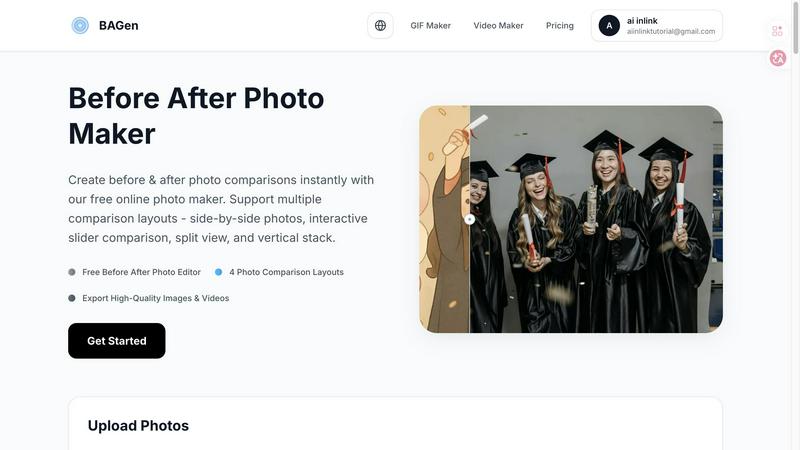
Before After Photo Maker
Supermachine

Feature Comparison
Before After Photo Maker
Four Dynamic Comparison Layouts
Choose from four professionally designed layouts to match your content's vibe. Go classic with Side-by-Side, create intrigue with the Interactive Slider, make a clean statement with Split View, or optimize for mobile feeds with the Vertical Stack. Each layout is engineered to highlight your transformation in the most visually appealing way, ensuring your comparison looks custom-made for any platform, from Instagram Stories to professional portfolios.
Professional Labeling & Branding Controls
Elevate your comparisons from simple images to branded content. Add customizable "Before" and "After" labels, adjusting their size and corner radius for a perfect fit. For businesses and serious creators, you can upload your company logo to appear discreetly in the corner and control watermark visibility, turning every comparison into a polished, on-brand asset that builds recognition and trust with your audience.
Instant Live Preview & Editing
See your creation come to life in real-time with the instant Live Preview panel. As you upload images, adjust labels, or switch between layouts, the preview updates immediately. This intuitive, what-you-see-is-what-you-get editing flow eliminates guesswork, allowing you to experiment and perfect your comparison in seconds before committing to the final export.
High-Quality Image & Video Export
Don't just create a static image; create shareable content. Export your final comparison as a high-resolution PNG for crisp detail or generate an engaging video/GIF that showcases the transition, perfect for Reels and TikTok. This multi-format output ensures you have the perfect asset for any social network, blog, or presentation, all generated directly in your browser.
Supermachine
60+ Curated AI Models
Stop wasting time testing unstable, hype-driven models. Supermachine gives you a powerhouse selection of over 60 meticulously chosen, high-performing AI models for image and video generation. This curated library is constantly updated with only the most useful and reliable engines, ensuring you get professional, consistent, and stunning results every single time you create, without the guesswork.
AI Image Edit Tool (Photoshop AI)
Go beyond simple generation and take full creative control. With the built-in AI Image Edit Tool, you can seamlessly modify existing images. Think of it as having Photoshop's generative AI powers integrated directly into your workflow. Effortlessly remove objects, expand backgrounds, alter details, or add new elements to any image with simple instructions, unlocking a new level of editing flexibility.
Video Generation
Turn your ideas into motion in seconds. Supermachine's Video Generation feature allows you to create captivating short-form videos and animations directly from text prompts or images. This is perfect for creating social media reels, product showcases, animated storyboards, or eye-catching video ads without needing complex video editing software or skills.
ControlNet & Face Swap
Achieve unprecedented precision and personalization. Use ControlNet to guide the AI's composition by using input sketches or poses for perfect structural control. Combine this with the powerful Face Swap capability to seamlessly place a specific face into your generated scenes, ideal for personalized marketing, character consistency, or just having fun with avatars.
Use Cases
Before After Photo Maker
Fitness & Wellness Transformations
Fitness coaches and enthusiasts are raving about this tool for showcasing weight loss, muscle gain, and fitness journeys. The interactive slider is particularly viral for revealing dramatic body transformations, creating suspenseful content that generates massive engagement and motivates followers by visually proving real, tangible results over time.
Home Renovation & Interior Design Reveals
Contractors, realtors, and DIY home decor bloggers use it to stunningly highlight renovation projects. The side-by-side or split-view layouts perfectly contrast outdated spaces with stunning makeovers, providing undeniable visual proof of workmanship and design skill that attracts new clients and wows social media audiences.
Beauty, Skincare, & Makeup Tutorials
Beauty influencers and skincare brands leverage the tool to demonstrate product efficacy and makeup artistry. Showing a "before" bare face next to a glamorous "after" look with the vertical stack layout is perfect for Instagram Stories, effectively showcasing makeup results or the long-term benefits of a skincare routine.
Digital Art & Creative Project Progression
Digital artists, game developers, and designers use it to document their creative process. Showcasing a rough sketch next to the final illustrated masterpiece, or a basic game asset beside its polished version, tells a compelling story of skill and dedication, perfect for building a portfolio or engaging a community of followers.
Supermachine
Social Media Content Creation
Dominated by over 100,000 creators, Supermachine is the secret weapon for viral social media. Generate a week's worth of unique, platform-optimized images and short videos for Instagram, TikTok, or Twitter in minutes. Create thumbnails that boost click-through rates, design engaging stories, and produce consistent visual branding that stands out in a crowded feed, all without a designer.
Marketing & Advertising Campaigns
Marketers leverage Supermachine to rapidly prototype and produce high-conversion visual assets for campaigns. Craft multiple ad variations for A/B testing, generate perfect product mockups, design email headers, and create compelling landing page graphics at the speed of thought. This drastically cuts production costs and time, allowing for agile, data-driven creative strategies.
Digital Art & NFT Projects
Artists and NFT creators use the platform to explore new mediums and generate unique collections. With access to 60+ specialized models, you can experiment with different artistic styles, create one-of-a-kind characters and environments, and maintain a cohesive aesthetic across hundreds of assets, fueling creativity and streamlining the production of digital art and generative NFT projects.
Small Business Branding
Small business owners with no design team use Supermachine to build their entire visual identity. Create professional logos, website banners, product photos, menu designs, and promotional flyers in a consistent style. It empowers entrepreneurs to produce high-quality, on-brand marketing materials in-house, saving thousands of dollars while maintaining a polished, competitive appearance.
Overview
About Before After Photo Maker
The Before After Photo Maker is the viral, browser-based tool taking social media by storm, designed to create stunning, professional-grade photo comparisons in seconds. It transforms the tedious process of manually aligning and editing images into a seamless, drag-and-drop experience. This tool is perfect for creators, marketers, fitness influencers, renovators, and artists who need to showcase dramatic transformations with maximum visual impact. Its core value proposition is powerful simplicity: deliver four distinct, high-engagement layout styles—side-by-side, interactive slider, split view, and vertical stack—without requiring any design skills, software downloads, or registration. Trusted by thousands for its instant preview and high-quality export options, it’s the go-to free solution for crafting compelling before-and-after narratives that stop the scroll and drive real engagement.
About Supermachine
Supermachine is the viral AI creative suite that's taking the creator world by storm, trusted by a massive community of over 100,000 users who generate more than one million images every single week. It's your all-in-one studio for generating breathtaking images and videos with artificial intelligence, designed to demolish the barriers between your ideas and professional-quality visual content. Whether you're a social media manager drowning in the need for daily posts, a marketer on a tight deadline, an artist exploring new digital frontiers, or a small business owner creating ads on a budget, Supermachine delivers. Its core, game-changing value is insane speed and radical simplicity: create stunning stock photos, custom illustrations, eye-catching thumbnails, unique NFTs, and engaging short-form videos in under 15 seconds. Forget being a prompt engineering expert; this platform is built for instant, reliable results. What truly sets it apart is its curated model library. Instead of overwhelming you with every new AI model, Supermachine's team selectively integrates and offers access to over 60 high-performing, proven models that actually work, ensuring you get top-tier, consistent output for every project. It's the intelligent choice for powerful creation.
Frequently Asked Questions
Before After Photo Maker FAQ
Is the Before After Photo Maker really free to use?
Yes, it is completely free! You can access all four comparison layouts, use the labeling and branding tools, and export your high-quality images without any cost, registration, or watermarks (unless you choose to add your own). It's a fully-featured, free online tool used by thousands daily.
What file formats and sizes are supported for upload?
You can upload your before and after photos in popular formats including PNG, JPG, and GIF. Each image can be up to 10MB in size, which is ample for high-resolution photos from most smartphones and digital cameras, ensuring your comparisons look sharp and professional.
Can I use this tool on my mobile phone or tablet?
Absolutely! The Before After Photo Maker is a web-based tool that works entirely in your browser, making it fully compatible with mobile devices, tablets, and desktop computers. The interface is optimized for touch and click, so you can create stunning comparisons on the go from any device.
How do I save or share my finished before-and-after comparison?
Once you're happy with your creation, simply use the export function. You can download your comparison as a high-quality PNG image directly to your device. For even more impact, you can generate a video or GIF to share the transformation dynamically, making it easy to post directly to social media platforms, emails, or websites.
Supermachine FAQ
How fast can I create an image with Supermachine?
Incredibly fast! Supermachine's core promise is speed. You can go from a simple text idea to a stunning, professional-quality image or short video in under 15 seconds. This rapid generation speed is what allows its massive community to create over a million images weekly, making it perfect for high-volume content needs.
Do I need to be good at writing AI prompts?
Not at all! Supermachine is specifically designed for creators of all skill levels, eliminating the need for complex prompt engineering. The platform's intuitive interface and curated models are optimized to deliver great results from simple, straightforward descriptions. You get powerful AI tools at your fingertips without the steep learning curve.
What makes Supermachine different from other AI art tools?
The key differentiator is its curated model approach. While others chase every new model release, Supermachine selectively integrates and provides access to over 60 models that have been proven to be high-performing and genuinely useful. This means more reliability, consistency, and top-tier results without the instability often found on other platforms.
Is there a free trial available?
Yes! You can jump right in and start creating. Supermachine offers a Get Started trial package that gives you full access to explore its features. This low-commitment trial lets you experience the power and speed of the platform firsthand and see why it's trusted by such a vast community of creators.
Alternatives
Before After Photo Maker Alternatives
Before After Photo Maker is a popular online design tool that lets you create stunning before-and-after photo comparisons in seconds. It falls into the category of visual content creation and design utilities, helping users across various fields showcase transformations with professional flair. People often search for alternatives for several key reasons. Some need more advanced editing features, while others require a tool that works directly on their mobile device or desktop app. Budget is another major factor, as users look for different pricing models, from freemium to one-time purchases, that better suit their long-term needs. When evaluating other options, focus on core capabilities. Look for flexible layout options like sliders and split views, ease of use with drag-and-drop functionality, and the ability to maintain high image quality. Security for your uploaded photos and the tool's overall speed are also critical deciding factors for a smooth workflow.
Supermachine Alternatives
Supermachine is a leading all-in-one AI creative studio in the design tools category, trusted by over 100,000 creators to generate commercial-ready images and videos in seconds. It simplifies complex AI art generation with a curated suite of over 60 high-performing models, making professional content creation accessible to everyone. Even with its popularity, creators often explore other options. Common reasons include budget constraints, the need for a different feature set like advanced editing tools or specific model access, or simply a preference for a different user interface. The quest for the perfect tool is a normal part of a creator's journey. When evaluating other platforms, focus on what matters for your workflow. Key considerations are the quality and variety of AI models offered, the speed of generation, ease of use, and transparent pricing. The goal is to find a tool that empowers your creativity without unnecessary complexity, just like the top creators do.