
Doodle Duel vs Prompt Builder
Side-by-side comparison to help you choose the right AI tool.

Doodle Duel
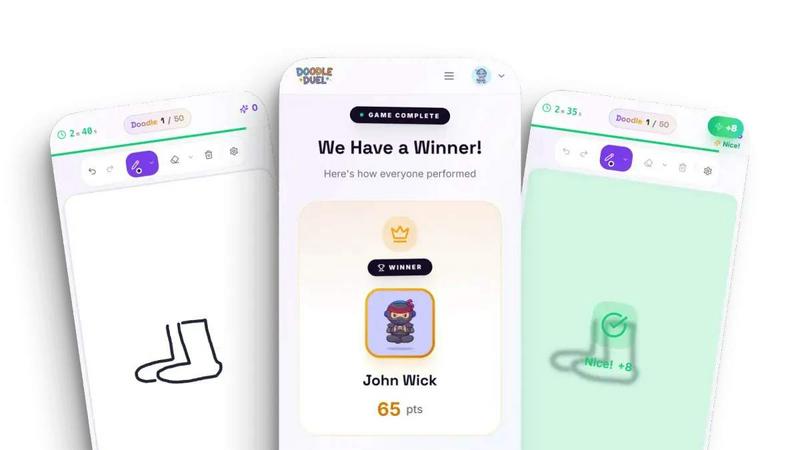
Compete in real-time drawing duels with friends as AI judges your creativity in this quick and fun multiplayer game.
Last updated: February 28, 2026

Prompt Builder
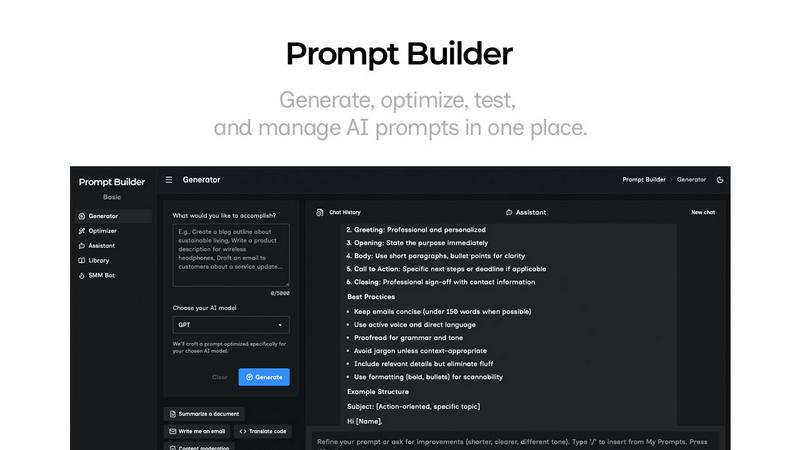
Generate, optimize, test, and manage AI prompts in one place. Turn an idea into a ready-to-use prompt in seconds.
Visual Comparison
Doodle Duel
Prompt Builder
Overview
About Doodle Duel
Doodle Duel is the ultimate real-time drawing game that combines creativity, competition, and fun, catering to both seasoned artists and casual doodlers alike. With an exciting gameplay format that allows you to engage with up to 29 friends, Doodle Duel eliminates the need for accounts or downloads, making it incredibly easy to jump right into the action. The game kicks off with a drawing prompt, and players have just 60 seconds to sketch their interpretation. To add an unexpected twist, an AI judge—powered by advanced algorithms from Google Gemini or OpenAI—evaluates each submission, providing comical yet fair feedback. This unique blend of speed, creativity, and humor ensures that Doodle Duel is perfect for parties, family gatherings, or any casual hangout. With flexible modes available, players can choose between a solo arcade adventure or chaotic multiplayer duels, making Doodle Duel an engaging experience for everyone involved.
About Prompt Builder
Prompt Builder is a prompt engineering workspace for writing, testing, and saving prompts. Describe the task in plain English, and it helps you create a prompt that matches the model you choose. Start with a draft, refine it in chat, save or pin versions, then run them when you are ready. It works with GPT, Claude, Gemini, Llama, Mistral, DeepSeek, Grok, Perplexity, and more. You also get an Optimizer, an assistant for quick tests, and a library of reusable prompts and templates from the community. Turn an idea into a ready-to-use prompt in seconds. Refine it in chat, save it to your Library, and run it anytime.